
DRAG DROP - You have a Microsoft Deployment Toolkit (MDT) deployment share named DS1. You import a Windows 11 image to DS1. You have an executable installer for an application named App1. You need to ensure that App1 will be installed for all the task sequences that deploy the image. Which three actions should you perform in sequence? To answer, move the appropriate actions from the list of actions to the answer area and arrange them in the correct order. 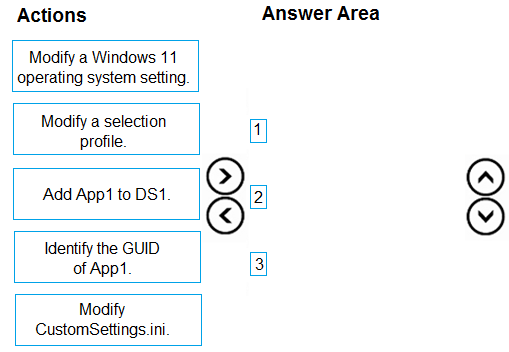
System Security ➔ BitLocker, Device Properties ➔ minimum OS version. That lines up with how Intune compliance policies work, at least from what I've seen in the official guide and practice tests. Device Health shows encryption state but isn't for policy enforcement. Let me know if you disagree or saw it differently.
I don’t think Device Health is right for BitLocker, that's more for reporting status not enforcement. System Security actually enforces encryption, so it should be:
System Security → Requires BitLocker
Device Properties → Requires minimum OS version.
Device Health is a common distractor here.
This setup matches what I've seen in the official guide plus labs: System Security → Requires BitLocker, Device Properties → Requires minimum OS version. Device Health isn't the right choice unless the policy asks for attestation. Anyone see it different?
