
Q: 3
HOTSPOT - You have a Microsoft 365 E5 subscription that uses Microsoft Intune. You have the Windows 11 devices shown in the following table.  You deploy the device compliance policy shown in the exhibit. (Click the Exhibit tab.)
 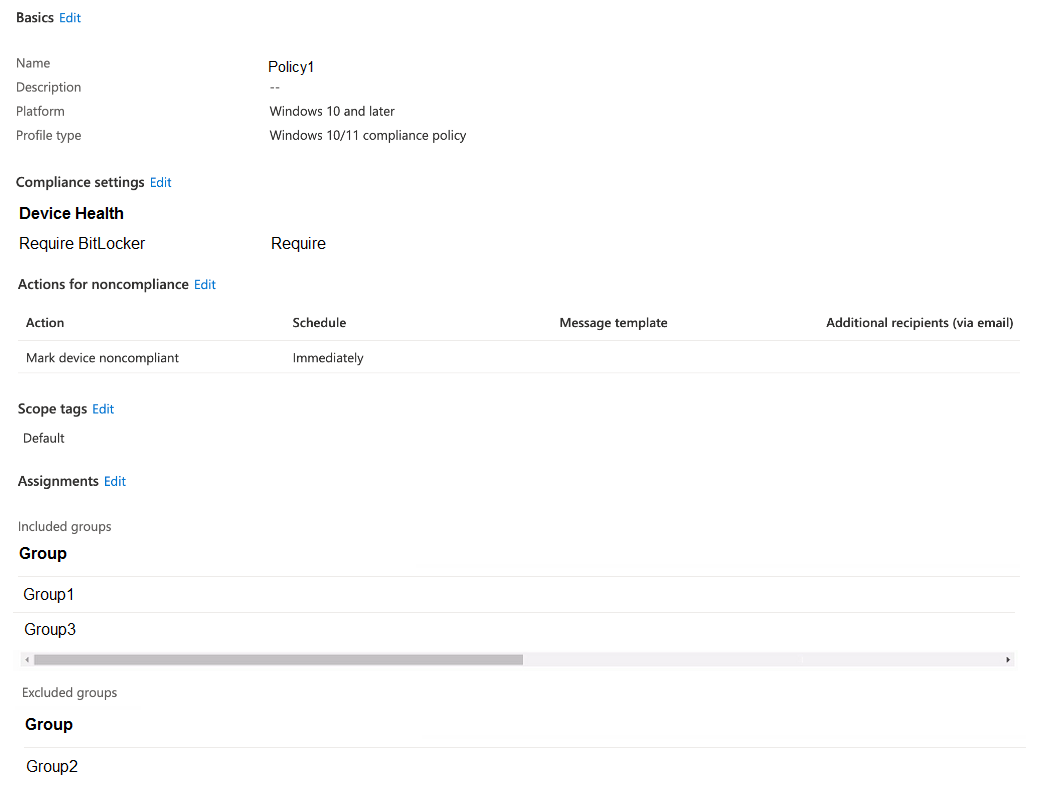 For each of the following statements, select Yes if the statement is true. Otherwise, select No.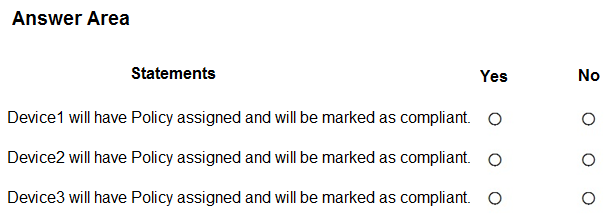
Your Answer
Discussion
For me, B since account protection policy is made for local group changes like removing users from Administrators. Compliance and app config don’t handle that directly, at least not in Intune. Pretty confident here but let me know if I’m missing something.
Probably B. Only account protection policies let you directly manage local group membership through Intune, so that's how you'd remove User1 from Administrators. Compliance policies (A) only check, not enforce. Not 100% sure but this lines up with what I've seen in Intune docs. Agree?
A, I remember a similar scenario from labs where compliance policies were used to enforce user restrictions on groups.
B tbh. Compliance policies (A) only check, don't actually remove users, so they're a trap here.
A is wrong, B. Compliance policy just checks if someone is an admin but doesn't actually take them out of the group. Account protection policy (B) manages local user group membership directly in Intune. Open to correction but that's how it works.
A , since compliance policy feels like it would enforce who has admin rights. Not fully sure if that's enough for removal though, maybe missing something in Intune specifics. Disagree?
A
A tbh
A is off here, B fits since you need to target local group memberships. Compliance policy won’t remove users from Administrators directly.
Its B
Be respectful. No spam.
