
Q: 2
DRAG DROP - You have a Microsoft 365 subscription. The subscription contains computers that run Windows 11 and are enrolled in Microsoft Intune. You need to create a compliance policy that meets the following requirements: Requires BitLocker Drive Encryption (BitLocker) on each device Requires a minimum operating system version Which setting of the compliance policy should you configure for each requirement? To answer, drag the appropriate settings to the correct requirements. Each setting may be used once, more than once, or not at all. You may need to drag the split bar between panes or scroll to view content. 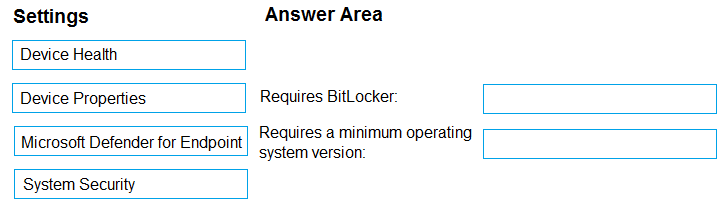
Drag & Drop
Discussion
B. not C. macOS is tempting since Edge runs on it, but Baseline only supports Windows devices. Agree?
Its B, Edge Baseline in Intune only covers Windows 10/11 not macOS or Android.
C vs B. Really wish Microsoft would just make Baseline work for macOS already, picking C.
C isn't right, it's B. Edge Baseline in Intune is only for Windows 10/11, so Device1 and Device2. macOS and Android devices don't get this baseline, unless Microsoft changed something super recently.
Why not C? Isn't Edge profile support on macOS still pretty limited compared to Windows, so Device3 wouldn't qualify for the baseline?
C
B tbh, only Device1 and Device2 are eligible here.
C tbh, since practice exams sometimes show Edge Baseline going to macOS too. Would double check official docs or MS learn though.
B , unless they've updated Edge Baseline to support macOS like some docs hint, but last I checked it's just Windows 10/11. That "supported" wording flips the answer here.
B tbh, only Device1 and Device2 qualify for Edge Baseline since Intune supports that baseline on Windows 10/11. Seen this mentioned in a few recent exam reports and docs. MacOS and Android don't count for this specific profile as far as I know, unless there's some super new update. Agree?
Be respectful. No spam.
