
DRAG DROP - You have a Microsoft 365 subscription that includes Microsoft Intune. You need to implement a Microsoft Defender for Endpoint solution that meets the following requirements: Enforces compliance for Defender for Endpoint by using Conditional Access Prevents suspicious scripts from running on devices What should you configure? To answer, drag the appropriate features to the correct requirements. Each feature may be used once, more than once, or not at all. You may need to drag the split bar between panes or scroll to view content. 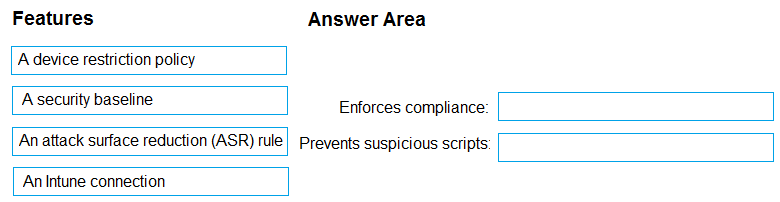
No for all the statements. Controlled folder access only allows apps that are explicitly listed, and Notepad/PowerShell aren't on that allowlist, so file creation/modification gets blocked. Also, even local admins can't override Intune-enforced protection settings. Some might think admin rights would bypass it but with Intune, they're locked out. Let me know if you see it differently-I'm pretty sure this matches what I've seen in other practice sets.
