
Q: 5
DRAG DROP You need to configure telemetry for the SaaS tenant and test whether the ingested signals are displayed. Which three actions should you perform in sequence? To answer, move the appropriate actions from the list of actions to the answer area and arrange them in the correct order. 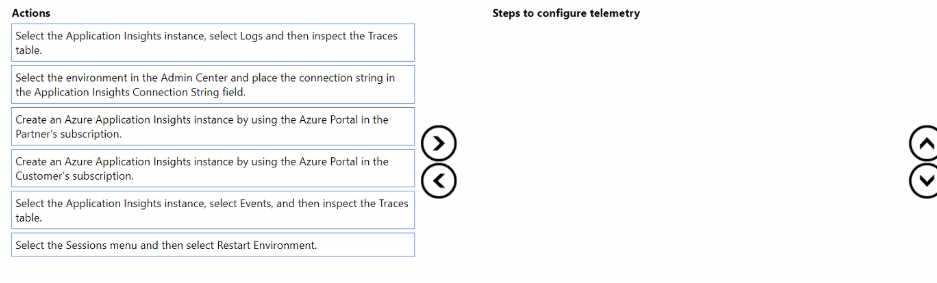
Drag & Drop
Discussion
Customer's App Insights -> Enter connection string in Admin Center -> Logs, check Traces table
Create App Insights in customer subscription → set connection string in Admin Center → inspect Logs/Traces. That's the right flow for this scenario if telemetry data stays with the customer. Swap to partner's sub only if ownership required, I think.
Nah, I don’t think it’s the partner’s subscription. Create in customer’s subscription, set connection string, then inspect Logs table.
Create Azure Application Insights in the customer's subscription → set connection string in Admin Center → inspect Logs/Traces table. That's the right order for customer-owned telemetry, pretty sure. Disagree if you think partner's subscription comes first?
This one matches official doc steps: Customer's subscription, connect in Admin Center, then Logs Traces table. Practice test covered this too.
I think it's Partner's subscription first, then set the connection string in Admin Center, and finally check the Traces table. Trap is using Customer's subscription right away, but I saw some practice questions use Partner.
Create Application Insights (partner's subscription), set connection string in Admin Center, then inspect Traces table. Pretty sure this matches what you'd do if the customer didn't specifically require data ownership-the partner setup is a usual trap here. Saw a similar question where just swapping the first step based on ownership changed the answer, so let me know if you read it differently.
Be respectful. No spam.
