
HOTSPOT A company plans to customize its per tenant extension reports. The company has the following requirements for the customization: • Child data items must not be displayed on the request page for some master detail reports. • Selecting key filter fields takes users too much time. The customization must decrease the amount of time to select the fields. You need to optimize the report request page. Which actions should you configure? To answer, select the appropriate options in the answer area. NOTE: Each correct selection is worth one point. 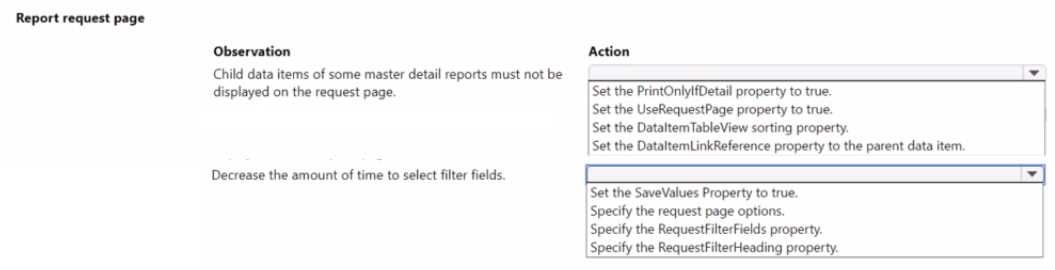
Set DataItemLinkReference on child, and use RequestFilterFields. Saw similar in some MB-820 practice reports.
Set DataItemLinkReference for the child and configure RequestFilterFields. DataItemLinkReference hides the child from the request page, while RequestFilterFields preselects key filter fields for users. Pretty sure this matches what’s needed for Dynamics report customization, anyone disagree?
Really clear scenario. For hiding child data items on the request page, setting DataItemLinkReference on the child to point to the parent is key, it makes the child tab disappear. For faster field selection, use RequestFilterFields, it lets you pick default filters so users don't have to waste time digging for them. I think these are the best ways to handle both requirements. Anyone see another approach?
For the first requirement, do you just need to set DataItemLinkReference on the child to its parent so that tab gets hidden on the request page? Also, for reducing filter field selection time, would using RequestFilterFields auto-pick what shows up by default? Or is there another property I'm missing here?
