1. Salesforce Trailhead, Data Modeling in Marketing Cloud Intelligence, "Extend Your Data Model with Calculated Dimensions and Measurements" Unit.
This unit explains the principle for ratio metrics: "For example, to calculate click-through rate (CTR), you divide clicks by impressions. If you were to average the daily CTRs to get a weekly CTR, your calculation would be incorrect. Instead, you must sum the total clicks for the week and divide them by the sum of the total impressions for the week. Datorama does this for you automatically when you create a calculated measurement." This confirms that the platform handles the component aggregation (SUM) before the calculation, making options C and D incorrect.
2. Salesforce Help, Marketing Cloud Intelligence, "Create a Calculated Measurement in Marketing Cloud Intelligence".
This document outlines the procedure for creating a calculated measurement. It instructs the user to enter a formula in the "Calculation" section. The documentation on aggregation types (SUM, AVG, MIN, MAX) does not recommend setting AVG or SUM for ratio metrics, as the platform's query-time calculation SUM(Numerator)/SUM(Denominator) is the correct methodology. This supports creating the formula without an explicit, and incorrect, aggregation change.

 *Note: CPC = Cost per Click
Formula: Cost / Clicks
Which action should an engineer take to successfully integrate CPC?
*Note: CPC = Cost per Click
Formula: Cost / Clicks
Which action should an engineer take to successfully integrate CPC?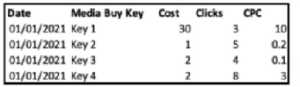 *Note: CPC = Cost per Click
Formula: Cost / Clicks
Which action should an engineer take to successfully integrate CPC?
*Note: CPC = Cost per Click
Formula: Cost / Clicks
Which action should an engineer take to successfully integrate CPC?