1. Salesforce Official Documentation, Marketing Cloud Intelligence Help, "Harmonization Center": This document explains that the Harmonization Center is used to "create and manage classification rules for your data." It details the use of patterns to populate new dimensions based on source fields and the ability to apply filters, such as by data source, to these patterns. This supports creating separate patterns for different data sources (LinkedIn/AdRoll vs. Google Analytics).
2. Salesforce Official Documentation, Marketing Cloud Intelligence Help, "Create a Pattern in the Harmonization Center": This guide outlines the process of creating a pattern. It specifies selecting a source field (e.g., 'Campaign Name' or 'Web Analytics Site Source'), defining extraction or replacement rules, and applying filters. This confirms that a single pattern can contain multiple rules (e.g., extracting "Offer1", "Offer2", and "Offer3") and can be filtered to apply only to specific data streams like Google Analytics, as described in the correct answer.
3. Salesforce Official Documentation, Marketing Cloud Intelligence Help, "Data Model": The official data model documentation defines standard dimensions. It confirms that 'Campaign Name' is the appropriate field for campaign-level naming conventions from advertising platforms like LinkedIn and AdRoll, and 'Web Analytics Site Source' is the correct dimension for source data within web analytics platforms like Google Analytics. This validates the choice of source fields in the correct answer.

 The implementation engineer to use the Harmonization Center. Which of the below actions can help
implement the new dimension ‘Offer?
The implementation engineer to use the Harmonization Center. Which of the below actions can help
implement the new dimension ‘Offer?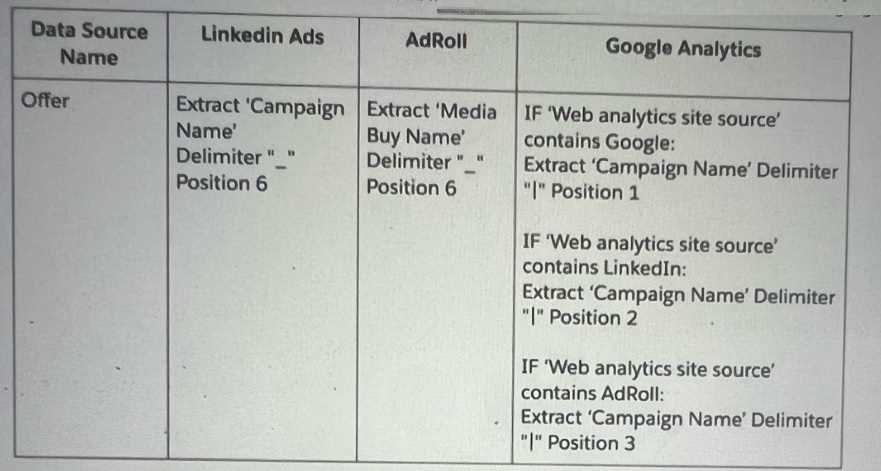 The implementation engineer to use the Harmonization Center. Which of the below actions can help
implement the new dimension ‘Offer?
The implementation engineer to use the Harmonization Center. Which of the below actions can help
implement the new dimension ‘Offer?