1. Juniper Networks TechLibrary - show route receive-protocol: "Use this command to display the routes that a BGP routing device has received from a neighbor, before the routing policy is applied." This documentation confirms that this command is used to inspect incoming advertisements from a peer, which includes the AS path attribute. (Source: Juniper Networks TechLibrary, CLI Explorer, show route receive-protocol).
2. Juniper Networks TechLibrary - show route: The documentation for the show route command and its variants (show route protocol bgp) does not list source-gateway or next-hop as valid keywords, confirming options B and C are incorrect. The hidden option is described for displaying routes that are not eligible to become active. (Source: Juniper Networks TechLibrary, CLI Explorer, show route).
3. Junos Routing Protocols Configuration Guide - Monitoring BGP: This guide details the use of operational mode commands for BGP. It specifies show route receive-protocol bgp peer-address as the method to "View the routes that the local router has received from the BGP peer before the routing policy has been applied." (Source: Junos OS 22.4, Routing Protocols Configuration Guide, Section: "Monitoring BGP Configuration and Operation").

 Referring to the exhibit, you see that the 0.0.0.0/0 route is coming from AS 64512.
What is the command to achieve this task?
Referring to the exhibit, you see that the 0.0.0.0/0 route is coming from AS 64512.
What is the command to achieve this task?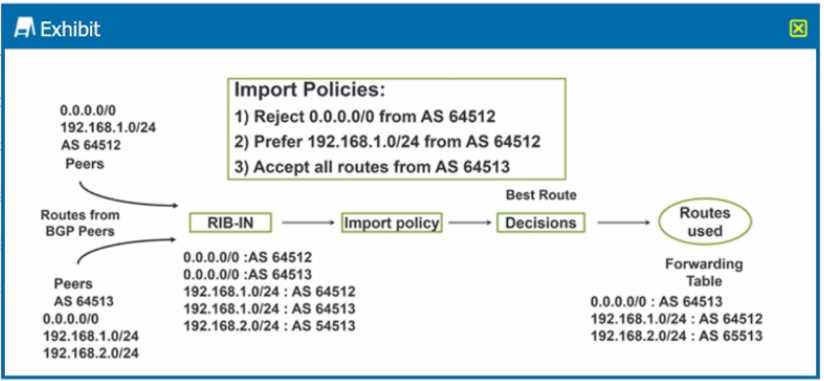 Referring to the exhibit, you see that the 0.0.0.0/0 route is coming from AS 64512.
What is the command to achieve this task?
Referring to the exhibit, you see that the 0.0.0.0/0 route is coming from AS 64512.
What is the command to achieve this task?