Q: 1
The noise floor measures 000000001 milliwatts, and the receiver's signal strength is -65dBm. What is
the Signal to Noise Ratio?
Options
Discussion
Option D The trick here is not falling for B, SNR is signal minus noise in dBm.
Maybe D for this, since SNR is just the signal dBm minus noise floor dBm. But if you interpret the noise floor in regular milliwatts or want SNR as a ratio, answers could differ. Anyone see this worded differently on a real test?
D imo, just use the signal strength minus the noise floor in dBm so -65 - (-90) equals 25 dBm. Official guide math section covers this pretty well if you want to check.
Looks like B. 15 dBm
Be respectful. No spam.
Q: 2
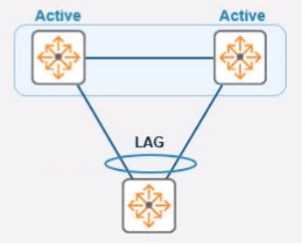
Refer to the exhibit.
In the given topology, a pair of Aruba CX 8325 switches are in a VSX stack using the active gateway
What is the nature and behavior of the Virtual IP for the VSX pair if clients are connected to the
access switch using VSX as the default gateway?
In the given topology, a pair of Aruba CX 8325 switches are in a VSX stack using the active gateway
What is the nature and behavior of the Virtual IP for the VSX pair if clients are connected to the
access switch using VSX as the default gateway?Options
Discussion
B , the whole point of VSX active gateway is that the VIP floats between the switches if there's a failure. Clients keep using the same default gateway IP no matter which box is up. Anyone think C makes sense here?
It’s B, since the floating VIP will move to the secondary switch if the primary fails. That’s how active gateway in VSX works, keeps things seamless for client traffic. Let me know if I’m missing something here.
B tbh. Pretty sure the virtual IP is meant to float between the VSX pair, so if one switch goes down, the other takes over the gateway IP without breaking client connectivity. Not totally confident but that's what I remember from similar practice questions. Somebody confirm?
Be respectful. No spam.
Q: 3
What are the main characteristics of the 6 GHz band?
Options
Discussion
Option D. seen similar on practice tests and some guides. Official docs and Aruba config labs are good for this topic.
B or D? But B is technically right because only indoor use is allowed for Low Power Devices, outdoor needs Very Low Power. Docs clarify this edge case, so B.
I don’t think it’s D. B fits since the 6 GHz band in North America does offer way more 80 MHz channels than 40 MHz channels in 5 GHz. Lots of extra spectrum for Wi-Fi 6E there. Pretty sure that's what they're after, but happy to hear other takes.
Be respectful. No spam.
Q: 4
What is the correct command to add a static route to a class-c-network 10.2.10.0 via a gateway of
172.16.1.1?
Options
Discussion
A not B. The 'ip-route' with CIDR is what ArubaOS expects, while option B looks like Cisco syntax and adds extra with the description. C and D are wrong format for Aruba, pretty sure about A but someone correct if you've seen a different syntax.
Looks like B is the right format for most Cisco gear: ip route 10.2.10.0 255.255.255.0 172.16.1.1. I picked B since it includes the mask and next hop, but not sure if the 'description aruba' at the end should be there for Aruba devices.
I don't think it's B. A is correct here because Aruba uses the 'ip-route' command with CIDR, so 'ip-route 10.2.10.0/24 172.16.1.1'. B is more of a Cisco style and adds extra stuff that ArubaOS doesn't need for a static route, like the description bit. Pretty sure A matches what you'd see in Aruba docs, but open to corrections if anyone's seen different.
Be respectful. No spam.
Q: 5
Which feature can network administrators use to centralized RF planning and optimization service
when using an Aruba mobility master architecture?
Options
Discussion
C/D? Depends if they're talking about cluster-wide RF planning. If so, pretty sure it's C.
Its B, since Client Match helps with RF optimization. Nice clear question.
Be respectful. No spam.
Q: 6
Which commands are used to set a default route to 10.4.5.1 on an Aruba CX switch when ln-band
management using an SVl is being used?
Options
Discussion
I’m going with C here, regular static route syntax is what you need for in-band via SVI. The VRF mgmt one (option B) is only used for out-of-band management. Pretty sure that's how it works on Aruba CX, but let me know if I missed something.
C. not B-B is tempting since it mentions 'mgmt' but that's for the management VRF, not in-band with SVI.
C tbh, Aruba CX in-band mgmt with an SVI uses regular static routes not the VRF mgmt version. B is for out-of-band management only. Pretty sure about this but open to being corrected if anyone's seen different behavior.
I think C, that’s the right static route syntax for in-band with an SVI on Aruba CX.
Its B, think that's the static route format for management, but someone confirm?
Be respectful. No spam.
Q: 7
You have been asked to onboard a new Aruba 6300M in a customer deployment You are working
remotely rather than on-site You have a colleague installing the switch The colleague has provided
you with a remote console session to configure the edge switch You have been asked to configure a
link aggregation going back to the cores using interfaces 1/1/51 and 1/1/52 The Senior Engineer of
the project has asked you to configure the switch and 1Q uplink with these guidelines
1. Add VLAN 20 to the local VLAN database with name Mgmt
2. Add L3 SVl on VLAN 20 for Management using address 10 in the 10.1.1 0/24 subnet 3. Add LAG 1
using LACP mode active for the uplink
4 use vlan 20 as the native vlan on the LAG 5. Make sure the interfaces are all ON.
Which configuration script will achieve the task?
Options
Discussion
Probably C
C , had something like this in a mock and C covers all requirements cleanly.
Why does B have 'shut' on the interfaces before bringing them up again? Looks off compared to C where all steps match the onboarding requirements, especially for native VLAN and interface state.
Option B here. It looks like it would work since it sets up VLAN 20, the SVI, and LACP active. The 'vlan trunk native 20' line is present too. Not sure about the order and interface handling, but I think B isn't a total trap.
C imo. Only this option puts VLAN 20 as the native VLAN for the LAG and gets all interfaces up. The others miss key bits or have typos in their commands, like missing native vlan config. Seen similar on practice exams.
Be respectful. No spam.
Q: 8
A network technician is using Aruba Central to troubleshoot network issues Which dashboard can be
used to view and acknowledge issues when beginning the troubleshooting process?
Options
Discussion
D imo
Its D
Not D, A. Alerts and Events dashboard is for seeing issues and acknowledging them up front.
Be respectful. No spam.
Q: 9
What are two advantages of a UXl? (Select two.)
Options
Discussion
C/E for sure. UXI is about simulating client use and testing app experience, not just checking signal strength.
Maybe C and D? I thought UXI sensors act like clients and can measure Wi-Fi coverage by connecting to different APs. Not 100% certain about the app testing part, so could be missing something here.
Seriously wish Aruba would use clearer wording, but it's C and E.
Pretty sure it's C and D for this one.
Be respectful. No spam.
Q: 10
What does WPA3-Personal use as the source to generate a different Pairwise Master Key (PMK) each
time a station connects to the wireless network?
Options
Discussion
Option C SAE is what WPA3-Personal relies on for unique PMKs each connection. Pretty sure this is correct.
C . SAE is specifically designed to create a unique PMK each time, not just reusing PSKs like WPA2. Makes WPA3 much stronger against offline attacks. Pretty certain that's what the question is after.
C imo. SAE is the handshake used in WPA3-Personal, which generates a new PMK every time based on the password, MACs, and nonces. A looks tempting but it's actually part of the SAE process, not a standalone method.
A . If we're being super nitpicky, the PMK is literally computed using session-specific info like MAC addresses and nonces, not just SAE itself. SAE is the handshake, but A describes what flows into the key generation. Not 100% tho, maybe someone has seen a different phrasing on exams?
Not A, it's C. SAE is the handshake that does the job, while A just describes info used inside it.
C since WPA3-Personal uses SAE to negotiate a fresh PMK for every connection, not just static info or OWE. SAE is what changed from WPA2's PSK method. Pretty sure that's the main point but let me know if you disagree.
C tbh
Be respectful. No spam.
Question 1 of 20 · Page 1 / 2