Understanding the Event Handler Configuration:
The event handler is set up to detect specific security incidents, such as spearphishing, based on logs
forwarded from other Fortinet products like FortiSandbox.
An event handler includes rules that define the conditions under which an event should be triggered.
Analyzing the Current Configuration:
The current event handler is named "Spearphishing handler" with a rule titled "Spearphishing Rule
1".
The log viewer shows that logs are being forwarded by FortiSandbox but no events are generated by
FortiAnalyzer.
Key Components of Event Handling:
Log Type: Determines which type of logs will trigger the event handler.
Data Selector: Specifies the criteria that logs must meet to trigger an event.
Automation Stitch: Optional actions that can be triggered when an event occurs.
Notifications: Defines how alerts are communicated when an event is detected.
Issue Identification:
Since FortiSandbox logs are correctly forwarded but no event is generated, the issue likely lies in the
data selector configuration or log type matching.
The data selector must be configured to include logs forwarded by FortiSandbox.
Solution:
B . Configure a FortiSandbox data selector and add it to the event handler:
By configuring a data selector specifically for FortiSandbox logs and adding it to the event handler,
FortiAnalyzer can accurately identify and trigger events based on the forwarded logs.
Steps to Implement the Solution:
Step 1: Go to the Event Handler settings in FortiAnalyzer.
Step 2: Add a new data selector that includes criteria matching the logs forwarded by FortiSandbox
(e.g., log subtype, malware detection details).
Step 3: Link this data selector to the existing spearphishing event handler.
Step 4: Save the configuration and test to ensure events are now being generated.
Conclusion:
The correct configuration of a FortiSandbox data selector within the event handler ensures that
FortiAnalyzer can generate events based on relevant logs.
Reference:
Fortinet Documentation on Event Handlers and Data Selectors FortiAnalyzer Event Handlers
Fortinet Knowledge Base for Configuring Data Selectors FortiAnalyzer Data Selectors
By configuring a FortiSandbox data selector and adding it to the event handler, FortiAnalyzer will be
able to accurately generate events based on the appropriate logs.

 You configured a spearphishing event handler and the associated rule. However. FortiAnalyzer did
not generate an event.
When you check the FortiAnalyzer log viewer, you confirm that FortiSandbox forwarded the
appropriate logs, as shown in the raw log exhibit.
What configuration must you change on FortiAnalyzer in order for FortiAnalyzer to generate an
event?
You configured a spearphishing event handler and the associated rule. However. FortiAnalyzer did
not generate an event.
When you check the FortiAnalyzer log viewer, you confirm that FortiSandbox forwarded the
appropriate logs, as shown in the raw log exhibit.
What configuration must you change on FortiAnalyzer in order for FortiAnalyzer to generate an
event?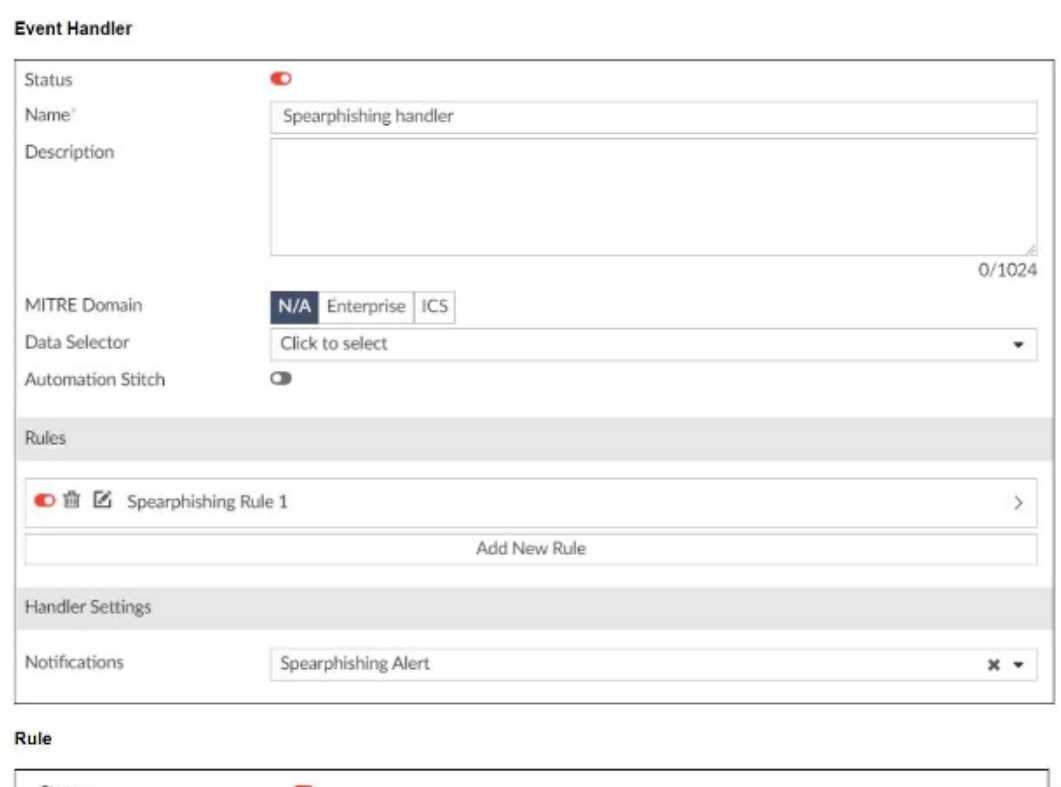 You configured a spearphishing event handler and the associated rule. However. FortiAnalyzer did
not generate an event.
When you check the FortiAnalyzer log viewer, you confirm that FortiSandbox forwarded the
appropriate logs, as shown in the raw log exhibit.
What configuration must you change on FortiAnalyzer in order for FortiAnalyzer to generate an
event?
You configured a spearphishing event handler and the associated rule. However. FortiAnalyzer did
not generate an event.
When you check the FortiAnalyzer log viewer, you confirm that FortiSandbox forwarded the
appropriate logs, as shown in the raw log exhibit.
What configuration must you change on FortiAnalyzer in order for FortiAnalyzer to generate an
event?