From the exhibit, you can observe that the debug output captures an IKEv1 negotiation in
aggressive mode. Let's break down the supporting details in line with official Fortinet IPsec
VPN troubleshooting resources and debug guides:
For Option B:
The very first line of the debug output shows:
comes 10.0.0.2:500->10.0.0.1:500, ifindex=7.
This indicates the traffic direction—from the remote IP (10.0.0.2) with port 500 to the local
IP (10.0.0.1) with port 500. According to Fortinet's documentation, the right side of the
arrow always represents the local FortiGate gateway. Thus, 10.0.0.1 is the local gateway IP
address.
For Option D:
You see the statement:
negotiation result "remote"
and
received peer identifier FQDNCE88525E7DE7F00D6C2D3C00000000
Official debug documentation describes that the "peer identifier" or peer ID sent by the
initiator is displayed here. In the context of IKE/IPsec negotiation, this value is used as the
IPsec peer ID for authentication and identification purposes. The initiator is providing
"remote" as the peer ID for its connection.
Why Not A or C:
Perfect Forward Secrecy (PFS): The debug does not show any DH group negotiation in
phase 2 (no reference to group2, group5, etc., for phase 2), so you cannot deduce the
presence of PFS solely from this output.
Phase 2 negotiation: The log focuses on IKE (phase 1) negotiation and establishment; there’s
no reference to ESP protocol, Quick Mode, or other identifiers that would show phase 2 SA
negotiation and establishment.
This interpretation aligns with the explanation in the FortiOS 7.6.4 Administration Guide's
VPN section and the official debug command output samples published in Fortinet’s
documentation. It demonstrates how to distinguish between local and remote addresses and
how to identify the use of peer IDs.
Reference:
FortiOS 7.6.4 Administration Guide: IPsec VPN and Debugging VPNs
Technical Support Resources on interpreting IKE debug output and peer ID roles

 Refer to the exhibit, which contains partial output from an IKE real-time debug.
Which two statements about this debug output are correct? (Choose two.)
Refer to the exhibit, which contains partial output from an IKE real-time debug.
Which two statements about this debug output are correct? (Choose two.)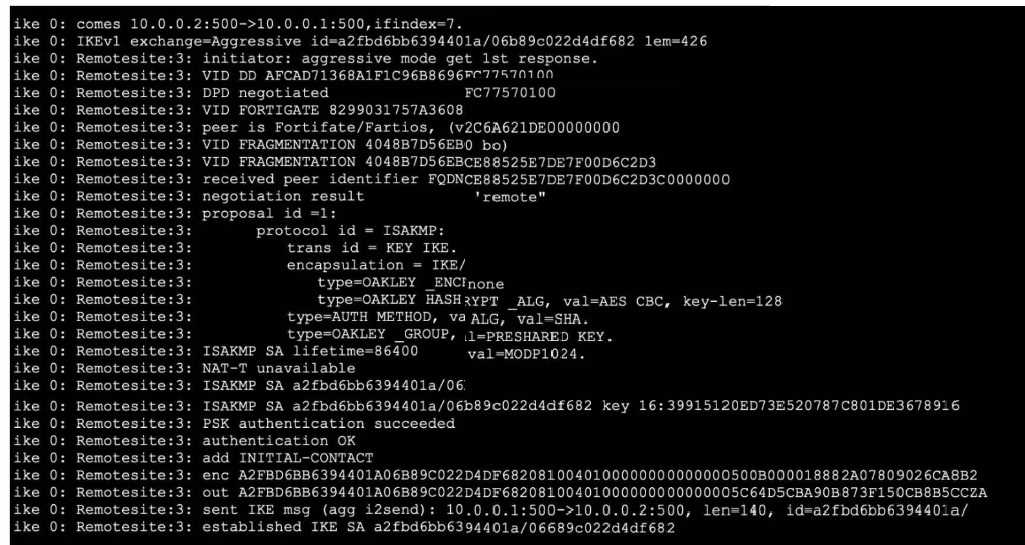 Refer to the exhibit, which contains partial output from an IKE real-time debug.
Which two statements about this debug output are correct? (Choose two.)
Refer to the exhibit, which contains partial output from an IKE real-time debug.
Which two statements about this debug output are correct? (Choose two.)