
Q: 8
HOTSPOT You have the source data model shown in the following exhibit. 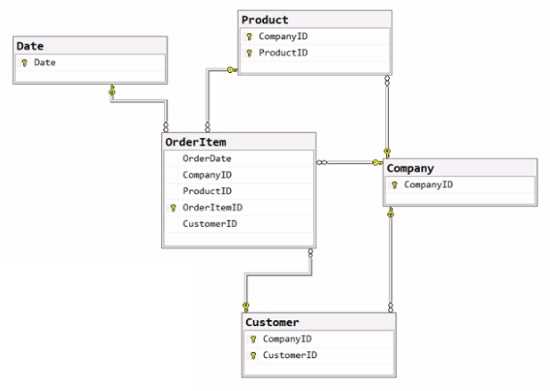 The primary keys of the tables are indicated by a key symbol beside the columns involved in each key. You need to create a dimensional data model that will enable the analysis of order items by date, product, and customer. What should you include in the solution? To answer, select the appropriate options in the answer area. NOTE: Each correct selection is worth one point.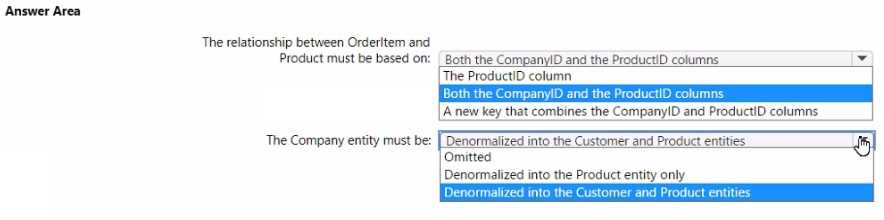
Your Answer
Discussion
Value to NativeQuery to EnableFolding. This matches how you let SQL Server handle the folding steps in Power Query.
Value to NativeQuery to EnableFolding is the right mapping, Optimize is a distractor here since folding's the priority.
Value, NativeQuery, EnableFolding
Had something like this in a mock. These fit the Power Query pattern for query folding with SQL sources.
Had something like this in a mock. These fit the Power Query pattern for query folding with SQL sources.
Would you create a concatenated key for Product (CompanyID+ProductID) and denormalize Company details into the dimensions for a proper star schema here?
Value to NativeQuery to EnableFolding. Optimize is a trap here, pretty sure EnableFolding is required for query folding. Disagree with Optimize pick.
Pretty sure it goes Value, NativeQuery, EnableFolding. That's the combo that lets Power Query push transformations back to SQL Server using folding. Saw this pattern in a practice test and the official docs cover it too.
Nah, I don’t think Optimize is right here-EnableFolding is needed for downstream folding. Should be Value, NativeQuery, EnableFolding. Trap answer for Optimize.
Value → NativeQuery → EnableFolding is the way to go, since you want all the transformations pushed down to SQL Server. EnableFolding lets Power Query fold steps past the native query. Pretty sure this matches the docs, but open to discuss if anyone sees a different flow.
Value → NativeQuery → EnableFolding seems right since the question wants foldable steps pushed to SQL Server. EnableFolding in the options makes sure downstream steps are folded. Pretty sure this is the expected mapping, but let me know if I’m missing a detail.
Value to NativeQuery to Optimize. I picked Optimize at the end since it sometimes helps with processing performance, even if EnableFolding is more common in docs. Not 100% sure, anyone else see Optimize used here?
Be respectful. No spam.