
Q: 14
HOTSPOT You have a Microsoft Power Bl semantic model. You plan to implement calculation groups. You need to create a calculation item that will change the context from the selected date to month- to-date (MTD). How should you complete the DAX expression? To answer, select the appropriate options in the answer area. NOTE: Each correct selection is worth one point. 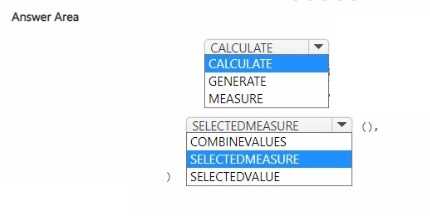
Your Answer
Discussion
Yeah, mapping should be:
Group by CustomerID (All Rows and max version date) → Expand the All Rows column → Filter where version date equals max → Remove the max version date column. No extra columns end up in the model. If I'm missing something let me know, but that's how I've handled similar ETL flows.
Group by CustomerID (All Rows and max version date) → Expand the All Rows column → Filter where version date equals max → Remove the max version date column. No extra columns end up in the model. If I'm missing something let me know, but that's how I've handled similar ETL flows.
Group by CustomerID with All Rows and max, expand All Rows, filter to version date = max, then remove max version column. Don’t think removing duplicates would work since you need all the other columns. Trap is just grouping without All Rows.
Wouldn't using SELECTEDVALUE break if it's not a scalar column, since calculation groups need SELECTEDMEASURE instead?
Group by CustomerID using All Rows, expand All Rows, filter where version date equals max, then remove max version date.
Pretty sure the right order is group by CustomerID with All Rows and max version, then expand All Rows, filter to where version date matches the max, then drop the max version column. That's usually how you keep all fields from the latest record without adding columns to the model. Not 100 percent if expand and filter can swap though.
Group by CustomerID All Rows, expand, filter to max date, remove max version. I think that’s the usual process here.
Group by CustomerID All Rows, expand, filter to max date, remove max column. Had something like this in a mock.
Group by CustomerID then max version date, expand All Rows step last. Saw similar flow on the official practice test but not 100 percent if the order matters here.
Group by CustomerID and just calculate max version date, then filter to that max, remove the extra column, and expand last. I think this works but you might miss other attributes not included in the group by. Anyone see a reason this sequence wouldn't preserve all needed columns?
Be respectful. No spam.