Q: 1
HOTSPOT You load data from a notebook in an Azure Machine Learning workspace into a pandas dataframe named df. The data contains 10.000 patient records. Each record includes the Age property for the corresponding patient. You must identify the mean age value from the differentially private data generated by SmartNoise SDK. You need to complete the Python code that will generate the mean age value from the differentially private data. Which code segments should you use? To answer, select the appropriate options in the answer area. NOTE: Each correct selection is worth one point. 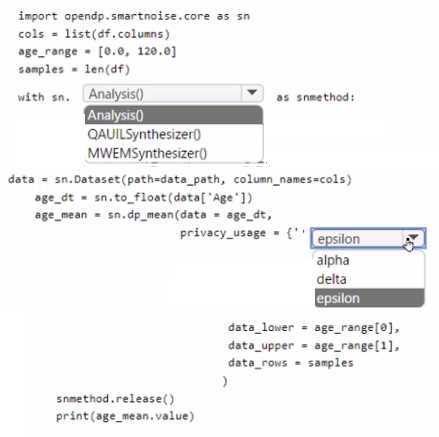
Your Answer
Discussion
Looks exactly like what you'd find in the official SDK docs or those practice exams, so I'd say Analysis() and epsilon.
Not everyone notices this, but if you're calculating a mean (not generating synthetic data), Analysis() is needed to define the DP workflow. For the privacy budget, epsilon is correct since that's what SmartNoise expects in
privacy_usage. I think that's spot on, unless they're asking for a more advanced use case.Analysis() and epsilon
Hmm, I'd say MWEMSynthesizer() and delta.
Analysis() and epsilon
Yeah, that's Analysis() and epsilon for just getting the differentially private mean.
Isn't it always about the resource ID for SynapseSparkCompute in SDK v2? The code needs that unique ARM path to connect properly. Workspace URL or name isn't enough, so B makes the most sense here imo.
D . I saw some practice questions using workspace name and URL, maybe that's the trap here. Docs can be confusing on this one.
If the question was about generating a synthetic dataset instead of just getting the mean, wouldn't MWEMSynthesizer() and maybe delta be more fitting? Seems like those are easy to mix up if you miss the use case.
Why wouldn't you just use Analysis() instead of one of the synthesizer classes for this mean calculation with SmartNoise?
Be respectful. No spam.