
Q: 6
DRAG DROP You manage an Azure Al Foundry project. You deploy a large language model from the model catalog. You need to manually evaluate the model, collect the statistics, and be able to review the results later. 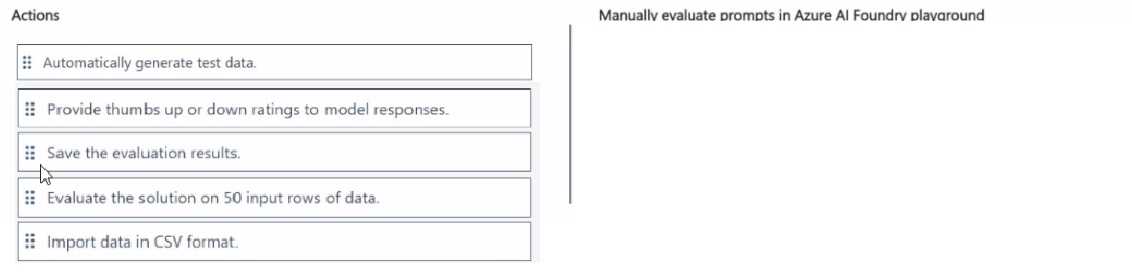
Drag & Drop
Discussion
Import data in CSV format, then thumbs up or down, then save evaluation results. That’s the sequence for manual eval here.
Import data in CSV format → thumbs up/down ratings → save the results. Manual process, not auto-generate here.
Makes sense to start by importing the CSV, then give thumbs up or down on the responses, and finally save the results. That's how manual eval is usually done in Azure AI Foundry from what I remember. Let me know if you see it differently.
Import data in CSV format → thumbs up/down for responses → save the evaluation results. This matches the manual review process for Azure AI Foundry, not the auto-generated test workflow. Pretty sure that's correct here unless they sneak in a requirement about not having evaluation data to import.
Import data in CSV format → thumbs up/down for responses → save results. That's the typical Azure AI Foundry evaluation flow from what I've seen. Makes sense unless the prompt says to auto-generate test data. Agree?
Import data in CSV format → thumbs up/down ratings → save evaluation results. These Foundry manual steps are always a pain, honestly, but that's the workflow I keep seeing on similar questions. Unless they've changed the UI again, this should be right.
Evaluate on 50 input rows → thumbs up/down → save results. The question's wording feels like a trap for CSV import, but going with these steps here.
Automatically generate test data → Action 1, Provide thumbs up or down ratings → Action 2, Save the evaluation results → Action 3
I picked auto-generate for Action 1 since that seems like it gets things started, but I might be off. The CSV import option looked tempting but not sure it's the main manual step here. Agree?
I picked auto-generate for Action 1 since that seems like it gets things started, but I might be off. The CSV import option looked tempting but not sure it's the main manual step here. Agree?
A
Not B, A. Saw a similar question in exam dumps, Workspace.get works for getting an existing AML workspace if params match.
Be respectful. No spam.
