
DRAG DROP You have a model with a large difference between the training and validation error values. You must create a new model and perform cross-validation. You need to identify a parameter set for the new model using Azure Machine Learning Studio. Which module you should use for each step? To answer, drag the appropriate modules to the correct steps. Each module may be used once or more than once, or not at all. You may need to drag the split bar between panes or scroll to view content. NOTE: Each correct selection is worth one point. 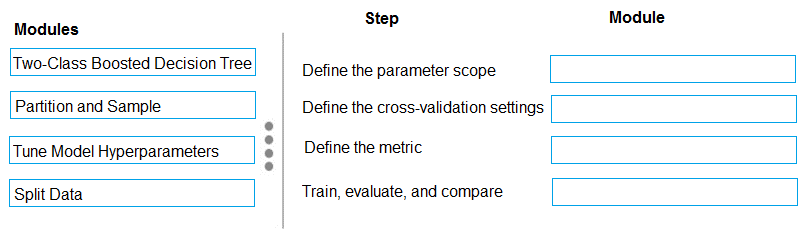
I think it should map like this: Two-Class Boosted Decision Tree for parameter scope, Partition and Sample for cross-validation settings, then Tune Model Hyperparameters handles both metric and training/evaluation. This fits how Azure ML Studio expects you to set up hyperparameter sweeps with cross-validation. Not 100% but matches what I’ve practiced.
Yeah, this mapping makes sense: parameter scope to Two-Class Boosted Decision Tree, cross-validation settings is Partition and Sample, then both metric and train/evaluate/compare go with Tune Model Hyperparameters. Pretty sure that's the Azure ML workflow for hyperparameter search. Seen similar setups in labs, but correct me if I'm missing something.
- Define the parameter scope: Two-Class Boosted Decision Tree
- Define the cross-validation settings: Partition and Sample
- Define the metric: Tune Model Hyperparameters
- Train, evaluate, and compare: Tune Model Hyperparameters
Pretty sure it's Define the parameter scope: Two-Class Boosted Decision Tree, cross-validation settings: Split Data, metric: Tune Model Hyperparameters, train/evaluate/compare: Tune Model Hyperparameters. Azure docs sometimes mix up Partition and Sample with Split Data for validation folds, so I picked Split Data for cross-validation. If the question had used "folds" specifically I'd rethink it. Agree?
