Options A, B, and C are all hot-swappable. SFPs, fans, and BBUs can be replaced while the system is powered on and running. Expansion IO modules usually aren't hot-swappable unless specifically designed for it. Pretty sure this matches what the docs say but happy to hear if anyone's seen a newer PowerStore model that supports D.
nas_server show command lists NAS servers and their statuses like Started or Degraded, not AD info or memory stats. Pretty sure about this, matches what I've seen in lab outputs.I think I'd pick A for this one. Fibre Channel (FC) is pretty standard for traditional SAN environments and gets used a lot in enterprise setups for storage networks. NFS and SMB are more about file-level access, right? Maybe iSCSI is common now, but my labs still used FC as the protocol for storage networks. Someone correct me if I'm missing a recent shift.
Makes sense, I'd pick A too since each node in a PowerStore T needs its own IP for active-active access and failover. Haven't seen it require more than 2 in the default setup. Let me know if you’ve seen otherwise!
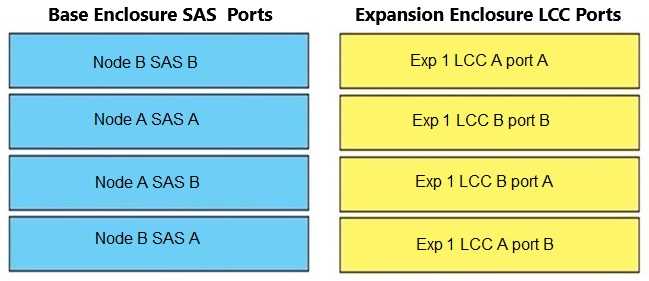
Official guide diagrams show B-to-A path for expansion cabling, with return to alternate node for redundancy. If you want to double-check, the Dell deployment guide covers this. Pretty sure that's what most practice exams show too.
Accessing the Repair Flow link is usually the most helpful step on PowerStore for troubleshooting big issues. It guides you through diagnostics and, if needed, sets up a support case. Pretty sure that's the intention here, unless I'm missing something.
I don’t think it’s A here. Associated Events can give you history, but the Repair Flow link (D) is what actually walks you through troubleshooting and lets you escalate to support if needed. B's notifications sometimes help, but usually not as detailed for actual resolution steps in PowerStore. Seen a similar question on practice, and D seemed to be the expected approach. Agree?
svc_rescue_state clear is the command to reset the node back to normal. Pretty sure about this, but open to corrections.Had something like this in a mock test, and B was correct there too. svc_rescue_state clear resets the node from service mode, not the other options. Anyone pick something else for this?

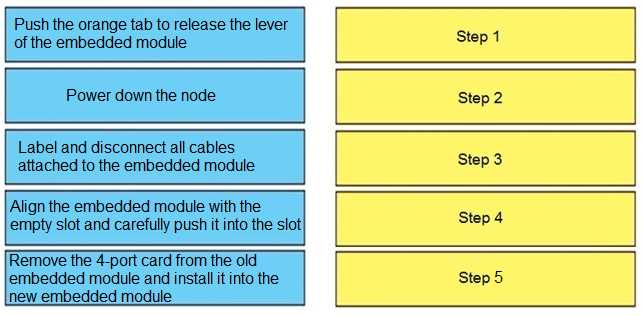
I saw similar steps in a practice test. I went with: power down, disconnect cables, release lever, transfer the card, then insert new module. Think that lines up with the service manual but open to corrections if I missed something!