
Q: 9
DRAG DROP
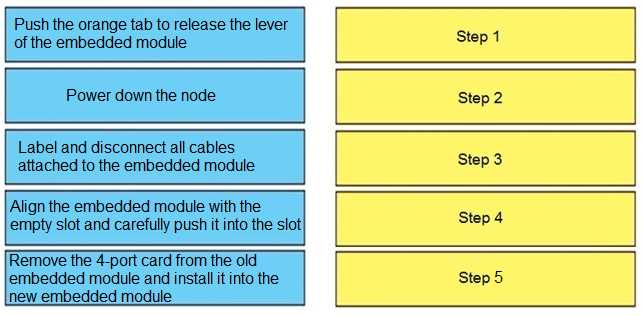
Correctly order the steps of the embedded module replacement procedure.

Your Answer
Discussion
Power down, disconnect cables, release lever, move 4-port card, insert new module. Exact Dell order from field guide.
Power down node > label and disconnect cables > release lever with orange tab > move 4-port card to new module > align and insert new module. Pretty sure that's the OEM procedure from Dell doc. Order matters for safety and not messing up ports.
Power down, disconnect cables, release lever, swap card, slot in new module. Had something like this in a mock and order matched.
I saw similar steps in a practice test. I went with: power down, disconnect cables, release lever, transfer the card, then insert new module. Think that lines up with the service manual but open to corrections if I missed something!
Power off node, label/disconnect cables, release lever using orange tab, transfer 4-port card, then align and install new module. That matches the Dell manual steps exactly from what I recall.
Pretty sure the card swap goes after the orange tab release, not before. Swap step too early is a trap.
Power down node → label/disconnect cables → orange tab to release lever → move 4-port card → align and insert new module. I don't think you should swap the card before releasing the lever, that's a common trap.
Be respectful. No spam.
