
Q: 13
DRAG DROP
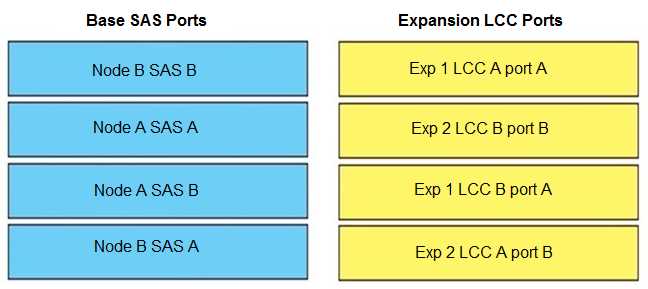
When connecting a PowerStore base enclosure to 2 expansion enclosures, match the base SAS ports
in column A to their corresponding expansion LCC ports in column B.

Your Answer
Discussion
Seen this on a few practice sets, official diagrams help a lot for these. B B → B A, A A → B B, A B → A A, B A → A B matches what’s in the reference guide. If you’ve got access to Dell’s manual or their setup videos, those really clarify the port mapping. Anyone using the official guide for confirmation?
Pretty sure the order is: A A to B B, A B to A A, B A to A B, B B to B A. Looks like Dell tries to trip people up by switching the port letters around. Similar pattern showed up in practice questions.
A A to B B, A B to A A, B A to A B, B B to B A. Had something like this in a mock.
B B → B A, A A → B B, A B → A A, B A → A B. The option with B B mapping to A B seems off-Dell diagrams show it as B A instead. Trap here is mixing up which LCC each base SAS port lands on. Let me know if I’m missing a scenario though.
Haven’t seen this exact drag and drop before but I’d map: B B → B A, A A → B B, A B → A A, B A → A B. Not 100 percent sure though.
Be respectful. No spam.
