
Q: 10
DRAG DROP
Match the base enclosure SAS ports in column A to their corresponding expansion LCC ports in
column B; when connecting a PowerStore base enclosure to a single expansion enclosure.

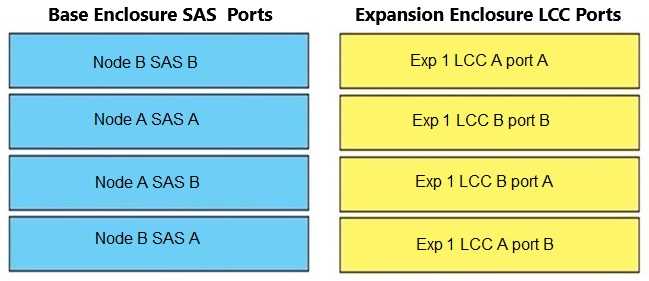
Your Answer
Discussion
A to A, B to B, C to C, D to D. Super clear mapping, nice visual in the question.
Yup, just follow A to A, B to B, C to C, D to D when connecting PowerStore base SAS ports to the expansion LCC. That's how Dell diagrams show it and I haven't seen exceptions for single enclosure setups.
Base SAS A to LCC A, B to B, C to C, D to D. That’s how Dell shows it for a single expansion enclosure. Keeps fault domains straight and prevents mixups. I’m pretty sure this is the standard mapping unless the question hinted dual-path or something unusual. Agree?
Seriously, Dell's SAS cabling always makes me double-check the diagram. The right mapping for one expansion enclosure is base A to LCC A, B to B, C to C, D to D. Pretty sure that's what their install docs show, unless I'm missing some obscure exception.
Man, Dell loves making these SAS port diagrams confusing. A->A, B->B, C->C, D->D is what matches here.
A to B, B to A, C to D, D to C. I remember seeing this as an option in practice but pretty sure it's a common confusion with redundant or cross-connect setups. Maybe Dell wants direct A-to-B mapping for failover? Not 100 percent certain on the pattern here so let me know if I'm missing a step.
Be respectful. No spam.
