Q: 1
HOTSPOT
Your company has offices in New York City, Sydney, Paris, and Johannesburg.
The company has an Azure subscription.
You plan to deploy a new Azure networking solution that meets the following requirements:
• Connects to ExpressRoute circuits in the Azure regions of East US, Southeast Asia, North Europe,
and South Africa
• Minimizes latency by supporting connections in three regions
• Supports Site-to-Site VPN connections
• Minimizes costs
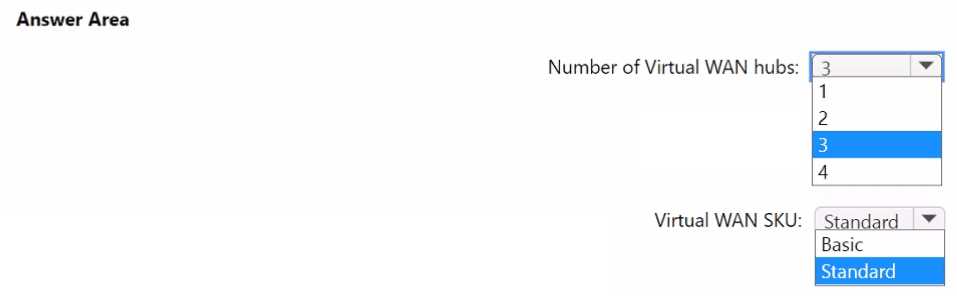
You need to identify the minimum number of Azure Virtual WAN hubs that you must deploy, and
which virtual WAN SKU to use. What should you identify? To answer, select the appropriate options
in the answer area.
NOTE: Each correct selection is worth one point.
Your Answer
Discussion
Yeah, it's 4 hubs with the Standard SKU required for ExpressRoute in each region.
Would the minimum hubs change if you didn't need ExpressRoute in all listed regions?
Seen similar on practice exams, official doc backs up 4 hubs and Standard SKU for ExpressRoute.
Why not just use three hubs to lower the cost, since latency in only three regions is required? Or does "connect to ExpressRoute circuits" mean every region listed has to get its own dedicated hub even if that raises costs?
Yeah, makes sense to go with 4 hubs and Standard SKU here. ExpressRoute termination in each region means one hub per Azure region, can't really cut corners on that. Basic SKU doesn't let you do ER anyway. Maybe there's a trick if regions overlapped but I don't see it for this scenario.
4 hubs, Standard SKU makes sense since ExpressRoute needs a separate hub in each Azure region where it's terminated. Pretty sure you can't share hubs across regions for ER connectivity. Cost can't overrule the need for proper ExpressRoute support here. Agree?
4 hubs, Standard SKU
Oh man, Microsoft makes this unnecessarily tricky-still, it's gotta be 4 hubs since ExpressRoute circuits in different Azure regions each need their own hub. Standard SKU only way to get ER support per region.
Had something like this in a mock-4 hubs, Standard SKU is the combo here.
Totally agree, needs to be 4 hubs and Standard SKU. ExpressRoute has to terminate in the same region as the hub, so can't really get fewer hubs. Pretty sure cost can't override that here.
Be respectful. No spam.

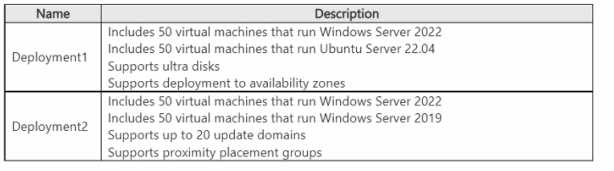 You need to recommend a virtual machine grouping solution for the deployments. What should you include in the recommendation for each deployment? To answer, select the appropriate options in the answer area. NOTE: Each correct selection is worth one point.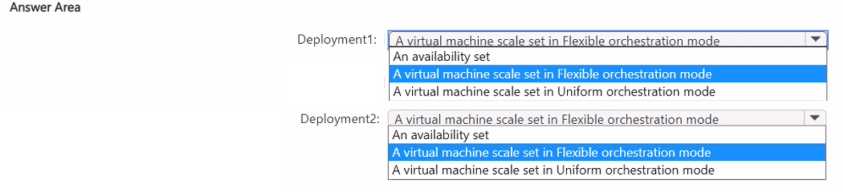

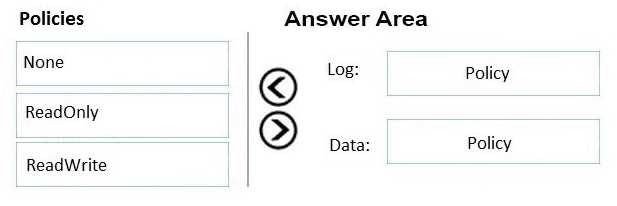
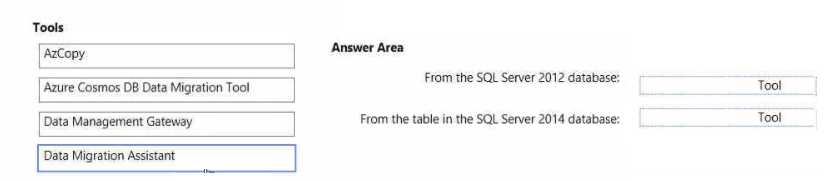
 What should you recommend using to migrate the data? To answer, drag the appropriate tools to the correct data sources-Each tool may be used once, more than once, or not at all. You may need to drag the split bar between panes or scroll to view content. NOTE: Each correct selection is worth one point.