
DRAG DROP A developer must containerize a Python application to integrate into a prebuilt CD environment by creating a Docker image. It will be hosted as a web application to enable end users from accessing it remotely. Drag and drop the code from the bottom onto the box where the code is missing in the Docker file Not all options are used. 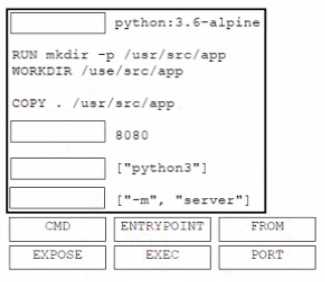
Looks right to me: FROM in Bucket 1 for base image, EXPOSE in 2 for networking, ENTRYPOINT as 3 (sets main process), and CMD in 4 for default args. This fits what I've seen in the official Docker docs and practice tests. Anyone see a reason it might be different?
FROM, EXPOSE, ENTRYPOINT, CMD is correct. FROM starts every Dockerfile (sets base image), EXPOSE makes the app reachable from outside, then ENTRYPOINT runs the main app and CMD lets you pass default params. EXEC and PORT aren't actual Dockerfile commands so they don't fit here. Pretty sure this is what Cisco wants but open to other takes if someone sees it differently.