
Q: 19
SIMULATION A user reports poor performance on the application server. INSTRUCTIONS Click on Server 1 and Server 2 and review the information presented in each chart to determine which drives need to be replaced. Select the appropriate replacement drive that should be used, for the least performance degradation to the server. If at any time you would like to bring back the initial state of the simulation, please click the Reset All button. 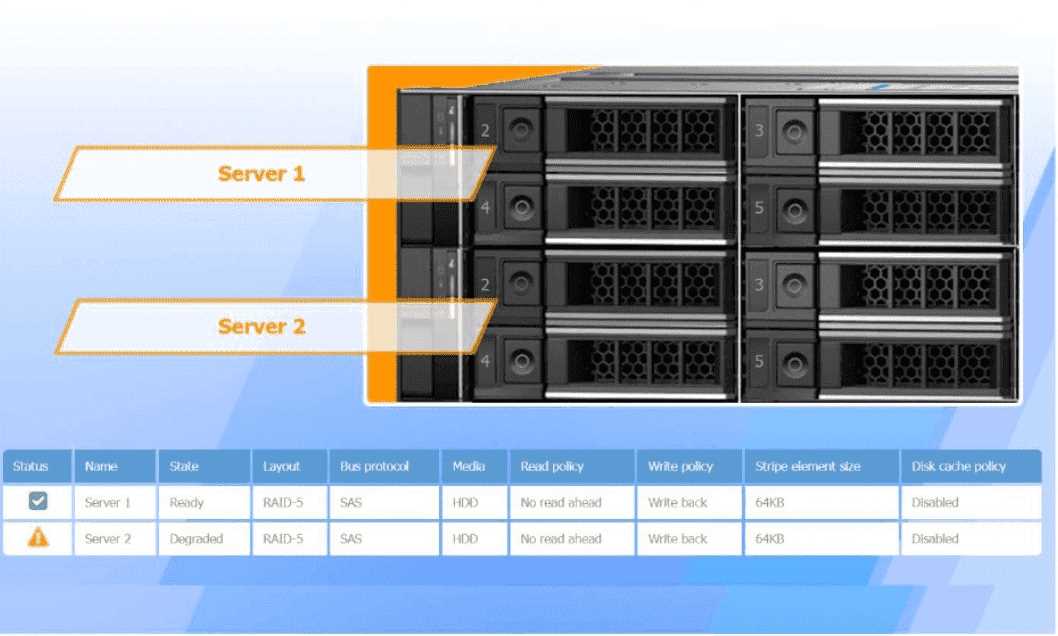
Your Answer
Discussion
Casey, you'd want a 4TB SAS 15K RPM drive for both servers here.
4TB SAS 15K RPM for both replacements.
Makes sense to swap both with 4TB SAS 15K RPM here. That way, you keep the server IO as fast as possible, so performance drop is minimized. Not totally confident if a size mismatch could ever matter in some controllers, but pretty sure that's best per exam criteria.
Replace with 4TB SAS 15K RPM for both drives.
Looks like you need to swap out Server 2, Drive Bay 2 (the failed RAID-5 disk), and Server 1, Drive Bay 3 (Physical Disk 1:2 with predicted failure). Replace both with a 4TB SAS 15K RPM drive for minimal performance drop. Fairly certain that's what CompTIA wants here.
If RAID controller only cares about matching size/interface, not speed, I'd swap in a 2TB SAS 7200rpm for Server 2 and just monitor the smart alert on Server 1 for now.
Replace failed disk with a 2TB SATA drive in Server 2.
Be respectful. No spam.
