
Q: 18
SIMULATION A technician is installing a wireless access point and is required to run all cabling and make patch cords if necessary. INSTRUCTIONS Part 1 For each cable type, click the (+) to select the appropriate connector and tool. part 2 An access point was moved and no longer has connectivity. Connect the access point, patch panel, and switch by clicking the (+) to select the appropriate cable end for each corresponding location to create a link. The link will be visible after making the second selection of each pair. Cable ends may be used multiple times, and all placeholders will be filled. 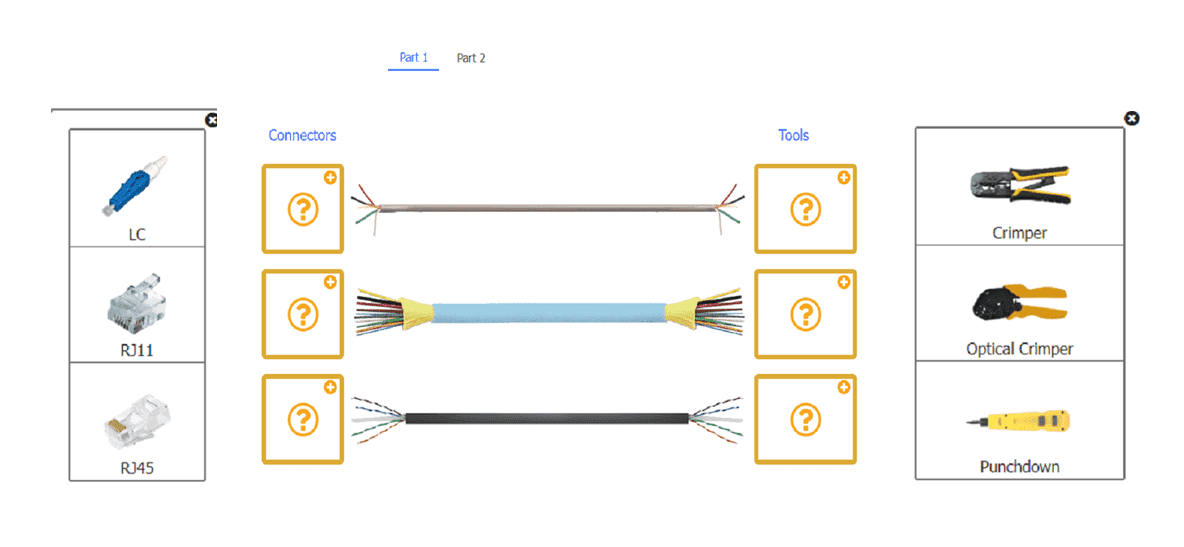
Your Answer
Discussion
Nah, it's RJ11/crimper, LC/optical crimper, RJ45/crimper. Punchdown is a trap if you're not terminating at a panel.
Not sure on this one, but think it's RJ11 with crimper for two-wire, LC plus optical crimper for fiber, and RJ45 with crimper for twisted pair. Can someone confirm if that's right?
RJ11 with crimper up top, LC and optical crimper for fiber, RJ45 plus crimper for twisted pair.
If they're asking about making patch cords only, not terminating at a patch panel, I'd say RJ11/crimper, LC/optical crimper, RJ45/crimper.
Be respectful. No spam.
