Option D makes the most sense here. Scanning to an SMB share with strict executive-only access keeps files protected and access controlled after scanning, which is key for confidential info. Emailing (A) isn't as secure, and badge access (C) only covers device usage, not data distribution. Pretty sure D is right but open to other takes if I'm missing something.
RFID is definitely meant for this kind of job, so B fits. It allows scanning lots of tagged items fast and you don't need line of sight like with barcode. Bluetooth/NFC are more for close range or device pairing, and WiFi isn't designed for inventory tags. Pretty confident it's B unless we misread the warehouse scenario. Anyone disagree?
Honestly, these protocol options are a nightmare, always feel like CompTIA wants to trip us up here. But for inventory tracking in a warehouse, B (RFID) just makes sense since it’s literally built for tagging and auto-scanning lots of items without line of sight. Bluetooth and NFC don’t scale as easily. Pretty sure B is it but open to hearing if someone thinks otherwise.
Pretty sure it's A here, since using a mobile authenticator app gives that extra factor (something you have) on top of the password. VPN or connecting to Wi-Fi doesn’t really count as a second authentication factor. Saw similar questions in official practice-mobile app is always suggested for 2FA setups. Anyone see it differently?
I don’t think connecting to Wi-Fi or VPN (B and C) actually counts as a second factor for authentication in this context. Mobile authenticator app (A) is designed for 2FA since it's something you have. Bastion server's more about controlled access, not really about user authentication factors. So A makes most sense, unless I’m missing some twist here.
Yeah, FTP is the only one here that uses both TCP 20 and 21, and it doesn't encrypt anything so it's cleartext all the way. SNMP, SSH, and Telnet use other ports. I remember seeing something like this in practice sets too. Pretty sure C, unless I'm missing a trick. Anyone disagree?
Yeah, C is the move. Always go for physical checks before digging into drivers or updates, especially with external USB stuff. Quick and can save you a lot of headache. I think this matches CompTIA's basic troubleshooting flow.
Honestly, with an external webcam not showing any image, reseating it (C) is the fastest move. Hardware check always comes before messing with drivers or firmware updates. Pretty sure that's what CompTIA wants us to try first for these devices.
I don't think it's B. Driver issues usually mean the cam doesn't work at all or looks glitchy, not just showing part of your face. A makes more sense here since framing is all about how you physically set up the cam. Pretty sure this is a common trap for A+ exams.
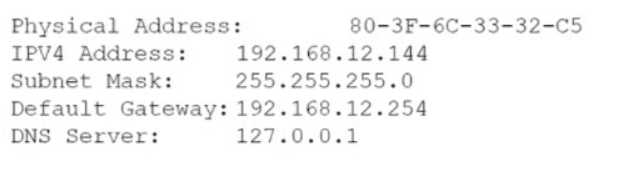
Which of the following is the most likely reason for the error?I don't think it's D. The error says hostname resolution failed, which is classic DNS (A). If it was a subnet mask or IPv4 address issue (like C or D), you'd get a connectivity error, not just a problem with resolving names. That DNS trap gets a lot of folks on similar A+ questions, so I'm sticking with A unless someone can point to something in the screenshot I missed.