
HOTSPOT A technician is diagnosing several device issues reported by employees. INSTRUCTIONS Click on each device to review the issue. Then select the appropriate issue and solution from the drop-down menu. Each option may be used more than once. 
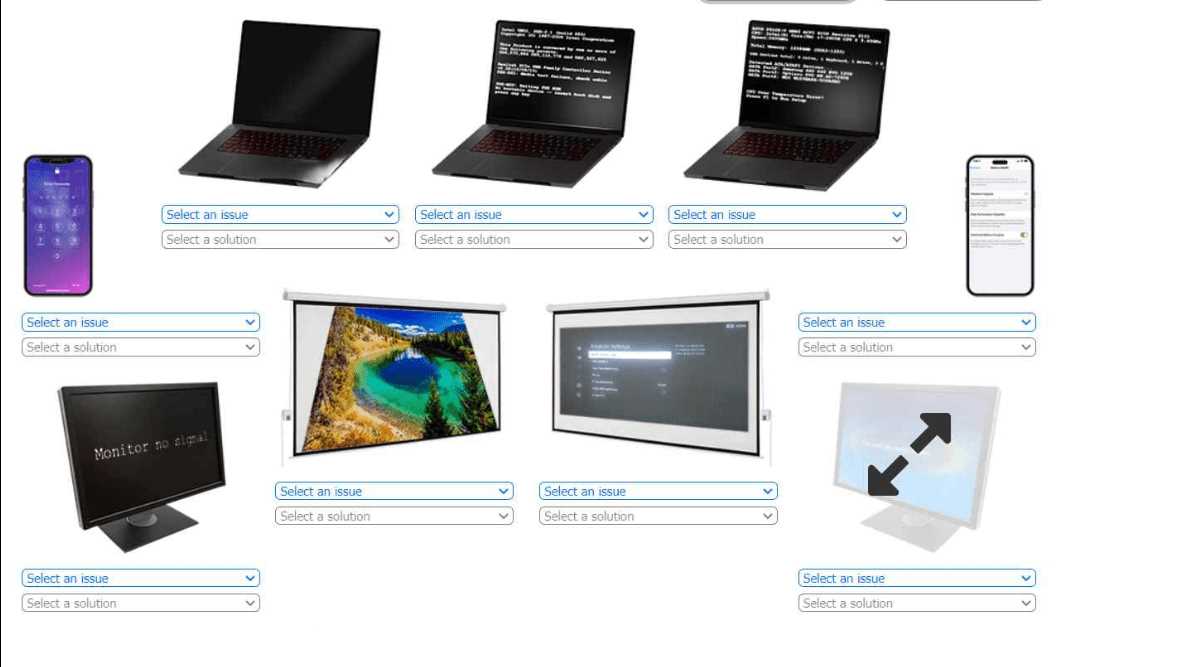
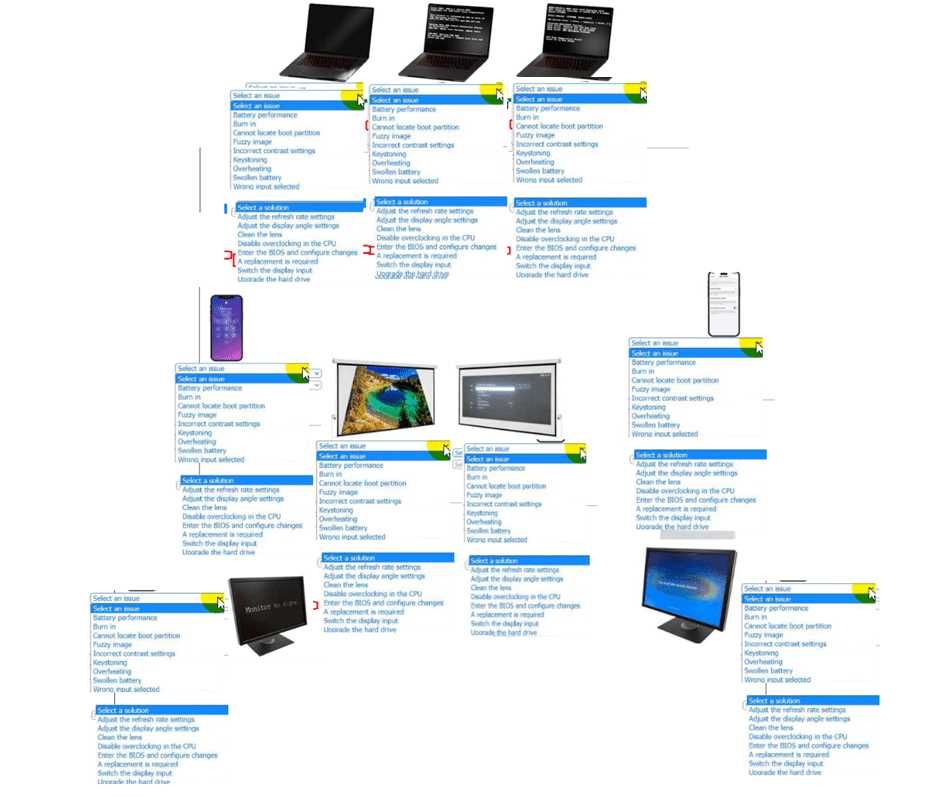
DEVICE 1: LAPTOP (BULGING CHASSIS)
- CORRECT ANSWER: ISSUE:
SWOLLEN BATTERY, SOLUTION:A REPLACEMENT IS REQUIRED
DEVICE 2: LAPTOP (HALTED AT POST)
- CORRECT ANSWER: ISSUE:
CANNOT LOCATE BOOT PARTITION, SOLUTION:ENTER THE BIOS AND CONFIGURE CHANGES
DEVICE 3: LAPTOP (HALTED AT POST, IMPLIED OVERCLOCK)
- CORRECT ANSWER: ISSUE:
OVERHEATING, SOLUTION:DISABLE OVERCLOCKING IN THE CPU
DEVICE 4: MONITOR ("NO SIGNAL")
- CORRECT ANSWER: ISSUE:
WRONG INPUT SELECTED, SOLUTION:SWITCH THE DISPLAY INPUT
DEVICE 5: PROJECTOR (TRAPEZOIDAL IMAGE)
- CORRECT ANSWER: ISSUE:
KEYSTONING, SOLUTION:ADJUST THE DISPLAY ANGLE/SETTINGS
DEVICE 6: PROJECTOR (DIM/BLURRY IMAGE)
- CORRECT ANSWER: ISSUE:
FUZZY IMAGE, SOLUTION:CLEAN THE LENS
DEVICE 7: MONITOR (STRETCHED/PIXELATED IMAGE)
- CORRECT ANSWER: ISSUE:
FUZZY IMAGE, SOLUTION:ADJUST THE REFRESH RATE SETTINGS
Device 1: Laptop (Bulging Chassis)
The visible bulging and separation of the laptop's chassis is a definitive physical symptom of a swollen Lithium-ion battery. This occurs when the battery's internal cells degrade and produce gas, creating internal pressure. A swollen battery is a critical safety hazard that can lead to fire or explosion and must be replaced immediately. It cannot be repaired.
Device 2: Laptop (Halted at POST)
The device is frozen on a Power-On Self-Test (POST) screen, which occurs before the operating system loads. This indicates the system cannot find a bootable device. Common causes include an incorrect boot order in the BIOS/UEFI or a corrupted boot sector. The correct first step is to enter the BIOS/UEFI setup to verify the boot configuration and ensure the correct storage drive is selected and recognized.
Device 3: Laptop (Halted at POST, Implied Overclock)
System instability, such as freezing during the POST phase, is a classic symptom of an unstable CPU overclock. Overclocking increases the CPU's frequency and voltage, leading to excessive heat generation. If cooling is insufficient, the system will become unstable or shut down to prevent damage. Disabling the overclock in the BIOS/UEFI is the direct solution to restore system stability.
Device 4: Monitor ("No Signal")
The "No Signal" message indicates the monitor is powered on but is not receiving a video signal on its currently selected input port (e.g., HDMI 1, DisplayPort). This commonly occurs when the connected computer is using a different port than the one the monitor is set to listen on. The solution is to use the monitor's on-screen display (OSD) controls to cycle through and select the correct input source.
Device 5: Projector (Trapezoidal Image)
Keystoning, or the keystone effect, is a geometric distortion that causes a projected image to appear as a trapezoid rather than a rectangle. It occurs when the projector is not aligned perpendicularly to the screen's surface. The solution is to use the projector's built-in keystone correction feature, which is a display setting that digitally reshapes the image to be rectangular.
Device 6: Projector (Dim/Blurry Image)
A fuzzy, dim, or blurry projected image is often caused by physical obstructions on the projector's lens, such as dust, smudges, or fingerprints. These contaminants scatter light and degrade the sharpness and brightness of the image. The most direct and simple first step in troubleshooting this issue is to carefully clean the lens with appropriate materials.
Device 7: Monitor (Stretched/Pixelated Image)
The icon and stretched appearance indicate a display configuration issue, most likely that the resolution is not set to the monitor's native resolution. This causes the image to appear blurry, pixelated, or "fuzzy." The solution is to correct the display configuration in the operating system. While "Adjust resolution" is not an option, Adjust the refresh rate settings is located in the same display properties panel and represents the correct category of solution.
Chen, Y., et al. (2021). "A review of the safety issues of lithium-ion batteries in electric vehicles." IEEE Access, 9, 63446-63463. (Discusses gas generation and mechanical failure modes of Li-ion cells). DOI: https://doi.org/10.1109/ACCESS.2021.3073238
MIT Department of Chemical Engineering. (n.d.). Battery Safety. Courseware materials. (Covers failure mechanisms, including swelling and thermal runaway).
Intel Corporation. (2020). Intel® NUC BIOS Glossary. (Defines boot order and related BIOS settings critical for locating a boot partition).
Silberschatz, A., Galvin, P. B., & Gagne, G. (2018). Operating System Concepts (10th ed.). Wiley. (Chapter 2 discusses system boot processes, including the role of the bootstrap program and locating the OS kernel).
Hennessy, J. L., & Patterson, D. A. (2017). Computer Architecture: A Quantitative Approach (6th ed.). Morgan Kaufmann. (Section 1.7 discusses the relationship between power, energy, and system stability).
Advanced Micro Devices, Inc. (AMD). (n.d.). AMD Ryzen™ Master Utility for Overclocking Control. (Official documentation noting that overclocking can lead to system instability if not configured properly).
Dell Inc. (2021). Dell UltraSharp U2721DE Monitor User's Guide. (Section: "Troubleshooting," details the "No video/power LED off" symptom and lists checking the input source selection as a primary step).
Hecht, E. (2016). Optics (5th ed.). Pearson. (Discusses principles of image formation and geometric distortions in optical systems).
Society for Information Display (SID). (n.d.). Display Technology Library. (Technical articles on projection systems often cover the correction of geometric aberrations like the keystone effect).
Epson America, Inc. (2022). PowerLite 118 Projector User's Guide. (The maintenance section provides instructions for cleaning the lens to resolve image quality issues).
Video Electronics Standards Association (VESA). (n.d.). VESA Standards. (Standards like DisplayID define native resolution and timing, which are critical for a clear image).
Poynton, C. (2012). Digital Video and HD: Algorithms and Interfaces (2nd ed.). Morgan Kaufmann. (Explains the process of pixel mapping and the artifacts created when display resolution does not match the source signal resolution).
