
Q: 1
You are setting up a captive portal to provide Wi-Fi access for visitors. To simplify the process, your
team wants visitors to authenticate using their existing social media accounts instead of creating new
accounts or entering credentials manually.
Which two actions are required to enable this functionality? (Choose two.)
Options
Discussion
No comments yet. Be the first to comment.
Be respectful. No spam.
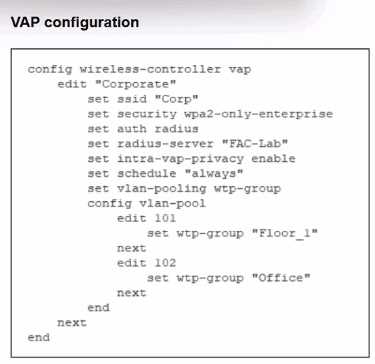
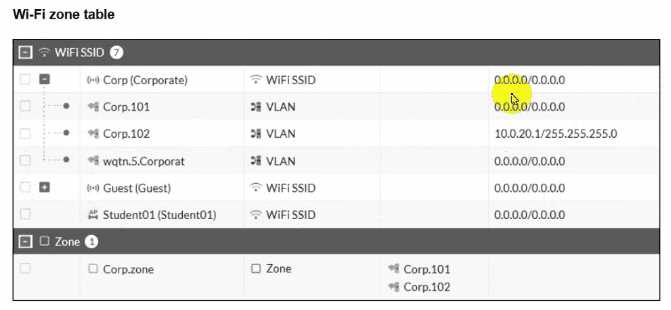 The exhibits show the VAP configuration. Wi-Fi SSIDs. and zone table.
Which two statements describe how FortiGate handles VLAN assignment for wireless clients?
(Choose two.)
The exhibits show the VAP configuration. Wi-Fi SSIDs. and zone table.
Which two statements describe how FortiGate handles VLAN assignment for wireless clients?
(Choose two.)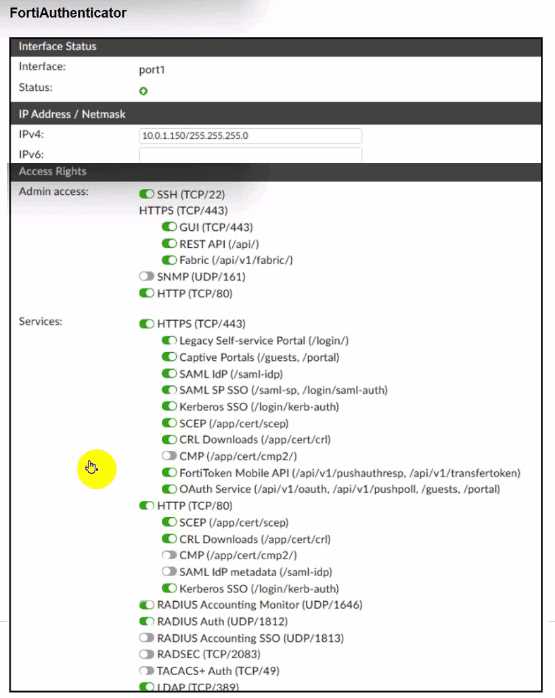
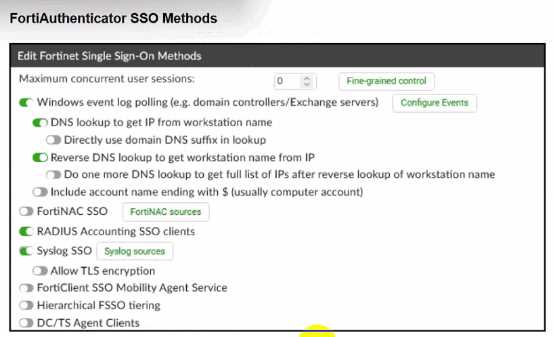
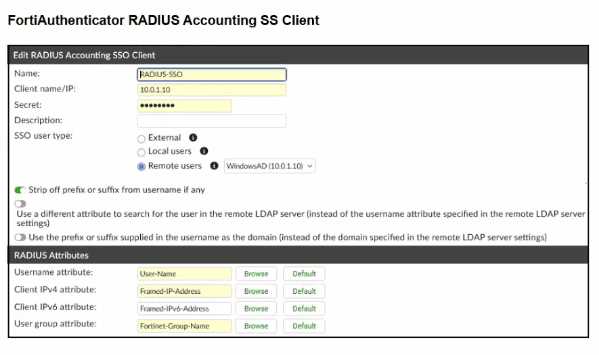 A company has multiple FortiGate devices deployed and wants to centralize user authentication and
authorization. The administrator decides to use FortiAuthenticator to convert RSSO messages to
FSSO, allowing all FortiGate devices to receive user authentication updates.
After configuring FortiAuthenticator to receive RADIUS accounting messages, users can authenticate,
but FortiGate does not enforce the correct policies based on user groups. Upon investigation, the
administrator discovers that FortiAuthenticator is receiving RADIUS accounting messages from the
RADIUS server and successfully queries LDAP for user group information. But, FSSO updates are not
being sent to FortiGate devices and FortiGate firewall policies based on FSSO user groups are not
being applied.
What is the most likely reason FortiGate is not receiving FSSO updates?
A company has multiple FortiGate devices deployed and wants to centralize user authentication and
authorization. The administrator decides to use FortiAuthenticator to convert RSSO messages to
FSSO, allowing all FortiGate devices to receive user authentication updates.
After configuring FortiAuthenticator to receive RADIUS accounting messages, users can authenticate,
but FortiGate does not enforce the correct policies based on user groups. Upon investigation, the
administrator discovers that FortiAuthenticator is receiving RADIUS accounting messages from the
RADIUS server and successfully queries LDAP for user group information. But, FSSO updates are not
being sent to FortiGate devices and FortiGate firewall policies based on FSSO user groups are not
being applied.
What is the most likely reason FortiGate is not receiving FSSO updates?
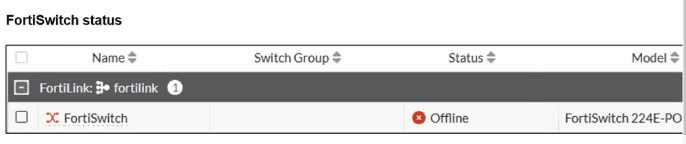
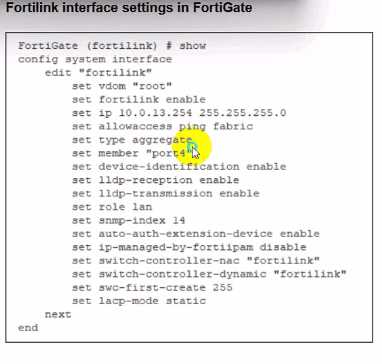
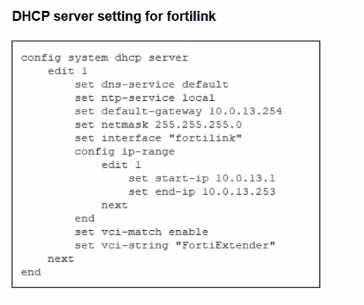 You are adding a new FortiSwitch to FortiGate for management. All necessary settings have been
configured on FortiGate, but FortiSwitch remains offline. The cabling has been verified and is
correctly connected.
Which misconfiguration might be preventing FortiGate from detecting FortiSwitch?
You are adding a new FortiSwitch to FortiGate for management. All necessary settings have been
configured on FortiGate, but FortiSwitch remains offline. The cabling has been verified and is
correctly connected.
Which misconfiguration might be preventing FortiGate from detecting FortiSwitch?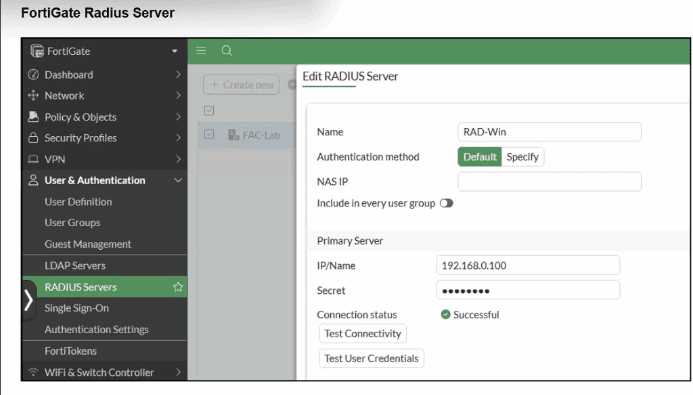

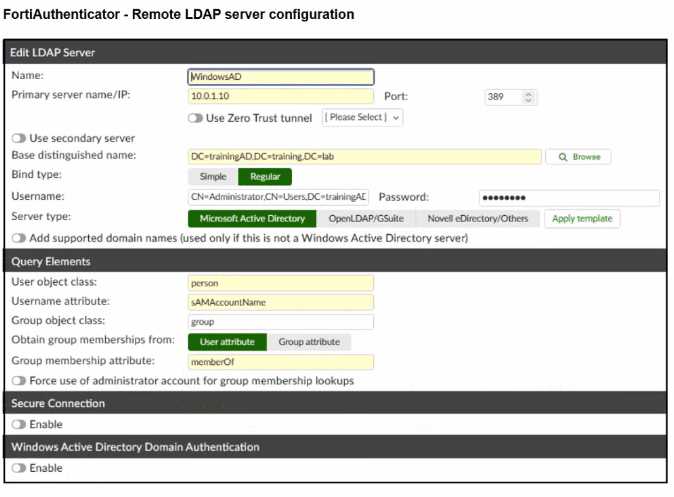 A RADIUS server has been successfully configured on FortiGate, which sends RADIUS authentication
requests to FortiAuthenticator. FortiAuthenticator, in turn, relays the authentication using LDAP to a
Windows Active Directory server.
It was reported that wireless users are unable to authenticate successfully.
The FortiGate configuration confirms that it can connect to the RADIUS server without issues.
While testing authentication on FortiGate using the command diagnose test authserver radius, it was
observed that authentication succeeds with PAP but fails with MSCHAPv2.
Additionally, the Remote LDAP Server configuration on FortiAuthenticator was reviewed.
Which configuration change might resolve this issue?
A RADIUS server has been successfully configured on FortiGate, which sends RADIUS authentication
requests to FortiAuthenticator. FortiAuthenticator, in turn, relays the authentication using LDAP to a
Windows Active Directory server.
It was reported that wireless users are unable to authenticate successfully.
The FortiGate configuration confirms that it can connect to the RADIUS server without issues.
While testing authentication on FortiGate using the command diagnose test authserver radius, it was
observed that authentication succeeds with PAP but fails with MSCHAPv2.
Additionally, the Remote LDAP Server configuration on FortiAuthenticator was reviewed.
Which configuration change might resolve this issue?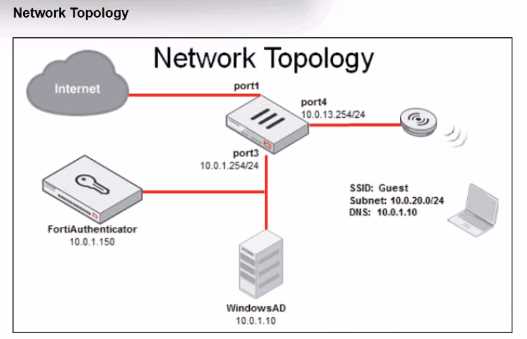
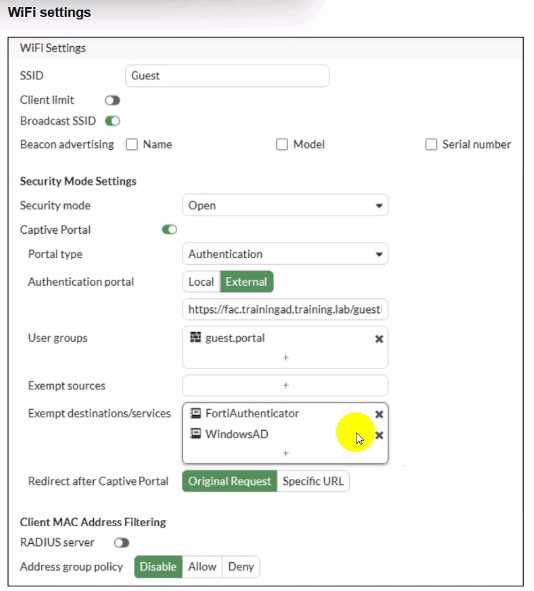
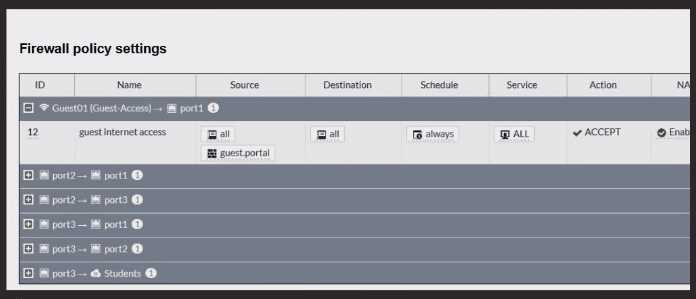 Review the exhibits to analyze the network topology, SSID settings, and firewall policies.
FortiGate is configured to use an external captive portal for authentication to grant access to a
wireless network. During testing, it was found that users attempting to connect to the SSID cannot
access the captive portal login page.
What configuration change should be made to resolve this issue to allow users to access the captive
portal?
Review the exhibits to analyze the network topology, SSID settings, and firewall policies.
FortiGate is configured to use an external captive portal for authentication to grant access to a
wireless network. During testing, it was found that users attempting to connect to the SSID cannot
access the captive portal login page.
What configuration change should be made to resolve this issue to allow users to access the captive
portal?