Free FCP_FGT_AD-7.6 Practice Test Questions and Answers (2026)

Last Update Check

View Mode
Q: 1
Refer to the exhibit. FCP_FGT_AD-7.6 question As an administrator you have created an IPS profile, but it is not performing as expected. While testing you got the output as shown in the exhibit. What could be the possible reason of the diagnose output shown in the exhibit?

Options
48 comments in the community discussion
6
Makes sense to pick A. If there’s no firewall policy with an IPS profile, the engine runs but can’t inspect traffic, so zero sessions as shown in the output. Pretty sure that matches what happens on FortiGate when IPS isn’t hooked to any active policy. If I’m missing something let me know.
1
Ugh, gets me every time with these Fortinet semantics. A
Q: 2
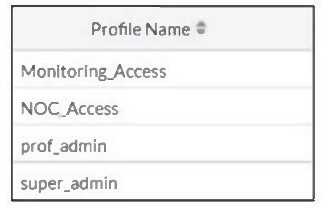
Refer to the exhibit. FCP_FGT_AD-7.6 question The NOC team connects to the FortiGate GUI with the NOC_Access admin profile. They request that their GUI sessions do not disconnect too early during inactivity. What must the administrator configure to answer this specific request from the NOC team?
Options
51 comments in the community discussion
6
D . Only D makes it profile-specific for NOC_Access, not all admins.
3
D . Encountered exactly similar question in my exam, and it's always admintimeout under the specific accprofile for profile-based session limits. No need to mess with global overrides.
Q: 3
A remote user reports slow SSL VPN performance and frequent disconnections. The user is located in an area with poor internet connectivity. What setting should the administrator adjust to improve the user's experience?
Options
52 comments in the community discussion
5
D . Changing the DTLS timeout helps when users have poor internet with high latency, since it stops the VPN from dropping too soon during packet delays. The other choices don't really target the core issue of unstable WAN here. Unless the disconnects were from idle timeout, I can't see A/B/C fixing it.
2
D . Adjusting the DTLS timeout is best here since it helps VPNs handle laggy or unstable connections, letting the session survive network hiccups. The other options don't really address the disconnects from bad latency. Pretty sure that's what Fortinet recommends.
Q: 4
You have configured an application control profile, set peer-to-peer traffic to Block under the Categories tab, and applied it to the firewall policy. However, your peer-to-peer traffic on known ports is passing through the FortiGate without being blocked. What FortiGate settings should you check to resolve this issue?
Options
53 comments in the community discussion
6
Makes sense to pick C here. Network Protocol Enforcement is what controls traffic on standard ports when app control doesn't catch it, so if P2P is still getting through, that's probably not enforced. Open to other insights but that's how I've seen it work.
4
Option C
Q: 5
Which two statements are true about an HA cluster? (Choose two.)
Options
48 comments in the community discussion
2
Heartbeat IP isn't always fixed so C can be wrong in some cluster configs, but still thinking B and D.
1
Option B and D, since C is default-only (trap answer), not always true for every HA cluster config.
Q: 6

What are three key routing principles in SD-WAN? (Choose three.)


Options
52 comments in the community discussion
1
C/D? Not totally sure since D's wording is tricky but C looks closer to FortiOS logic.
1
Probably A, C, E. Policy routes get checked before SD-WAN rules and SD-WAN rules don’t apply if no member has a valid route or if the main route isn’t through a member. That’s how FortiOS does it, I think.
Q: 7

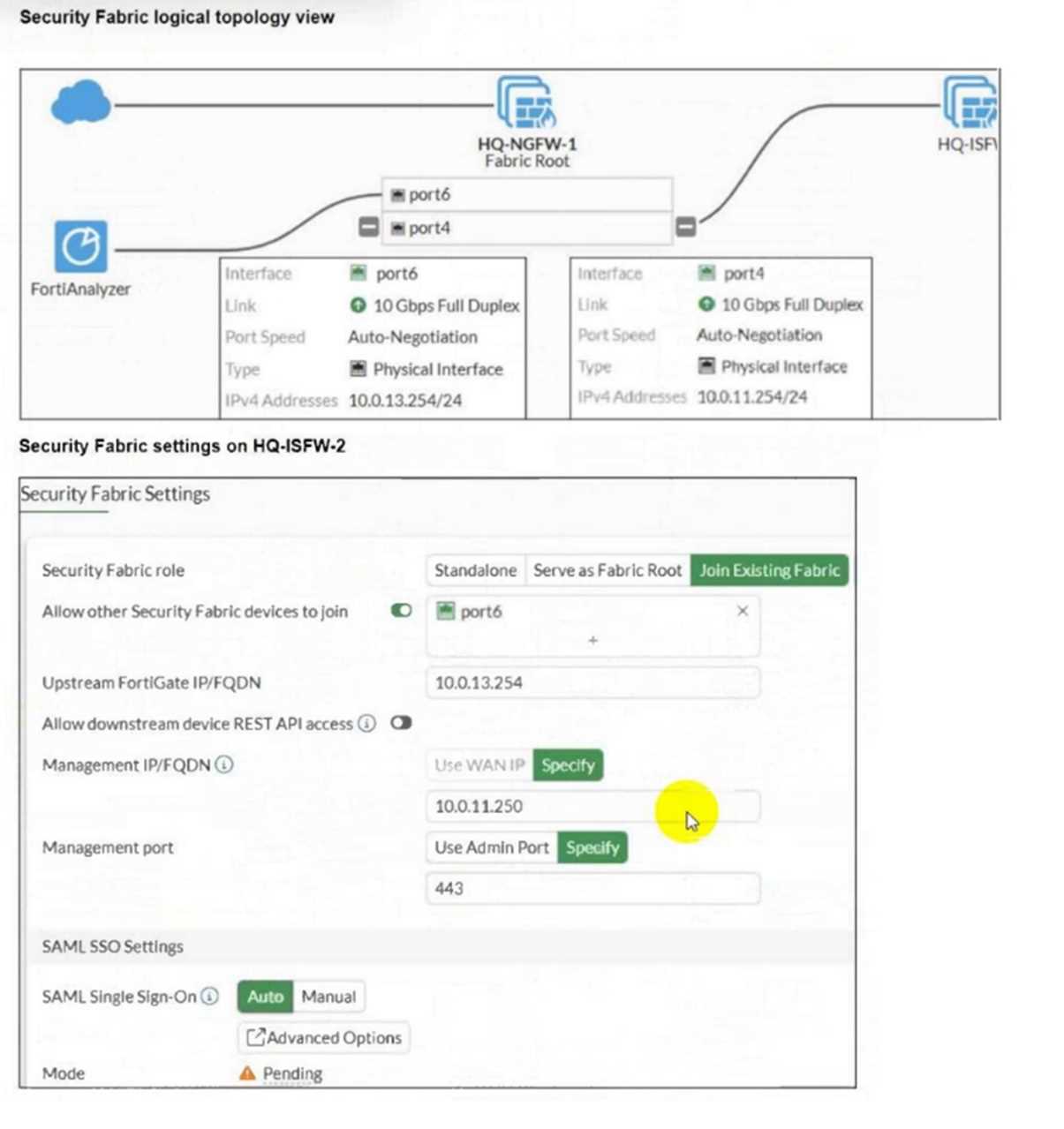
Refer to the exhibits. Enlarged An administrator wants to add HQ-ISFW-2 in the Security Fabric. HQ-ISFW-2 is in the same subnet as HQ-ISFW. After configuring the Security Fabric settings on HQ-ISFW-2, the status stays Pending. What can be the two possible reasons? (Choose two.)

Options
55 comments in the community discussion
2
A and C make sense here. The Security Fabric needs the correct upstream FortiGate IP (A), and new devices don't fully join until they're authorized (C). That's what official docs and labs usually highlight. Not 100% but that's how it's worded in most guides, let me know if you disagree.
2
I think A and C here. D is tricky but "Pending" usually comes from wrong upstream IP or missing authorization, not the management IP. Seen this tripped up folks in other exam reports, agree?
Q: 8

An administrator wants to configure dead peer detection (DPD) on IPsec VPN for detecting dead tunnels. The requirement is that FortiGate sends DPD probes only when there is no inbound traffic. Which DPD mode on FortiGate meets this requirement?

Options
62 comments in the community discussion
4
Option B is correct here. "On Idle" specifically sends DPD probes only when there's no inbound traffic, matching the question's condition. Option D is a common trap since "On Demand" would be more for manual or general inactivity, not just inbound. Feel free to correct me if I'm off.
4
Option B
Q: 9
An administrator notices that some users are unable to establish SSL VPN connections, while others can connect without any issues. What should the administrator check first?
Options
54 comments in the community discussion
6
Option B makes sense here since the firewall policy could be missing certain users or groups. If only some can connect, it's usually a policy match issue in my experience. Not 100% but that's where I'd start.
4
B . If it was the port or HTTPS service, nobody would be working. Checking the firewall policy catches user-specific issues. Disagree?
Q: 10
Refer to the exhibit, which shows a partial configuration from the remote authentication server. FCP_FGT_AD-7.6 question Why does the FortiGate administrator need this configuration?
Options
57 comments in the community discussion
1
Fortinet and their weird group mapping again, probably D since filter-id restricts to the "Training" group only.
1
Probably D for sure, filter-id always means group match not OU.
Question 1 of 20

Premium Access Includes

  • Quiz Simulator
  • Exam Mode
  • Progress Tracking
  • Question Saving
  • Flash Cards
  • Drag & Drops
  • 3 Months Access
  • PDF Downloads
Get Premium Access
Scroll to Top