Prepare Smarter for Security+ Exam with Our Free and Accurate SY0-701 Exam Questions – 2025 Updated.
At Cert Empire we are committed to providing the best and the latest exam questions to the aspiring students who are preparing for CompTIA Security+ SY0-701 Exam. To help the students prepare better, we have made sections of our SY0-701 exam preparation resources free for all. You can practice as much as you can with Free SY0-701 Practice Test.
CompTIA Security + SY0-701 Dumps
The core issue is the unencrypted transfer of sensitive data by a legacy system for
which no encryption-providing software update exists. Compensating controls are
needed.
1. SSH Tunneling (C) directly addresses the unencrypted protocol by encapsulating
the data within an encrypted Secure Shell (SSH) tunnel. This protects the sensitive
data while in transit to the third party over potentially insecure network segments.
SSH is designed to provide a secure channel over an insecure network (IETF RFC
4251).
2. Segmentation (D) is a crucial compensating control for legacy systems. By isolating
the legacy system on its own network segment, its exposure to threats is reduced. This
limits the attack surface, making it harder for attackers to compromise the system or
intercept the unencrypted data before it enters an SSH tunnel or as it's processed by
the vulnerable system (NIST SP 800-53 Rev. 5, SC-7; NIST SP 800-82).
These two controls work together: SSH tunneling secures the data in transit, and
segmentation protects the vulnerable source system.
· A. Tokenization: While tokenization (replacing sensitive data with non-sensitive
tokens) is a valid compensating control (NIST SP 800-122, Sec 4.4), the question
implies "sensitive data" needs to be transferred. If the third party requires the actual
sensitive data, tokenizing the payload isn't appropriate. If tokenized data were
acceptable, this would be a strong choice.
· B. Cryptographic downgrade: This would involve using weaker encryption or
reverting to no encryption, which increases risk and is the opposite of a compensating
control for unencrypted data.
· E. Patch installation: The question explicitly states, "No software updates that use an
encrypted protocol are available." While other patches might be beneficial, they don't
solve the specific problem of the unencrypted protocol for data transfer.
· F. Data masking: Similar to tokenization, data masking obscures data. If the third
party requires the actual sensitive data, masking the payload is not a solution for the
transfer itself, though it's useful for other contexts like non-production environments.
· SSH Tunneling (C):
o IETF RFC 4251: "The Secure Shell (SSH) Protocol Architecture." Deutsch, Y., et al.
January 2006. Section 1. URL: https://www.rfc-editor.org/info/rfc4251 (States SSH
provides a secure channel over an insecure network).
o Microsoft Learn. "OpenSSH overview." Updated 09/15/2023. URL:
https://learn.microsoft.com/en-us/windowsserver/administration/openssh/openssh_overview (Mentions SSH can be used for port
forwarding/tunneling).
· Segmentation (D):
o NIST Special Publication 800-53 Revision 5: "Security and Privacy Controls for
Information Systems and Organizations." NIST. December 2020. Control SC-7
(Boundary Protection). URL: https://csrc.nist.gov/publications/detail/sp/800-53/rev5/final (Details how boundary protection, often achieved via segmentation, controls
communications).
o NIST Special Publication 800-82 Revision 2: "Guide to Industrial Control Systems
(ICS) Security." NIST. May 2015. Section 5.2.2 (Network Segmentation). URL:
https://csrc.nist.gov/publications/detail/sp/800-82/rev-2/final (Although focused on ICS,
it extensively discusses segmentation for protecting legacy and critical systems).
· Tokenization (A) & Data Masking (F) (for rationale on why they might be less
appropriate here):
o NIST Special Publication 800-122: "Guide to Protecting the Confidentiality of
Personally Identifiable Information (PII)." NIST. April 2010. Section 3.3.3 (De-
Identifying PII) and Section 4.4 (Compensating Controls). URL:
https://csrc.nist.gov/publications/detail/sp/800-122/final (Discusses de-identification
techniques like tokenization and masking as ways to protect data, and their use as
compensating controls). The limitation arises if the third party needs the original
sensitive data.
Non-compliance is the failure to adhere to mandated laws, regulations, or standards.
Audits are conducted to verify adherence. When audits reveal that an organization has
not met these obligations, a government regulatory agency can impose penalties, such
as fines, as a direct consequence of this non-compliance. This aligns with the principle
that failure to comply with legal and regulatory requirements leads to such punitive
actions. (NIST SP 800-39, p. 11)
B. Contract violations: Contract violations pertain to breaches of private agreements.
While they can lead to financial penalties, the scenario describes action by a
"government regulatory agency" following an "audit," which typically concerns
adherence to public laws and regulations, not private contractual terms. (Principle B:
Focus on the Question's Core)
C. Government sanctions: Government sanctions are the penalties or actions (like
fines) imposed by a government. Non-compliance is the reason or cause for these
sanctions. The question asks for the cause of the fines, not what the fines represent.
(Principle A: Precision is Paramount; NIST SP 800-39)
D. Rules of engagement: Rules of engagement define how to act in specific operational
scenarios, like security incidents or military actions. This term is irrelevant to the context
of failing general regulatory audits and subsequent fines. (Principle B: Focus on the
Question's Core)
National Institute of Standards and Technology (NIST). (2011). Special Publication
(SP) 800-39, Managing Information Security Risk: Organization, Mission, and
Information System View. (Section 2.2.3, p. 11). Retrieved from
https://csrc.nist.gov/publications/detail/sp/800-39/final
Quote: "Failure to comply can result in significant penalties (e.g., fines, public
reprimands, imprisonment), loss of accreditations or licensures, and damage to credibility
and reputation."
U.S. Department of Health & Human Services (HHS). (n.d.). Guidance on Complying
with the HIPAA Rules. Retrieved from https://www.hhs.gov/hipaa/forprofessionals/compliance-enforcement/data-sharing-guidance/index.html
Context: "OCR may impose civil money penalties on a covered entity for a failure to
comply with a requirement of the HIPAA Rules." This illustrates non-compliance leading
to penalties from a regulatory agency.
Which of the following best describes the action captured in this log file?The provided log snippet shows multiple "Audit Failure" entries for "Logon" events
(Event ID 4625) from "Microsoft Windows security" occurring in rapid succession
approximately every two seconds. This pattern is characteristic of a brute-force attack,
where an attacker attempts to gain unauthorized access by systematically trying a large
number of username and password combinations. Microsoft documentation explicitly
states that Event ID 4625 is logged when an account fails to log on, and a high volume
of these events can indicate a password guessing attempt or brute-force attack.
B. Privilege escalation: This involves an attacker gaining higher-level permissions
after initially compromising an account or system. The logs show failed logon
attempts, not actions taken by an already authenticated user.
C. Failed password audit: A password audit is a systematic check of password strength,
typically an authorized internal process. These logs represent unauthorized, repeated,
failed attempts to gain access, not a structured audit.
D. Forgotten password by the user: While a user might make a few incorrect
attempts, the rapid, numerous, and systematic nature of the failures (12 failures in 22
seconds) is highly indicative of an automated attack rather than a user repeatedly
mistyping a forgotten password.
Microsoft: "4625(F): An account failed to log on." Microsoft Learn.
URL: https://learn.microsoft.com/en-us/windows/security/threatprotection/auditing/event-4625
Specific section: "Security Monitoring Recommendations" section often notes that a
high volume of 4625 events could indicate brute force or password guessing. The
general description confirms it's a failed logon.
NIST: "Glossary - Brute Force Attack." NIST Computer Security Resource Center.
URL: https://csrc.nist.gov/glossary/term/brute_force_attack
Definition: "A method of cryptanalysis that involves systematically checking all possible
keys or passwords until the correct one is found." The log reflects the initial phase of
such an attack (password checking).
NIST: "Glossary - Privilege Escalation." NIST Computer Security Resource Center. URL:
https://csrc.nist.gov/glossary/term/privilege_escalation
Definition: "The act of an attacker obtaining a higher level of privilege or access to a
system than they are authorized to have." This occurs post-initial compromise.
OWASP: "Brute Force Attack." OWASP Foundation.
URL: https://owasp.org/www-community/attacks/Brute_force_attack
Description: Describes brute force as an activity that tries to guess login information.
The rapid succession of failed logins in the image is a key indicator.
Information security policies related to software development methodology aim to
integrate security into the development lifecycle. Peer review requirements are a
fundamental aspect of this. Peer reviews (or code reviews) involve developers other
than the author examining source code for defects, security vulnerabilities, and
adherence to coding standards. This practice is a direct policy control over the software
development process itself, ensuring quality and security are addressed
methodologically. Organizations often mandate peer reviews within their secure
software development lifecycle (SSDLC) policies.
B. Multifactor authentication: While crucial for securing access to development
environments and tools, MFA is a broader access control policy, not a policy
specifically governing the methodology or process of how software is developed.
C. Branch protection tests: These are specific technical checks or configurations
within version control systems (e.g., Git). A policy might mandate secure branching
strategies or code integrity, and these tests would be an implementation detail or
procedure to enforce that policy, rather than the policy itself.
D. Secrets management configurations: This refers to the specific technical settings
for storing and accessing secrets (like API keys). A policy would mandate secure
secrets management, but the "configurations" are implementation details guided by the
policy and associated standards.
National Institute of Standards and Technology (NIST) Special Publication (SP) 800-
218: Secure Software Development Framework (SSDF) Version 1.1:
Recommendations for Mitigating the Risk of Software Vulnerabilities.
URL: https://csrc.nist.gov/publications/detail/sp/800-218/final
Specific Reference: Section 3, Practice: "Produce Well-Secured Software (PW)," Task
PW.5.2 (formerly PSO.3.2 in earlier drafts often cited): "Have code reviewed by other
developers for security vulnerabilities." This directly supports the inclusion of peer/code
review requirements in development policies. (Note: The specific numbering might
have evolved slightly, but the principle of code review as a defined practice is
consistent). In the final SSDF v1.1, this is covered under PW.5: Review code. PW.5.2
states "Have code reviewed for vulnerabilities by other [trusted] individuals who are
proficient in code review and secure coding practices."
Microsoft Security Development Lifecycle (SDL): Practice #9: Implement Static
Analysis Security Testing (SAST) and the general principle of security gates. While SAST
is automated, manual peer reviews are also a core SDL recommendation.
URL: https://www.microsoft.com/en-us/securityengineering/sdl/practices
Specific Reference: The SDL emphasizes multiple verification steps. The
documentation for Practice #7 (Threat Modeling) and #9 (SAST) implicitly support
rigorous review processes. More broadly, the concept of "Security Gates" within the SDL
often includes manual code reviews (peer reviews) as a requirement before code
progression. A policy would formalize such requirements. For instance, under
"Verification" phase, "All Code Must Pass Through Prerequisite Code Quality and
Security Gates."
OWASP Software Assurance Maturity Model (SAMM):
URL: https://owaspsamm.org/model/
Specific Reference: Business Function: "Design," Security Practice: "Security
Architecture," Activity: "Code Review" (SR2.3 in SAMM v2.0). This details the importance
and process of code review, which policies would mandate. The model states, "Code
review aims to ensure that code is developed according to the organization’s secure
coding guidelines." This is a policy-driven activity.
Automating the process of disabling access for employees who leave a company is a
critical security measure. This use case directly enhances an organization's security
posture by ensuring that former employees' permissions are revoked rapidly and
consistently. Timely revocation of access rights minimizes the window of opportunity for
unauthorized access to sensitive systems and data, aligning with security best practices
for identity lifecycle management, such as those outlined by NIST regarding prompt
account termination for departing individuals.
A. Provisioning resources: This refers to granting or allocating access and resources,
typically for new employees or those changing roles, which is the opposite of the
scenario described.
C. Reviewing change approvals: While important for governance, this is a procedural
step that may precede or follow access modifications. It is not the direct automated
action that rapidly updates permissions upon an employee's departure to enhance
security.
D. Escalating permission requests: This process involves seeking higher-level approval
for increased access rights for current employees, not removing access for those who
have left the company.
National Institute of Standards and Technology (NIST) Special Publication (SP) 800-
53 Revision 5, "Security and Privacy Controls for Information Systems and
Organizations":
Reference: Control AC-2 "Account Management", specifically point (g).
Details: States that the organization "Terminates accounts for departing individuals as
soon as possible." Automation of "disabling access" directly supports this requirement
for rapid action.
URL: https://csrc.nist.gov/publications/detail/sp/800-53/rev-5/final (See control AC-2)
Chaudhry, J., & Kumar, R. (2018). A Framework for Automated User Account
Management in Enterprises. 2018 International Conference on Computing,
Communication and Informatics (ICCCI):
Reference: Abstract and introductory sections discussing de-provisioning.
Details: Emphasizes that "User account de-provisioning, which is the process of
revoking user access rights from IT resources, is a critical process when a user leaves
an organization or changes roles." The paper highlights the need for automation for
timeliness and efficiency.
DOI: https://doi.org/10.1109/ICCCI.2018.8440989
Microsoft Identity Manager (MIM) Documentation (Illustrative of industry best
practice for automation in deprovisioning):
Reference: Concepts related to "Deprovisioning" within Microsoft Identity Lifecycle
Management.
Details: Official documentation for identity management systems like MIM (or its
successors like Microsoft Entra Identity Governance) describe how automation is used to
"automatically unmake a provisioning decision as a result of a new rule or a rule change,"
which includes disabling accounts or removing access when user objects are removed or
attributes change (e.g., employment status).
URL (Conceptual Example): https://learn.microsoft.com/en-us/microsoft-identitymanager/understand-mim-sync-deprovisioning (This specific link discusses MIM's
deprovisioning logic, which illustrates the automation of disabling access based on
rule changes indicative of employee departure).
The described actions—updating switch operating systems, patching servers, and updating endpoint definitions—are core components of a robust vulnerability management program. These activities are specifically designed to remediate security flaws and protect against malware for which a solution (a patch or a signature) has already been developed and released by the vendor. This process directly hardens systems against attacks that leverage publicly disclosed vulnerabilities and previously identified malware. Therefore, these measures are most effective at preventing the exploitation of known security issues.
A. Zero-day attacks: These attacks exploit vulnerabilities that are unknown to the vendor and the public, meaning no patch or signature exists to prevent them.
B. Insider threats: While patching reduces the technical attack surface, it does not address the primary risks of insider threats, such as abuse of legitimate access or malicious intent.
C. End-of-life support: These maintenance actions are only possible because the systems are currently supported; they do not prevent the vendor from eventually ending that support.
1. National Institute of Standards and Technology (NIST). (2022). Guide to Enterprise Patch Management Planning: Preventive Maintenance for Technology (NIST Special Publication 800-40 Revision 4).
Page 1
Section 1.1
Paragraph 1: "Patch management is the process of identifying
acquiring
installing
and verifying patches for products and systems. Patches correct security and functionality problems in software and firmware." This establishes that patching addresses known problems.
Page 4
Section 2.1
Paragraph 2: "Exploitation of vulnerabilities is a common source of security incidents... Timely patch management is a critical part of a defense-in-depth strategy because it can reduce the organization’s exposure to threats." This links patching directly to preventing the exploitation of known vulnerabilities.
2. Ciampa
M. (2021). Security+ Guide to Network Security Fundamentals (7th ed.). Cengage Learning.
Chapter 4
Section "Responding to Vulnerabilities
" Page 148: "A patch is a general software security update intended to cover vulnerabilities that have been discovered." This explicitly connects patches to discovered (i.e.
known) vulnerabilities.
3. Kim
D.
& Solomon
M. G. (2020). Fundamentals of Information Systems Security (4th ed.). Jones & Bartlett Learning.
Chapter 6
"Network and System Security
" Section "Applying Patches
" Page 214: "A patch is a piece of software that is intended to update an application or operating system to fix a known bug or vulnerability." This source confirms that patching is a reactive measure for known issues.
A responsibility matrix, often part of a larger cloud governance framework or
agreement, explicitly defines which party (customer or Cloud Service Provider - CSP) is
responsible for implementing specific security controls within a cloud environment. In an
Infrastructure as a Service (IaaS) model, the customer has significant responsibility for
securing the operating systems, applications, and data, making this matrix crucial for
clarity. The matrix details the division of these responsibilities.
· A. Statement of Work (SOW): An SOW typically defines the specific services to be
delivered, project scope, deliverables, and timelines, but not usually the detailed
breakdown of security control responsibilities.
· C. Service-Level Agreement (SLA): An SLA defines the expected level of service,
availability, and performance metrics. While it might mention security uptime or
incident response times, it doesn't detail the implementation responsibility for
specific controls.
· D. Master Service Agreement (MSA): An MSA is a foundational contract outlining the
general terms and conditions between the CSP and customer. Specific control
responsibilities are usually detailed in supplementary documents or addendums, like a
responsibility matrix.
1. NIST SP 800-145, "The NIST Definition of Cloud Computing": While not directly
defining a responsibility matrix, it outlines the IaaS service model (Section 2),
highlighting the consumer's responsibility for "operating systems, storage, and
deployed applications," which necessitates a document to delineate these
responsibilities.
o URL: https://csrc.nist.gov/publications/detail/sp/800-145/final
o Specific: Page 3, Section "Infrastructure as a Service (IaaS)".
2. Cloud Security Alliance (CSA), "Security Guidance for Critical Areas of Focus
in Cloud Computing v4.0": This document frequently discusses the division of
responsibilities and the importance of clearly defining them, which is the role of a
responsibility matrix.
o URL: https://cloudsecurityalliance.org/research/guidance/ (Access to the specific
document may require navigating the CSA's research page or membership for the
latest version, but the concept is foundational in their guidance). Domain 1: Cloud
Computing Concepts and Architecture, often discusses shared responsibility.
o Specific: The concept of a "shared responsibility model" is central, and a
responsibility matrix is a common tool to document this model. For example, see
discussions around IaaS responsibilities.
3. AWS Documentation, "Shared Responsibility Model": This is an official vendor
documentation example illustrating the concept. While AWS-specific, it exemplifies the
industry-standard practice of defining responsibilities, which is formalized in a
responsibility matrix.
o URL: https://aws.amazon.com/compliance/shared-responsibility-model/
o Specific: The page clearly outlines AWS's responsibility "of" the cloud and the
customer's responsibility "in" the cloud, which is what a responsibility matrix would
codify.
4. Microsoft Azure Documentation, "Shared responsibility in the cloud": Similar
to AWS, Microsoft provides clear documentation on shared responsibilities,
underpinning the need for a responsibility matrix.
o URL: https://docs.microsoft.com/en-us/azure/security/fundamentals/sharedresponsibility
o Specific: The diagrams and explanations illustrate the division of responsibilities
which would be listed in a responsibility matrix for an IaaS deployment.
While "Responsibility Matrix" might not always be a standalone, top-level document title
in every contract, the function it describes clarifying who does what regarding security
controls is essential, especially in IaaS, and is most accurately captured by this term
over the other options. Often, this matrix is part of or an annex to the broader cloud
agreement or security documentation.
The AI tool described is a creation developed by a company for a specific business purpose. Such creations, including software, algorithms, and unique business processes, are considered intellectual property (IP). IP refers to creations of the mind over which the owner is granted exclusive rights. The development of the tool for a specific contract underscores its proprietary and commercial value, making it a key business asset that falls directly under the definition of intellectual property, which can be protected by copyrights, patents, or trade secrets.
A. Classified: This term is reserved for government data with specific security levels (e.g., Top Secret, Secret, Confidential) and is not the primary descriptor for a commercial software asset.
B. Regulated information: This refers to data types governed by specific laws or industry standards, such as PII or PHI. The AI tool is the asset itself, not the regulated data it might process.
C. Open source: This designation means the software's source code is publicly available for use and modification, which is the opposite of a proprietary tool developed under a private contract.
1. CompTIA. (2023). CompTIA Security+ SY0-701 Exam Objectives. Section 3.4
"Explain techniques used to protect data
" lists "Intellectual property (IP)" as a key concept for data protection.
2. World Intellectual Property Organization (WIPO). (2020). What is Intellectual Property? WIPO Publication No. 450(E). On page 2
it states
"Intellectual property (IP) refers to creations of the mind
such as inventions; literary and artistic works; designs; and symbols
names and images used in commerce." Page 4 further clarifies that computer programs are protected under copyright
a form of IP.
3. Cornell Law School
Legal Information Institute. (n.d.). Intellectual property. Wex Legal Dictionary. The definition states
"Intellectual property is any product of the human intellect that the law protects from unauthorized use by others... The main purpose of intellectual property law is to encourage the creation of a wide variety of intellectual goods." This directly applies to a custom-developed AI tool.
A VM escape is a security exploit where an attacker breaks out of an isolated virtual machine (VM) to access the underlying hypervisor or host operating system. The scenario describes a penetration tester gaining unauthorized access to the hypervisor platform, which is the direct result of a successful VM escape. This type of vulnerability undermines the core security principle of virtualization—isolation—by exploiting flaws in the hypervisor's code that manage guest-to-host interactions. This allows the attacker to gain control over the host and, consequently, all other VMs it manages.
A. Cross-site scripting: This is a web application vulnerability that injects malicious scripts into a website, targeting the browsers of other users, not the hypervisor.
B. SQL injection: This is an attack vector used to exploit vulnerabilities in the database layer of an application by inserting malicious SQL statements into an entry field.
C. Race condition: This is a general programming flaw where the system's behavior depends on the sequence or timing of uncontrollable events, which is a potential cause but not the specific exploit itself.
1. Wu
H.
Liu
G.
& Yao
Y. (2021). A Survey on Virtual Machine Escape. IEEE Access
9
153313-153326. (In Section I
Introduction
the paper defines VM escape as "a process of breaking out of a virtual machine and interacting with the host operating system.") https://doi.org/10.1109/ACCESS.2021.3126618
2. Parno
B. (2011). Lecture 18: Virtual Machine Security. Carnegie Mellon University
Course 15-410: Operating System Design and Implementation. (Slide 21
"Threats to the VMM
" explicitly lists "Escape from the VM" as a primary threat where a malicious guest compromises the hypervisor.)
3. Boneh
D.
& Mazières
D. (n.d.). Lecture 9: Web Security. Stanford University
Course CS 155: Computer and Network Security. (Slides 4-20 define SQL injection and Slides 26-45 define Cross-Site Scripting
demonstrating they are web application vulnerabilities distinct from hypervisor exploits.)
□□
An access badge system is a preventive control that directly manages and restricts
entry to sensitive areas like a data center. For an insider, who may already have
general access to a facility, an access badge system can enforce least privilege by
ensuring they can only enter areas explicitly authorized for their role. This directly
addresses "intrusion" into specific, secured zones within the data center.
A. Bollards: Bollards are primarily designed to protect against external vehicular
threats or accidents, not an insider who is already within the facility's perimeter.
They don't restrict an individual's movement within the building.
C. Motion sensor: Motion sensors are detective controls. While useful for alerting to
unauthorized presence, they do not prevent an insider from entering a restricted area.
D. Video surveillance: Video surveillance is primarily a detective and deterrent
control. It records events and can discourage illicit actions, but it doesn't physically
prevent an insider from accessing an unauthorized area.
1. NIST Special Publication 800-53 Revision 5: Security and Privacy Controls
for Information Systems and Organizations
o URL: https://csrc.nist.gov/pubs/sp/800/53/r5/upd1/final
o Specific Reference: Control PE-2 (Physical Access Authorizations) and PE-3
(Physical Access Control) emphasize authorizing and controlling physical access to
facilities. Access badges are a common implementation of these controls. PE-3 states:
"Control physical access to organizational systems, equipment, and the respective
operating environments to only authorized individuals." This directly relates to using
access badges to prevent insider intrusion into specific areas.
2. NIST Special Publication 800-171 Revision 3 (Draft): Protecting
Controlled Unclassified Information in Nonfederal Systems and
Organizations
o URL: https://csrc.nist.gov/pubs/sp/800/171/r3/ipd (Referencing concepts generally
applicable from earlier revisions as well)
o Specific Reference: Section 3.10 Physical Access, specifically 3.10.1: "Limit
physical access to organizational systems, equipment, and the respective operating
environments to authorized individuals." Access badges are a primary mechanism to
achieve this limitation against insiders.
3. Federal Information Processing Standards Publication (FIPS PUB) 201-3:
Personal Identity Verification (PIV) of Federal Employees and Contractors
o URL: https://csrc.nist.gov/pubs/fips/201/3/final
o Specific Reference: While focused on PIV, this standard extensively discusses the
use of PIV cards (which function as sophisticated access badges) for controlling
physical access to federally controlled facilities and information systems (Section 1.1
Purpose, and throughout discussing physical access control systems). This highlights
the role of card-based access control.
4. Microsoft Cloud Adoption Framework for Azure - Security - Physical security
o URL: https://learn.microsoft.com/en-us/azure/cloud-adoptionframework/secure/physical-security
o Specific Reference: "Access request and approval processes: Access to data
centers is strictly limited to those with a legitimate business need. Approvals are
required from Microsoft personnel and the facility provider (if not Microsoft). Access is
granted only for the duration of the business need." This principle is enforced through
mechanisms like access badges. It also distinguishes between preventing initial entry
(perimeter) and controlling access within the facility (layers), where access
cards/badges are crucial. While about Microsoft's datacenters, the principles are
broadly applicable.
Job rotation involves periodically moving employees between different jobs or tasks
within an organization. This practice is highly effective in preventing disruptions caused
by the departure of an employee with specialized knowledge, as it ensures that multiple
individuals are cross-trained and familiar with critical processes. By distributing
knowledge and skills, job rotation mitigates the risk of a single point of failure when an
employee resigns, as others can seamlessly take over their responsibilities, such as
managing weekly batch jobs. This directly addresses the scenario where a job failed
due to the departure of the sole knowledgeable employee.
· B. Retention: While employee retention is valuable, it does not guarantee
knowledge transfer. If a retained employee still holds exclusive knowledge, their
eventual departure or unavailability would still pose the same risk. The question
concerns prevention after resignation has occurred.
· C. Outsourcing: Outsourcing transfers responsibility to a third party. While it might
address the specific batch job issue, it's a broader strategic decision and not the most
direct internal mechanism to prevent knowledge loss impact from any employee
departure across various roles.
· D. Separation of duties: This is a security principle primarily aimed at preventing
fraud, errors, or malicious acts by ensuring no single individual has excessive control
over a critical process. Its core purpose is not knowledge transfer for operational
continuity following an employee's departure.
1. National Institute of Standards and Technology (NIST) Computer Security
Resource Center (CSRC) Glossary:
o Job Rotation: "Periodically moving individuals into different job roles or positions
within an organization. Note: Job rotation can be implemented as a temporary or
permanent measure. For example, job rotation can be used to provide individuals with a
broader understanding of the organization’s functions and to promote knowledge
sharing. It can also be used as a security measure to detect and prevent fraud, waste,
and abuse by ensuring that no single individual has exclusive control over a particular
function or process for an extended period."
URL: https://csrc.nist.gov/glossary/term/job_rotation
Specific section: Definition of "Job Rotation."
2. National Institute of Standards and Technology (NIST) Computer Security
Resource Center (CSRC) Glossary:
o Separation of Duties: "The practice of dividing the steps in a critical function among
different individuals...This principle is implemented to prevent a single individual from
being able to subvert a critical process."
URL: https://csrc.nist.gov/glossary/term/separation_of_duties
Specific section: Definition of "Separation of Duties." (This highlights its difference from
job rotation's knowledge-sharing benefit).
3. Valacich,
J. S., & George,
J. F. (2020). Modern Systems Analysis and Design (9th
ed.). Pearson. (Representative of university courseware and academic publications in
information systems)
o Chapter on "Maintaining Information Systems" or "Managing Information Systems
Personnel" often discusses practices like job rotation for business continuity and
knowledge management. While not a direct URL to a page, concepts like cross-
training (achieved via job rotation) are standard in such texts for ensuring operational
resilience. (e.g., Chapter 12, "Systems Operation, Support, and Security" in similar
texts often cover personnel management for continuity). The principle is that job
rotation reduces dependency on individuals.
4. Ferraiolo,
D. F., Kuhn,
D. R., & Chandramouli,
R. (2007). Role-Based Access
Control (2nd ed.). Artech House. (While focused on RBAC, it builds on fundamental
security principles including those related to personnel)
o Page 20 (in similar editions/contexts discussing operational procedures): "Rotation
of duties can be used for both fraud detection and to provide a pool of individuals
trained to perform critical functions." This highlights the dual benefit, with "trained to
perform critical functions" being key for the scenario.
Zero Trust is a security model based on the principle of "never trust, always verify." It
requires strict identity verification for every person and device trying to access
resources on a private network, regardless of whether they are sitting within or outside
of the network perimeter. A Zero Trust Architecture (ZTA), as defined by NIST SP 800-
207, is designed to prevent data breaches and limit internal lateral movement. This
inherently involves creating secure zones (often through microsegmentation), enforcing
granular access control policies company-wide, and thereby reducing the overall scope
and impact of threats.
B. AAA: Authentication, Authorization, and Accounting is a framework for controlling
access to resources. While crucial for enforcing access control policies (a component
of Zero Trust), AAA by itself doesn't holistically address the creation of
secure zones in an architectural sense or the broader strategy of reducing threat scope
as comprehensively as Zero Trust.
C. Non-repudiation: This is a security service that provides proof of the integrity and
origin of data, and the actions of an entity, making it difficult to deny later. It doesn't
directly relate to setting up secure zones or enforcing company-wide access control for
all resources.
D. CIA: Confidentiality, Integrity, and Availability (CIA Triad) represent the
fundamental objectives of a security program. They are goals to be achieved, not a
system or architecture that a systems administrator "sets up" to meet the listed
requirements. A Zero Trust architecture helps achieve these objectives.
Zero Trust:
National Institute of Standards and Technology (NIST). (2020). Zero Trust Architecture
(NIST Special Publication 800-207).
URL: https://csrc.nist.gov/publications/detail/sp/800-207/final
Specifically: Abstract (p. v) for core definition and goals like preventing data breaches and
limiting lateral movement; Section 2.1 "Tenets of Zero Trust" (p. 5) for principles including
dynamic policy-based access; Section 3.1.1 "Micro-segmentation" (p. 6) for creating
secure zones.
AAA:
Cisco. (n.d.). Authentication, Authorization, and Accounting (AAA). URL:
https://www.cisco.com/c/en/us/support/docs/security-vpn/remoteauthentication-dial-user-service-radius/13838-10.html (General concept of AAA)
This defines AAA as a framework for controlling access, enforcing policies, and auditing
usage.
Non-repudiation:
National Institute of Standards and Technology (NIST). (n.d.). Glossary - Non-
repudiation.
URL: https://csrc.nist.gov/glossary/term/non_repudiation
This defines non-repudiation as assurance that an entity cannot later deny having
processed information.
CIA:
National Institute of Standards and Technology (NIST). (2004). Standards for Security
Categorization of Federal Information and Information Systems (FIPS PUB 199).
URL: https://csrc.nist.gov/publications/detail/fips/199/final
Specifically: Section 2 "Security Objectives" and Appendix A, which define Confidentiality,
Integrity, and Availability as security objectives.
A bug bounty program is the most effective method among the choices for a company
aiming to find "any possible issues" on its website, especially when cost is not a primary
constraint. These programs leverage a diverse and large pool of security researchers
who apply varied methodologies to uncover a wide spectrum of vulnerabilities, including
zero-day exploits and complex business logic flaws that automated tools or limited
internal assessments might miss. The "at any cost" willingness aligns with the model of
rewarding researchers for discovered vulnerabilities, encouraging thorough and
persistent efforts to secure the site comprehensively.
· A. Permission restrictions: These are preventative security controls designed to limit
access and potential damage, not a method for actively discovering existing
vulnerabilities within the system.
· C. Vulnerability scan: While useful, vulnerability scans typically identify known
vulnerabilities based on predefined signatures and patterns. They are less likely to find
novel, undocumented (zero-day), or highly complex issues.
· D. Reconnaissance: This is an initial information-gathering phase to identify
potential targets and publicly exposed weaknesses. It does not involve a
comprehensive test to find all internal security flaws.
1. Bug Bounty Programs (Effectiveness and Purpose):
o Zhao, M., Zhang, J., Titcomb, A., Liu, H., & Su, Z. (2015). An Empirical Study of
Vulnerability Disclosure through Bug Bounty Programs. 2015 IEEE 26th International
Symposium on Software Reliability Engineering (ISSRE), 283-293. DOI:
10.1109/ISSRE.2015.7381816. (Page 283 notes that bug bounty programs are an
increasingly popular way to discover software vulnerabilities, implying their role in
finding issues).
o Microsoft Security Response Center. (n.d.). Microsoft Bug Bounty Programs.
Microsoft. Retrieved from https://www.microsoft.com/msrc/bounty (Illustrates a
major vendor's use of bug bounties to "find and fix vulnerabilities").
2. Vulnerability Scan (Limitations):
o National Institute of Standards and Technology (NIST). (2008). SP 800-115:
Technical Guide to Information Security Testing and Assessment. Section 4.2.1
"Vulnerability Scanners" states, "Scanners rely on a database of known
vulnerabilities..." and Section 1, page 1-1 notes, "While useful for identifying known
vulnerabilities, they may not detect new or undocumented issues." Retrieved from
https://csrc.nist.gov/publications/detail/sp/800-115/final
3. Permission Restrictions (Nature of Control):
o National Institute of Standards and Technology (NIST). (n.d.). Glossary: Access
Control. Retrieved from https://csrc.nist.gov/glossary/term/access_control (Defines
access control as a process of granting/denying requests, a control mechanism, not a
discovery method).
o National Institute of Standards and Technology (NIST). (2020). SP 800-53 Rev. 5:
Security and Privacy Controls for Information Systems and Organizations. Control
Family AC (Access Control). Retrieved from
https://csrc.nist.gov/publications/detail/sp/800-53/rev-5/final (Describes access
controls as safeguards to be implemented).
4. Reconnaissance (Definition and Phase):
o National Institute of Standards and Technology (NIST). (2008). SP 800-115:
Technical Guide to Information Security Testing and Assessment. Section 3.2 "Pre-
assessment Steps" and page 3-1. Retrieved from
https://csrc.nist.gov/publications/detail/sp/800-115/final (Describes information
gathering/reconnaissance as the first phase in security testing, focused on scoping and
target identification, not comprehensive issue finding itself).
SQL injection (SQLi) is a type of injection attack that makes it possible to execute
malicious SQL statements. These statements control a database server behind a web
application. Attackers can use SQL injection vulnerabilities to bypass application
security measures and access, modify, or delete data in a database. Input fields are
common vectors for these attacks, where attackers submit crafted SQL commands.
A. Cross-site scripting (XSS): XSS vulnerabilities allow attackers to inject malicious
client-side scripts into web pages viewed by other users. While it uses input fields, its
primary goal is to target other users' sessions or browsers, not directly manipulate
server-side data through database commands.
B. Side loading: This term refers to installing applications, typically on mobile devices,
from sources other than the official app store. It's unrelated to exploiting input fields to
run commands for data manipulation on a server.
C. Buffer overflow: A buffer overflow occurs when more data is written to a buffer
than it can hold, potentially overwriting adjacent memory. While it can lead to
arbitrary code execution and data manipulation, the question specifically describes
using an input field to run commands to view or manipulate data, which is the
hallmark of SQL injection when databases are involved. SQLi is a more precise fit for
the described action.
SQL Injection:
National Institute of Standards and Technology (NIST), Computer Security Resource
Center. (n.d.). SQL Injection. In Glossary. Retrieved from
https://csrc.nist.gov/glossary/term/sql_injection
Pertinent information: "An injection attack in which an attacker can execute malicious
SQL statements to control a web application’s database server."
The Open Web Application Security Project (OWASP). (n.d.). SQL Injection. Retrieved
from https://owasp.org/www-community/attacks/SQL_Injection
Pertinent information: "SQL injection is a web security vulnerability that allows an
attacker to interfere with the queries that an application makes to its database. It
generally allows an attacker to view data that they are not normally able to retrieve."
Cross-site Scripting (XSS):
National Institute of Standards and Technology (NIST), Computer Security Resource
Center. (n.d.). Cross-site Scripting. In Glossary. Retrieved from
https://csrc.nist.gov/glossary/term/cross_site_scripting
Pertinent information: "A type of vulnerability in web applications that allows an attacker
to inject client-side scripts into web pages viewed by other users."
The Open Web Application Security Project (OWASP). (n.d.). Cross Site Scripting (XSS).
Retrieved from https://owasp.org/www-community/attacks/xss/
Side Loading:
National Institute of Standards and Technology (NIST), Computer Security Resource
Center. (n.d.). Sideloading. In Glossary. Retrieved from
https://csrc.nist.gov/glossary/term/sideloading
Pertinent information: "The installation of an application on a mobile device from a
source other than an official application store."
Buffer Overflow:
National Institute of Standards and Technology (NIST), Computer Security Resource
Center. (n.d.). Buffer Overflow. In Glossary. Retrieved from
https://csrc.nist.gov/glossary/term/buffer_overflow
Pertinent information: "A condition at an interface under which more input can be
placed into a buffer or data holding area than the capacity allocated, overwriting other
information. Attackers exploit such a condition to crash a system or to insert specially
crafted code that allows them to gain control of the system."
MIT OpenCourseWare. (2014). Lecture 15: Buffer Overflows. 6.858 Computer
Systems Security, Fall 2014. Retrieved from https://ocw.mit.edu/courses/6-858computer-systems-security-fall-
2014/resources/mit6_858f14_lec15_buffer_overflows_notes/ (PDF document, see
Section 15.1).
A Service Level Agreement (SLA) is a contract between a service provider and a
customer that defines the level of service expected from the provider. SLAs are output-
based in that their purpose is specifically to define what the customer will receive. They
typically include metrics for service availability (uptime), performance,
and responsibilities, along with remedies or penalties if the agreed-upon levels are not
met. The client's demand for "at least 99.99% uptime" is a classic example of a service
level objective that would be documented in an SLA.
· A. MOA (Memorandum of Agreement): An MOA typically outlines a cooperative
agreement or partnership where parties agree to a common line of action, not specific,
measurable service guarantees like uptime. It's less formal than an SLA.
· B. SOW (Statement of Work): A SOW details the specific tasks, deliverables,
timelines, and costs for a project. While it might reference an SLA, it doesn't
primarily define ongoing service levels like uptime guarantees.
· C. MOU (Memorandum of Understanding): An MOU is a document that describes a
bilateral or multilateral agreement between parties. It expresses a convergence of will
between the parties, indicating an intended common line of action, but is often less formal
and less binding than an SLA regarding service metrics.
1. NIST Special Publication 800-35, "Guide to Information Technology
Security Services":
o Section 5.2 "Service Level Agreements (SLAs)" discusses that SLAs define the terms
of service, including availability and performance metrics. (While this document doesn't
explicitly define SLA in the context of uptime guarantees with percentages, its
discussion on SLAs setting terms for service delivery is relevant).
o Note: A more direct definition linking SLA to uptime percentages is commonly
found in IT service management frameworks which are often reflected in vendor
documentation and academic materials.
2. NIST Special Publication 800-145, "The NIST Definition of Cloud Computing":
o While not directly defining SLA, it discusses service agreements in the context of
cloud service characteristics, where uptime is a critical component of availability,
typically governed by an SLA. (Page 2, Section "Essential Characteristics").
3. University of Washington, "Service Level Agreements (SLAs)":
o This university IT page defines an SLA as: "A Service Level Agreement (SLA) is a
contract between an IT service provider and a customer that specifies, in measurable
terms, what services the IT service provider will furnish." It often includes "Availability
(e.g. 99.9% uptime)."
o URL: https://itconnect.uw.edu/service-management/service-level-agreements-slas/
(Accessed May 30, 2025)
4. IETF RFC 5235, "SLA Parameters":
o This RFC, while specific to SIPPING, discusses various parameters that can be part
of an SLA, including availability metrics. Section 2 states, "A Service Level Agreement
(SLA) is a contract that exists between a customer and a service provider."
o URL: https://datatracker.ietf.org/doc/html/rfc5235 (Section 2, Paragraph 1)
5. Microsoft Azure, "Service Level Agreements summary":
o This vendor documentation provides numerous examples of SLAs that specify
uptime guarantees (e.g., "We guarantee at least 99.9% availability..."). This
demonstrates the practical application of SLAs for uptime commitments.
o URL: https://azure.microsoft.com/en-us/support/legal/sla/summary/ (Accessed May
30, 2025)
Corrective controls are implemented to rectify errors or irregularities after they have been
detected. In a financial system, ensuring data integrity is paramount. A new regulatory
requirement for corrective controls would most likely aim to mitigate the impact of errors
by fixing them within the originating system. This prevents the propagation of these
errors to interconnected systems, which could otherwise lead to compounded
inaccuracies, incorrect financial reporting, or systemic issues. Therefore, ensuring errors
are not passed to other systems is a direct and critical objective of implementing
corrective controls in response to a regulatory mandate.
· A. To defend against insider threats altering banking details: This primarily
describes the goal of preventive controls (e.g., access restrictions) or detective controls
(e.g., audit trails for suspicious activity). Corrective controls would address the aftermath
of such an alteration, not the defense itself.
· C. To allow for business insurance to be purchased: While strong controls
can influence insurability or premiums, this is generally an indirect business
benefit
rather than the primary driver for a specific regulatory requirement mandating
corrective controls.
· D. To prevent unauthorized changes to financial data: This is the main objective of
preventive controls (e.g., authorization mechanisms). Corrective controls are enacted
after an unauthorized change has occurred, to remediate it.
1. NIST Special Publication 800-53 Revision 5: Security and Privacy Controls
for Information Systems and Organizations
o Definition & Purpose of Corrective Controls (Implied): While NIST SP 800-53 Rev.
5 categorizes controls, the concept of corrective actions is embedded within various
families, such as Incident Response (IR) and System and Information Integrity (SI).
For example, SI-4 (System Monitoring) includes aspects that can lead to corrective
actions. The overall purpose of controls classified as 'corrective' is to address issues
post-detection to restore systems and data to a correct state and prevent recurrence or
further impact.
o SI-7: SOFTWARE, FIRMWARE, AND INFORMATION INTEGRITY (relevant to
error handling): This control family emphasizes detecting unauthorized changes and
includes "Corrective actions can be taken to address findings from integrity checking..."
(Discussion section of SI-7). This implies that once an integrity issue (which can be an
error) is detected, corrective actions are taken, a key outcome of which is to prevent the
compromised information from causing further harm, such as propagating to other
systems.
o URL: https://csrc.nist.gov/publications/detail/sp/800-53/rev-5/final
o Specific Reference: See control family descriptions for IR, SI, and the general
principles of control types. The concept of correcting errors to prevent propagation
aligns with maintaining system integrity and managing incidents, which are core
tenets.
2. NIST Glossary - "Corrective Action"
o Definition: "Action taken to (i) correct and remediate identified vulnerabilities or
deficiencies; and (ii) minimize or eliminate the effects of a realized threat or an
exploited vulnerability."
o Relevance: Errors in a financial system can be seen as deficiencies or effects of
realized threats/vulnerabilities. A key part of minimizing or eliminating the effects is
preventing the error from spreading to other systems.
o URL: https://csrc.nist.gov/glossary/term/corrective_action
3. Federal Financial Institutions Examination Council (FFIEC) - Information
Technology Examination Handbook (While not on the explicit list, FFIEC is an
official U.S. government interagency body for financial regulation and
examination, very relevant for "financial system" context. Its principles often
align with NIST).
o General Control Principles: FFIEC handbooks consistently discuss the importance
of controls to ensure data integrity and accuracy in financial systems. Corrective
controls play a role in addressing discrepancies. For instance, in the "Business
Continuity Management" booklet, corrective actions are essential for recovery and
restoration, preventing prolonged impact from disruptions or errors. Preventing
propagation of errors is a logical extension of these principles.
o URL (example booklet - Business Continuity Management):
https://ithandbook.ffiec.gov/it-booklets/business-continuity-management.aspx
o Specific Reference: Section: "Mitigation and Recovery Strategies" often implies
corrective actions to restore normal operations and prevent wider impact. (This source
is provided for conceptual alignment in financial regulatory contexts, primary reliance
for definitions is on NIST).
The scenario describes an "invoice scam," also known as a false invoice scheme. This
is a form of financial fraud where an attacker sends a fraudulent invoice for goods or
services not actually rendered, or from a non-existent or unapproved vendor, with
the aim of tricking the recipient into making a payment to an account controlled by the
attacker. The fact that the vendor is not in the vendor management database is a key
indicator of this type of scam.
· A. Pretexting: Pretexting is the creation of a fabricated scenario to obtain
information or illicit an action. While an invoice scam uses a pretext (e.g., a
legitimate-looking invoice), "invoice scam" is the more specific description of the
overall fraudulent activity itself.
· B. Impersonation: Impersonation involves an attacker pretending to be a legitimate
entity. While the sender of the fraudulent invoice is impersonating a vendor (even if
fictitious), "invoice scam" more comprehensively describes the entire fraudulent event,
not just the act of impersonation.
· C. Ransomware: Ransomware is a type of malicious software that encrypts a victim's
files and demands payment for their decryption. This scenario involves a fraudulent
payment request, not file encryption, making ransomware an incorrect choice.
1. Invoice Scam (as part of Business Email Compromise):
o Microsoft Security. (n.d.). What is business email compromise (BEC)? Microsoft.
Retrieved from https://www.microsoft.com/en-us/security/business/security101/what-is-business-email-compromise-bec
Specifically, refer to the section "Common types of BEC attacks," which describes "False
invoice scams."
2. Pretexting:
o National Institute of Standards and Technology (NIST). (n.d.). Pretexting. CSRC
Glossary. Retrieved from https://csrc.nist.gov/glossary/term/pretexting
Definition: "The act of creating and using an invented scenario (the pretext) to engage a
targeted victim in a manner that increases the chance the victim will divulge information
or perform actions the attacker would like them to perform."
3. Impersonation:
o National Institute of Standards and Technology (NIST). (n.d.). Impersonation. CSRC
Glossary. Retrieved from https://csrc.nist.gov/glossary/term/impersonation
Definition: "An attack where an adversary successfully assumes the identity of one of
the legitimate parties in a system or in a communications protocol."
4. Ransomware:
o National Institute of Standards and Technology (NIST). (n.d.). Ransomware. CSRC
Glossary. Retrieved from https://csrc.nist.gov/glossary/term/ransomware
Definition: "A type of malicious software (malware) that blocks access to a computer
system or data, usually by encrypting it, until the victim pays a fee to the attacker."
The attack method that most directly relates to printing centers from the options provided
is Dumpster diving. Printing centers handle physical documents, and improperly
discarded prints, drafts, or misprints can contain sensitive information. Attackers can
retrieve these from trash receptacles.
Explanation:
Dumpster diving is a physical information gathering technique where an attacker sifts
through an organization's trash to find discarded documents, media, or equipment that
may contain sensitive information. Printing centers, by their nature, produce a
significant amount of paper waste, including potentially sensitive documents that were
misprinted, are no longer needed, or were part of test runs. If not disposed of securely
(e.g., through shredding), these documents become a prime target for dumpster divers
seeking confidential data.
· A. Whaling: This is a type of phishing attack specifically targeting high-profile
individuals like executives. While a printed document could theoretically be used in a
sophisticated whaling scheme, the attack method itself is social engineering via
(usually) electronic communication, not an attack directly on the printing center's
processes or waste.
· B. Credential harvesting: This involves collecting login credentials through various
means (e.g., phishing, malware). While a printing center's systems or users could be
targets for credential harvesting, the method itself is not uniquely or most directly
related to the physical output and waste stream of a printing center.
· C. Prepending: This technique involves adding data to the beginning of a message or
string (e.g., adding "SAFE:" to an email subject to feign legitimacy). It's primarily
associated with digital social engineering tactics and doesn't directly relate to an attack
on the physical aspects of a printing center.
1. Dumpster Diving:
o National Institute of Standards and Technology (NIST). (2021). Special Publication
800-53 Revision 5: Security and Privacy Controls for Information Systems and
Organizations. Appendix F, F.15 Physical and Environmental Protection, PE-14
Controlled Egress. While not a direct definition of dumpster diving, it discusses
controls related to physical access and media disposal, which are countermeasures. A
more direct NIST definition can be inferred from various glossaries: "Collecting
information from discarded media (e.g., paper, diskettes, tapes)." (Often cited in
relation to physical security assessments).
o Pfleeger,
C. P., Pfleeger,
S. L., & Margulies,
J. (2015). Security in Computing (5th
ed.). Prentice Hall. Chapter 1, section 1.4 "Methods of Attack" often discusses
dumpster diving as a classic non-computerized attack. (General academic
cybersecurity textbook concept).
2. Whaling:
o National Institute of Standards and Technology (NIST). (n.d.). Glossary - Whaling.
Retrieved from https://csrc.nist.gov/glossary/term/whaling
"A type of phishing attack that targets high-ranking executives or other important
individuals within an organization with the goal of tricking them into revealing sensitive
information or performing an action that benefits the attacker."
3. Credential Harvesting:
o National Institute of Standards and Technology (NIST). (2013). Special Publication
800-63-2: Electronic Authentication Guideline. Appendix A: Glossary. While this
specific document is archived, the concept is widely understood and covered in
successor documents and other NIST publications focusing on identity and access
management. Credential harvesting is the "process of illicitly collecting login
credentials."
o MITRE ATT&CK. (n.d.). Credential Access - T1552 Unsecured Credentials.
Retrieved from https://attack.mitre.org/tactics/TA0006/ (While MITRE is not on the
explicit primary list, its framework is widely used and based on real-world
observations, often referenced by approved sources. Credential harvesting is a
precursor or part of many techniques listed under Credential Access).
4. Prepending:
o Krombholz, K., Hobel, H., Huber, M., & Weippl, E. (2015). Advanced social
engineering attacks. Journal of Information Security and Applications, 22, 113-122.
https://doi.org/10.1016/j.jisa.2014.09.005 (This paper discusses various social
engineering techniques, and prepending as a method to increase believability would
fall under such categories). Prepending is a technique used to make malicious content
appear legitimate, for example, by adding "RE:" to an email subject.
A systems administrator leverages a hash value provided by a vendor for an installer
file primarily to test the integrity of the file. A cryptographic hash algorithm generates
a unique string (the hash value) from the file's content. If the downloaded file has been
altered in any way (due to corruption during download or malicious modification), the
hash value computed from the downloaded file will not match the hash value provided
by the vendor. This comparison directly verifies that the file's content has not changed
since the vendor created the hash, which is the definition of integrity. While a matching
hash from a trusted vendor source also helps assure that the file is the one the vendor
intended to distribute (contributing to authenticity), the direct and primary check
performed by the hash comparison itself is for integrity. The term "3DES hash" is likely a
misnomer, as 3DES is an encryption algorithm, not a hashing algorithm; the question
presumably refers to a standard cryptographic hash (e.g., SHA-256, MD5).
B. To validate the authenticity of the file: While related, and often an outcome if the
hash source is trusted, authenticity (proving the file is genuinely from the vendor) is
more comprehensively addressed by digital signatures. A hash primarily verifies the
file's content integrity; the authenticity claim relies on trusting the source of the hash.
C. To activate the license for the file: File hashes are not typically used as a
mechanism for software license activation. Licensing systems use unique keys, online
activation, or hardware dongles.
D. To calculate the checksum of the file: Calculating the checksum (or hash) of the
downloaded file is an action the administrator performs. Leveraging the vendor-
provided hash is for the purpose of comparing it with this locally calculated checksum to
achieve a goal, such as integrity verification.
1. Microsoft Learn. (n.d.). Get-FileHash. Retrieved from https://learn.microsoft.com/enus/powershell/module/microsoft.powershell.utility/get-filehash?view=powershell-7.4
o Page/Section: Main description.
o Quote/Concept: "Hash values provide a cryptographically secure way to verify that
the contents of a file haven't been changed... The primary purpose of a hash value is
to verify file integrity." This source explicitly states integrity as the primary purpose.
2. NIST Special Publication 800-175B Revision 1. (May 2023). Guideline for
Using Cryptographic Standards in the Federal Government: Cryptographic
Mechanisms. National Institute of Standards and Technology. Retrieved from
https://doi.org/10.6028/NIST.SP.800-175Br1
o Page/Section: Page 7, Section 3.2 "Hash Algorithms."
o Quote/Concept: "Message digests are used to detect whether the data has
been modified (i.e., to protect data integrity)." This confirms hashes are for
integrity.
3. NIST Computer Security Resource Center. (n.d.). Glossary - Data Integrity.
Retrieved from https://csrc.nist.gov/glossary/term/data_integrity
o Page/Section: Term definition.
o Quote/Concept: "The property that data has not been altered in an unauthorized
manner. Data integrity covers data in storage, during processing, and while in transit."
This defines integrity.
4. Rivest,
R. L. (n.d.). 6.857 Computer and Network Security - Lecture Notes:
Cryptographic Hashes. MIT Computer Science and Artificial Intelligence Laboratory
(CSAIL). Retrieved from https://people.csail.mit.edu/rivest/pubs/lectures/6.857-notescrypto-hashes.pdf (Note: This is a specific PDF of lecture notes that aligns with the
content generally found on https://people.csail.mit.edu/rivest/crypto-security.html)
o Page/Section: Page 1, under "Modifications Detection Codes (MDC)".
o Quote/Concept: "Goal: Protect data integrity. Detect any accidental or malicious
modifications of data." This highlights hash functions (MDCs) are for data integrity.
Insider threats attempting data exfiltration often utilize easily accessible methods.
Unidentified or unauthorized removable devices (like USB drives, external hard drives)
represent a common and straightforward vector for insiders to copy and physically
remove sensitive data from an organization's premises. This method bypasses network
monitoring to some extent and is often a simple way for an individual with physical
access to exfiltrate large volumes of data.
· B. Default network device credentials: While poor credential management is a
security risk that an insider could exploit for broader access, it's not a direct data
exfiltration vector itself. Exfiltration would typically occur after leveraging such
credentials, possibly then using another method listed or network channels.
· C. Spear phishing emails: Spear phishing is primarily an attack technique used by
external actors to gain initial access, credentials, or deploy malware. An insider, by
definition, already has some level of authorized access and would typically use other
means for exfiltration.
· D. Impersonation of business units through typosquatting: Typosquatting is a
technique generally used by external attackers to deceive users into visiting malicious
websites for credential theft or malware distribution. It is not a common method for an
insider to exfiltrate data.
1. Nukon (incorporating a study/survey findings): "Grand Theft Data – Data
Exfiltration Study: Actors, Tactics, and Detection." This report indicates that theft
involving physical media is still quite common. Specifically, it states, "The 40% of data
stolen using physical media was mostly on laptops, tablets, or USB drives." While it
covers both internal and external actors, the prominence of USB drives is highlighted as
a physical media exfiltration method.
o URL: https://www.nukon.com/hubfs/nukon/nukon-blog/Nukon-Manufacturing- and-
cybersecurity-Best-practices-for-secure-systems/pdf/nukon-rp-data- exfiltration.pdf
(Page 7, "Physical Media" section under "HOW DATA IS TAKEN")
2. Cynet: "Insider Threat: Types, Real Life Examples, and Preventive Measures." This
article, in its best practices section, mentions: "Track usage of removable media:
Establish strict policies around the use of USB drives or other external storage devices,
and monitor any data transfers to such devices. Data exfiltration via removable media
remains a significant risk that often goes unnoticed." This directly links removable
media to insider data exfiltration risk.
o URL: https://www.cynet.com/insider-threat/ (Section: "Best Practices for Insider
Threat Detection and Prevention", Bullet point: "Track usage of removable media")
3. SentinelOne: "What is Data Exfiltration? Types, Risks, and Prevention." Under
"Types of Data Exfiltration," it lists "Physical Exfiltration: Physical exfiltration occurs
through the physical transfer of data by using devices such as USB drives, external
hard drives, or CDs. This kind of exfiltration is often by an insider or person who has
direct access to the system that hosts the computer or network."
o URL: https://www.sentinelone.com/cybersecurity-101/cybersecurity/dataexfiltration/ (Section: "Types of Data Exfiltration", Bullet point: "Physical
Exfiltration")
4. NIST Special Publication 800-53 Revision 5: "Security and Privacy Controls for
Information Systems and Organizations." While not directly stating it's the "most
common," controls like MP-4 (Media Protection - Media Use) and MP-6 (Media
Sanitization) highlight the risk posed by removable media and the need for policies
and technical controls around their use, implicitly acknowledging them as a significant
vector for data movement, including exfiltration by insiders. For instance, MP-4
addresses controlling the use of removable media on system components.
o URL: https://csrc.nist.gov/publications/detail/sp/800-53/rev-5/final (See controls
MP-4, MP-6 in Appendix F)
HOTSPOT Select the appropriate attack and remediation from each drop-down list to label the corresponding attack with its remediation. INSTRUCTIONS Not all attacks and remediation actions will be used. If at any time you would like to bring back the initial state of the simulation, please click the Reset All button
Row 1:
Attack Description: An attacker sends multiple SYN packets from multiple sources.
Target: Web server
Correct Answer:
Attack Identified: Botnet
BEST Preventative or Remediation Action: Enable DDoS protection
Explanation: The description of sending SYN packets from "multiple sources" to overwhelm a server is a classic SYN flood, a type of Distributed Denial-of-Service (DDoS) attack. Such attacks are typically executed using a botnet, a network of compromised computers. The most direct and effective countermeasure is to use a specialized DDoS protection service that can absorb and filter this malicious traffic.
Row 2:
Attack Description: The attack establishes a connection, which allows remote commands to be executed.
Target: User
Correct Answer:
Attack Identified: RAT
BEST Preventative or Remediation Action: Implement a host-based IPS
Explanation: Malware that provides an attacker with full, unauthorized remote control over a victim's machine, including the ability to execute commands, is known as a Remote Access Trojan (RAT). A host-based Intrusion Prevention System (IPS) is the best remediation as it monitors the endpoint for suspicious behavior and can block the unauthorized network connections and commands initiated by the RAT.
Row 3:
Attack Description: The attack is self propagating and compromises a SQL database using well-known credentials as it moves through the network.
Target: Database server
Correct Answer:
Attack Identified: Worm
BEST Preventative or Remediation Action: Change the default system password
Explanation: The key characteristics of being "self propagating" and moving through a network define a Worm. The description explicitly states the worm exploits "well-known credentials" to compromise the database. Therefore, the most precise remediation is to change the default system password, which eliminates the specific vulnerability the worm is using to spread.
Row 4:
Attack Description: The attacker uses hardware to remotely monitor a user's input activity to harvest credentials.
Target: Executive
Correct Answer:
Attack Identified: Keylogger
BEST Preventative or Remediation Action: Implement 2FA using push notification
Explanation: The act of monitoring and recording a user's keyboard inputs is done by a keylogger, which can be either software or hardware. While physical inspection can find hardware keyloggers, the best security control listed to mitigate the impact of stolen credentials is to implement 2FA. With two-factor authentication, the compromised password alone is insufficient for the attacker to gain access.
Row 5:
Attack Description: The attacker embeds hidden access in an internally developed application that bypasses account login.
Target: Application
Correct Answer:
Attack Identified: Backdoor
BEST Preventative or Remediation Action: Conduct a code review
Explanation: A hidden mechanism embedded in code that allows an attacker to bypass normal security controls like authentication is a backdoor. Since this flaw is intentionally written into the application's source code, the only effective way to discover and remove it is to conduct a code review, which involves a thorough manual or automated inspection of the source code for security flaws and malicious logic.
Botnet/DDoS: National Institute of Standards and Technology (NIST). (2012). Special Publication 800-61 Rev. 2: Computer Security Incident Handling Guide. Section 3.2.3, "Denial of Service." https://doi.org/10.6028/NIST.SP.800-61r2
RAT/HIPS: Nazario, J. (2009). RATs: The Remote Administration Trojan. IEEE Security & Privacy, 7(3), 77-80. This article describes the functionality of RATs. Host-based defenses are discussed as countermeasures against endpoint malware. https://doi.org/10.1109/MSP.2009.61
Worm/Passwords: Aycock, J. (2006). Computer Viruses and Malware. Springer. Chapter 3 discusses worm propagation, including via weak or default passwords. Changing default credentials is a primary defense mechanism.
Keylogger/2FA: National Institute of Standards and Technology (NIST). (2017). Special Publication 800-63B: Digital Identity Guidelines - Authentication and Lifecycle Management. Section 5.1.1, "Memorized Secrets." This document emphasizes that multi-factor authentication (MFA/2FA) is essential to protect against attacks where memorized secrets (like passwords) are compromised. https://doi.org/10.6028/NIST.SP.800-63b
Backdoor/Code Review: McGraw, G. (2006). Software Security: Building Security In. Addison-Wesley. Chapter 5, "Code Review," explains that static analysis and manual code review are fundamental for finding vulnerabilities like backdoors and malicious code within an application's source.
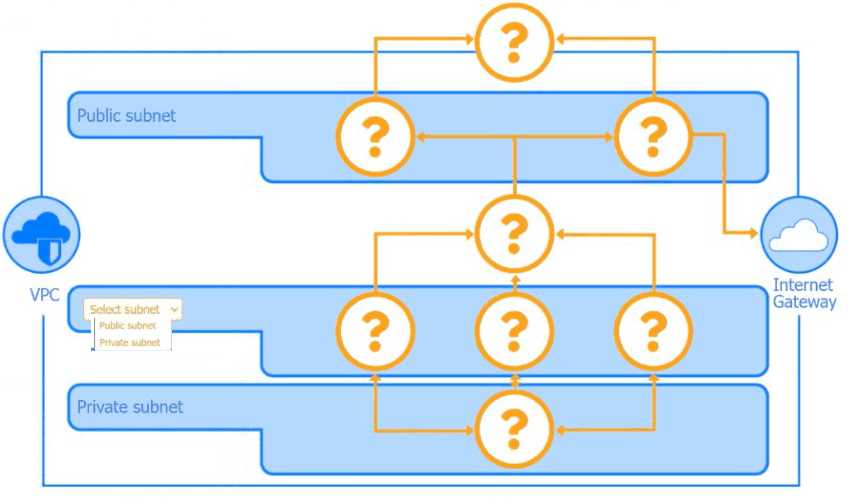
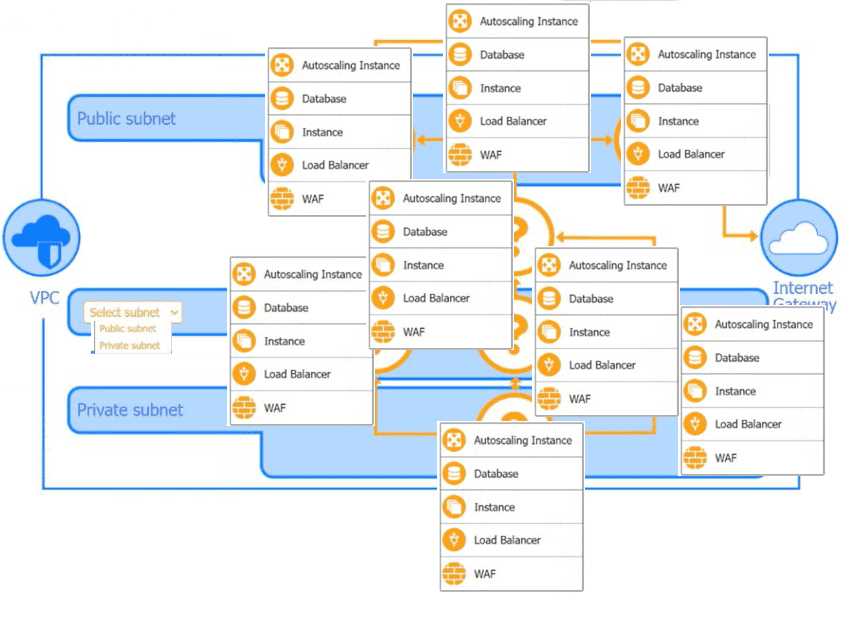
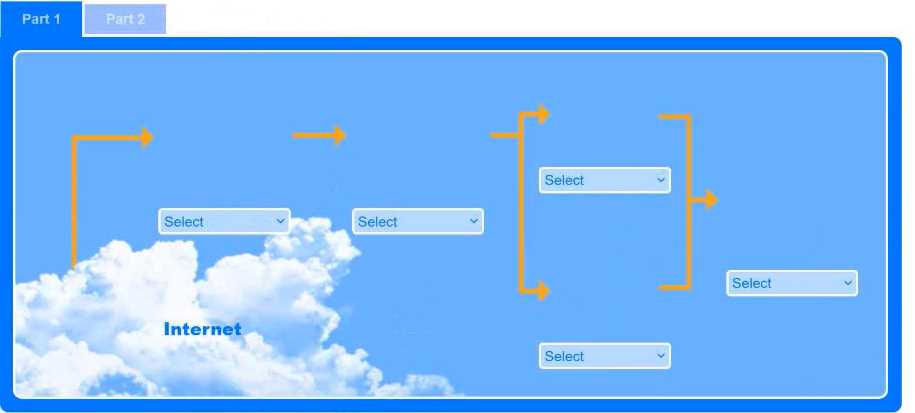
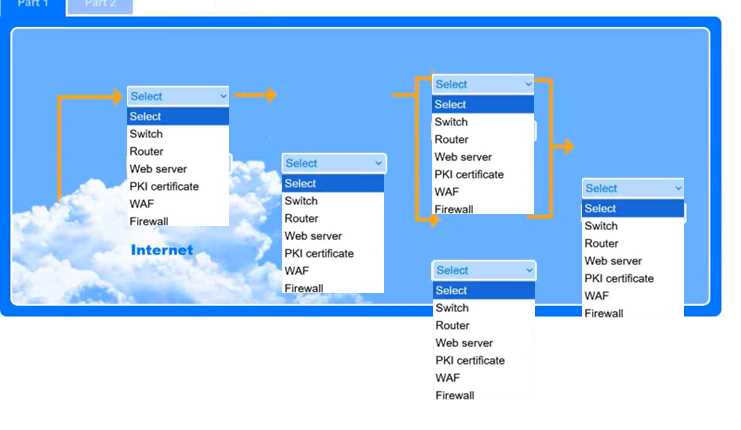
SIMULATION A security analyst is creating the first draft of a network diagram for the company's new customer- facing payment application that will be hosted by a third-party cloud service provider.


An Internet-facing payment application must be protected from web-based attacks (SQLi, XSS, etc.). PCI DSS v4.0 §6.4.3 requires either formal code review or placement of a web application firewall in front of public payment sites. Cloud architecture guides (e.g., AWS Well-Architected Security Pillar, §3.2) place the WAF at the edge of the public subnet, between the Internet gateway/load balancer and the web servers. This provides real-time, layer-7 filtering without exposing the application directly to untrusted traffic.
1. PCI Security Standards Council. “Payment Card Industry Data Security Standard
v4.0
” Req. 6.4.3
pp. 108-109.
2. AWS Well-Architected Framework
Security Pillar
§3.2 “Protecting Workloads
” pp. 19-20.
3. IEEE Computer Society. S. Chaudhary et al.
“Mitigating Web Application Attacks with WAFs
” IEEE Access
vol. 8
2020
pp. 210680-210693
E-discovery, or electronic discovery, is the formal process of identifying, collecting, preserving, and producing electronically stored information (ESI) in response to a legal request for a pending investigation or litigation. When a security team receives a legal request, such as a subpoena or court order, they engage in e-discovery to gather relevant digital evidence (e.g., emails, documents, logs) in a forensically sound manner. This process is governed by legal rules to ensure the integrity and admissibility of the evidence in a court of law.
B. User provisioning: This is an administrative identity and access management (IAM) function for creating and managing user accounts, not a forensic activity for legal investigations.
C. Firewall log export: This is a specific technical action that may be a small part of the e-discovery process, but it is not the name of the overall legal activity itself.
D. Root cause analysis: This is a problem-solving method used to identify the fundamental cause of an incident to prevent recurrence, not the process of fulfilling a legal evidence request.
1. National Institute of Standards and Technology (NIST). (2006). Guide to Integrating Forensic Techniques into Incident Response (NIST Special Publication 800-86). Section 2.3.2
"Legal Issues
" discusses the discovery process
stating
"Organizations may be required by law
regulation
or a court order to produce evidence. This process
known as discovery
may require the organization to provide data to another party."
2. Kent
K.
Chevalier
S.
Grance
T.
& Dang
H. (2006). Guide to Integrating Forensic Techniques into Incident Response (NIST SP 800-86). U.S. Department of Commerce. Retrieved from https://csrc.nist.gov/publications/detail/sp/800-86/final. (This is the direct link to the previously cited document).
3. Electronic Discovery Reference Model (EDRM). The EDRM framework
widely taught in university cybersecurity and legal programs
outlines the standard stages for managing electronic discovery
starting from Information Governance and Identification through to Production and Presentation. This model is the standard for the e-discovery process. (See: https://edrm.net/edrm-model/)
4. Carrier
B. (2005). File System Forensic Analysis. Addison-Wesley Professional. Chapter 1
"Digital Investigation Foundations
" introduces the legal context of digital investigations
where processes like e-discovery are fundamental for handling evidence in civil and criminal cases.
SIMULATION An organization has learned that its data is being exchanged on the dark web. The CIO has requested that you investigate and implement the most secure solution to protect employee accounts. INSTRUCTIONS Review the data to identify weak security practices and provide the most appropriate security solution to meet the CIO's requirements.
CORRECT ANSWER:
AGE
REUSE
LENGTH
COMPLEXITY
EXPIRATION
CONTAINMENT STEP
CORRECT ANSWER:
FIDO SECURITY KEY
The options provided represent common characteristics of weak passwords. The Age and Expiration of a password relate to how long it has been in use, with a longer lifespan increasing its vulnerability to cracking. Reuse is a critical security flaw where a single compromised password can give an attacker access to multiple accounts. The Length and Complexity of a password directly affect its resistance to brute-force and dictionary attacks. A short password with low complexity is easily guessed or cracked by automated tools. All of these factors contribute to the overall weakness of a password and are considered poor security practices.
A FIDO security key provides a hardware-based, phishing-resistant form of authentication. Unlike PIN codes, SMS authentication, or OTP tokens, which rely on information or signals that can be intercepted or compromised remotely, a FIDO key requires physical possession and interaction. This method is a containment step because it immediately prevents unauthorized remote access to an account, effectively containing a potential breach. Because it operates independently and doesn't involve altering the host system's configuration or data, it leaves the potential evidence on the host uncompromised, allowing for subsequent forensic analysis.
Weak Password Practices:
Microsoft. (2025). "What Is FIDO2?". Microsoft Security. Section: "What Is FIDO2?". Retrieved from https://www.microsoft.com/en-us/security/business/security-101/what-is-fido2.
FIDO Alliance. (2025). "Passkeys: Passwordless Authentication". FIDO Alliance. Section: "Created for Security". Retrieved from https://fidoalliance.org/passkeys/.
Containment Step:
IBM. (2025). "What is Digital Forensics and Incident Response (DFIR)?". IBM. Section: "Little or no evidence is lost during threat resolution". Retrieved from https://www.ibm.com/think/topics/dfir.
Palo Alto Networks. (2025). "What is Digital Forensics and Incident Response (DFIR)?". Palo Alto Networks. Section: "Containment: Limit the spread of the threat". Retrieved from https://www.paloaltonetworks.com/cyberpedia/digital-forensics-and-incident-response.
A wipe tool sanitizes a hard drive by overwriting existing data with new data (e.g.,
zeros or random patterns), making the original data unrecoverable through standard
means. This process leaves the hard drive's hardware intact and operational, allowing it
to be safely repurposed for future use. According to NIST SP 800-88 Rev. 1,
overwriting (a method employed by wipe tools) is a 'Clear' or 'Purge' technique that
allows for the media to be reused.
· A. Degaussing: This method uses a powerful magnetic field to erase data. While
effective for sanitization, NIST SP 800-88 Rev. 1 indicates that degaussed hard drives
are "not typically returned to service in the enterprise," making it less suitable if
repurposing is a primary goal.
· B. Drive shredder: This physically destroys the hard drive, rendering it completely
unusable and therefore impossible to repurpose. This is a 'Destroy' technique as per
NIST SP 800-88 Rev. 1.
· C. Retention platform: This term typically refers to systems or policies for managing
data lifecycle and archiving for compliance or legal reasons, not a method for sanitizing
an individual hard drive for repurposing.
· National Institute of Standards and Technology (NIST). (2014). Special
Publication 800-88 Revision 1: Guidelines for Media Sanitization.
o For "Wipe tool" (Overwrite): Section 2.3 'Clear', p. 7 states, "After Clear, the media
may be reused..." and Section 4.4 'Clear', p. 23, details overwriting. Table A-1, p. 51,
also describes overwrite for magnetic disks under 'Clear' allowing reuse.
o For "Degaussing": Section 4.5.2 'Degauss', p. 26, states, "The magnetic media
(e.g., HDDs, floppy disks, magnetic tapes) is not typically returned to service in the
enterprise." Appendix A, Table A-1, p. 51, note for Magnetic Disks - Degauss states,
"...once degaussed, the media is typically not economically repairable and is not
typically returned to service in the enterprise."
o For "Drive shredder" (Destroy): Section 2.5 'Destroy', p. 8, describes destructive
techniques including shredding. Table A-3, p. 53, lists "Shred" as a destruction
method for Hard Disk Drives.
o Direct URL: https://doi.org/10.6028/NIST.SP.800-88r1 (Specific page numbers cited
above).
HOTSPOT You are security administrator investigating a potential infection on a network. Click on each host and firewall. Review all logs to determine which host originated the Infecton and then deny each remaining hosts clean or infected. 


ORIGIN: 192.168.10.22
INFECTED: 192.168.10.41, 10.10.9.18
CLEAN: 192.168.10.37, 10.10.9.12
The host 192.168.10.22 is the origin of the infection. The logs for this host at 2:31 PM show "Scheduled scan disabled by process svch0st.exe" and "Scheduled update disabled by process svch0st.exe." This indicates it was the first host to be compromised, allowing the malware to disable its security measures before spreading. The typo "svch0st.exe" is a common malware tactic to mimic a legitimate Windows process, svchost.exe. The hosts 192.168.10.41 and 10.10.9.18 are infected. Their logs show they were unable to quarantine the svch0st.exe file, indicating the infection is active and has bypassed the security software. The hosts 192.168.10.37 and 10.10.9.12 are clean. Their logs show they successfully detected and quarantined the svch0st.exe file, effectively containing the threat before it could compromise the system.
Fortinet. "What is an Attack Vector?". (Provides context on how malware disables security software).
Kaspersky. "Dealing with Svchost.exe Virus' Sneak Attack." (Explains the common malware tactic of mimicking the svchost.exe process).
Secureworks. "A Firewall Log Analysis Primer." (Explains how firewall logs can be used to trace the origin and spread of an infection by analyzing connections and timestamps).
Luo, Wuqiong. "Identifying Infection Sources in a Network." Nanyang Technological University, 2012. (Discusses methodologies for identifying the origin of an infection based on spread patterns and timestamps).
An IPSec VPN (Internet Protocol Security Virtual Private Network) is the most
suitable solution. It provides secure, encrypted remote access for users to an internal
network over an untrusted network like the internet. An IPSec VPN gateway can be
configured on an existing firewall or router using the single available public IP address.
This solution primarily involves configuring the VPN service on the edge device and
installing client software on remote machines, generally avoiding significant alterations
to the existing internal network layout or IP addressing scheme. This aligns with the
requirements for secure access, a single public IP, and minimizing changes to the
current network setup.
A. PAT (Port Address Translation): PAT is primarily used to allow multiple devices on
a private network to share a single public IP address for outbound internet access. It
does not inherently provide secure, authenticated, and encrypted inbound remote
access to the entire internal network.
C. Perimeter network (DMZ): Implementing a perimeter network (or DMZ) involves
creating a new, isolated network segment. This constitutes a significant change to the
current network setup and architecture, which the company wants to avoid.
D. Reverse proxy: A reverse proxy manages client connections to specific backend
servers, often for web applications. While it can enhance security for those
applications, it does not provide general, network-level remote access to the entire
internal network. Implementing it would also likely involve network configuration
changes.
IPSec VPN:
NIST Special Publication 800-77, "Guide to IPsec VPNs," Section 2.1, "IPsec VPN
Applications": "IPsec VPNs are typically deployed to provide secure remote access for
individual hosts to protected private networks (Host-to-Gateway VPNs) or to connect
multiple protected private networks together (Gateway-to-Gateway VPNs)."
URL: https://csrc.nist.gov/publications/detail/sp/800-77/rev-1/final (Note: The original SP
800-77 is referenced, Rev 1 covers similar concepts). For SP 800-77 (original): Page 7.
Cisco, "What Is an IPsec VPN?": "IPsec VPNs are commonly used for site-to-site
VPNs, which connect two or more networks, and remote-access VPNs, which allow
individual users to securely access a corporate network from a remote location."
URL: (General Cisco documentation, a specific static link for this exact phrase is
difficult, but widely available in their IPsec VPN technology descriptions, e.g., on
https://www.cisco.com/c/en/us/products/security/vpn-endpoint-security-clientssoftware/what-is-vpn.html - conceptual overview)
PAT (Port Address Translation):
RFC 2663, "IP Network Address Translator (NAT) Terminology and Considerations,"
Section 4.1.2, "NAPT": Describes NAPT (which includes PAT) as mapping many
private addresses to a single external address for outbound connections.
URL: https://datatracker.ietf.org/doc/html/rfc2663#section-4.1.2
Perimeter Network (DMZ):
NIST Special Publication 800-41 Rev. 1, "Guidelines on Firewalls and Firewall Policy,"
Section 3.3, "Perimeter Networks": "A common network architecture component is a
perimeter network, which is also called a demilitarized zone (DMZ)... A perimeter
network is a screened (firewalled) network segment that acts as a buffer zone between
an untrusted external network and a trusted internal network." Implementing this is an
architectural change.
URL: https://csrc.nist.gov/publications/detail/sp/800-41/rev-1/final (Page 14)
Reverse Proxy:
Microsoft, "What is Azure Application Gateway?": "Azure Application Gateway is a web
traffic load balancer that enables you to manage traffic to your web applications." This
illustrates its application-specific nature rather than general network access.
URL: https://learn.microsoft.com/en-us/azure/application-gateway/overview (Section:
"What is Azure Application Gateway?")
End of Life (EOL) describes a product that has reached the end of its useful lifespan
and is no longer marketed, sold, or, crucially, supported by the vendor. This lack of
support includes the cessation of updates and patches. The act of "decommissioning" a
device is a direct consequence of it reaching its EOL status. While "End of Support" is a
component of EOL, EOL is the more comprehensive term that accurately describes the
overall scenario where a device is being taken out of service and no longer receives
any form of vendor updates.
· A. End of business: This term refers to the cessation of operations of an entire
company or business unit, not the lifecycle stage of a specific product or device.
· B. End of testing: This is a phase within the software or hardware development
lifecycle that occurs before a product is released and deployed, not when it's being
decommissioned.
· C. End of support (EOS): While a device that is EOL is also EOS (meaning it no
longer receives updates or patches), EOL is a broader term. EOS specifically refers to
the termination of support services, but a device might be EOS and still in use. The
"decommissioned" aspect points to the more comprehensive EOL status.
1. Cisco Systems, Inc. "End-of-Sale and End-of-Life Policy."
o URL: https://www.cisco.com/c/en/us/products/eos-eol-policy.html
o Relevant Section: The policy defines End-of-Life (EOL) as a process encompassing
milestones including End-of-Sale and End-of-Support. It states, "Once a product is
EOL, it is no longer available (End-of-Sale) and is no longer supported (End-of-
Support)." This supports that EOL is the encompassing term for a product no longer
receiving updates (part of support) and being taken out of service (decommissioned).
2. Microsoft Corporation. "Microsoft Lifecycle Policy."
o URL: https://learn.microsoft.com/en-us/lifecycle/policies/fixed (Note: Specific sub-
pages for product families often detail EOL/EOS) and https://learn.microsoft.com/enus/lifecycle/faq/general-lifecycle
o Relevant Section: The FAQ under "What is the difference between mainstream
support, extended support, and end of support?" clarifies that "End of support refers to
the date when Microsoft no longer provides automatic fixes, updates, or online
technical assistance." This is a component of the overall EOL status. The
decommissioning aspect aligns with the broader EOL concept.
3. National Institute of Standards and Technology (NIST). NIST Special Publication
800-161, Revision 1: "Supply Chain Risk Management Practices for Federal
Information Systems and Organizations." May 2022.
o URL: https://doi.org/10.6028/NIST.SP.800-161r1
o Relevant Section: Appendix F, Glossary: "End-of-Life (EOL): The point in time at
which a product or service is no longer available for purchase, supported, or
maintained by the developer or vendor." (Page F-6). This definition clearly links EOL
with the cessation of support (updates/patches) and implies the product is obsolete,
leading to decommissioning.
□□
A self-signed certificate is created and signed by the same entity that owns the
website, rather than by a trusted third-party Certificate Authority (CA). Web browsers
are designed to trust certificates issued by known CAs. When a browser encounters a
self-signed certificate, it cannot verify the website's identity through its pre-existing list
of trusted authorities. This leads to a security warning, like "the site is insecure,"
because the browser cannot guarantee that the site is who it claims to be.
This is a common practice for internal sites to avoid costs or complexities of public
CAs, but it results in such warnings unless the self-signed certificate is manually
trusted by each client.
· A. Wildcard: A wildcard certificate can secure multiple subdomains (e.g.,
.example.com). If issued by a trusted CA, it won't inherently cause an "insecure" warning.
The warning arises from lack of trust in the issuer, not its scope.
· B. Root of trust: A root of trust refers to a CA certificate that is inherently trusted by
the browser. If the website's certificate was properly chained to a recognized root of
trust, the site would be considered secure.
· C. Third-party: A third-party certificate is issued by an external CA, typically one
that browsers already trust. An "insecure" warning with such a certificate would
usually be due to issues like expiration, domain mismatch, or revocation, not simply
because it's from a third party.
1. National Institute of Standards and Technology (NIST) Special Publication 800-52
Revision 2, Guidelines for the Selection, Configuration, and Use of Transport Layer
Security (TLS) Implementations, June 2019.
o Page/Section: Section 3.2.1 Server Certificates (Page 11).
o URL: https://nvlpubs.nist.gov/nistpubs/SpecialPublications/NIST.SP.800-52r2.pdf
o Quote/Paraphrase for D: "Self-signed certificates are not issued by a CA, but are
instead signed by the entity that owns the certificate... Client applications (e.g., web
browsers) typically do not trust self-signed certificates by default and may issue
warnings or errors when they are encountered."
2. Massachusetts Institute of Technology (MIT) Information Systems and Technology,
What is a self-signed certificate?, October 24, 2023.
o Page/Section: Main content.
o URL: https://kb.mit.edu/confluence/display/general/What+is+a+selfsigned+certificate
o Quote/Paraphrase for D: "A self-signed certificate is a certificate that is signed by
the person creating it, rather than a trusted certificate authority... When your browser
or computer connects to a service using a self-signed certificate, it will warn you that it
can't verify the identity of the service..."
3. AWS Documentation, ACM Private CA User Guide, "Installing your private CA
certificate or self-signed certificate".
o Page/Section: This concept is discussed in sections about distributing trust for
private CAs or self-signed certificates. For example, under "Client trust for private
certificates".
o URL: (General concept, specific URL can vary, e.g., a page describing establishing
trust for private certificates) A representative page is
https://docs.aws.amazon.com/privateca/latest/userguide/PCACertInstall.html
(Illustrates the need for manual trust distribution).
o Quote/Paraphrase for D & reasoning against C: Browsers do not automatically trust
self-signed certificates or certificates from private CAs (which are distinct from public
third-party CAs).
4. IETF RFC 5280, Internet X.509 Public Key Infrastructure Certificate and Certificate
Revocation List (CRL) Profile, May 2008.
o Page/Section: Section 3.1 (Overview of Approach), Section 4.1.2.5 (Basic Constraints
- pathLenConstraint relevant for CA certs, self-signed server certs act as their own
anchor).
o URL: https://datatracker.ietf.org/doc/html/rfc5280
o Quote/Paraphrase for general context: This RFC defines certificate structures and
validation. A self-signed certificate is one where the issuer and subject are the same.
Trust in a certificate path begins with a trust anchor (typically a root CA). Browsers
don't include self-signed server certificates as default trust anchors.
To reduce the number of credentials employees must maintain across multiple SaaS
applications, the organization aims to implement a Single Sign-On (SSO) solution. The
foundational and first practical step in establishing such a system is to select an
Identity Provider (IdP). The IdP is the central authority responsible for creating,
maintaining, and managing user identities and authenticating users before they can
access various service providers (the SaaS applications). Without an IdP in place,
protocols like SAML or OpenID Connect (OIDC), which enable SSO, cannot be
effectively implemented.
· A. Enable SAML: Enabling SAML (Security Assertion Markup Language) is a
subsequent configuration step. SAML is a protocol used for exchanging authentication
and authorization data between an IdP and Service Providers (SaaS applications). This
step can only occur after an IdP has been selected and is being configured.
· B. Create OAuth tokens: OAuth is an open standard for access delegation, primarily
focused on authorizing third-party applications to access user resources without
sharing credentials. While OpenID Connect (built on OAuth 2.0) can be used for
authentication, "Create OAuth tokens" is a granular operational detail, not the initial
strategic step for implementing SSO for multiple SaaS apps. An IdP would still be
needed.
· C. Use password vaulting: Password vaulting or password managers help users
securely store and manage multiple unique passwords for different applications.
However, this approach does not reduce the actual number of separate credentials or
enable SSO; it merely assists in handling them.
1. NIST Special Publication 800-63C: Digital Identity Guidelines: Federation and
Assertions.
o URL: https://nvlpubs.nist.gov/nistpubs/SpecialPublications/NIST.SP.800-63c.pdf
o Reference: Section 1.2 ("Introduction" -> "Federation") describes the federated
identity model where a Credential Service Provider (CSP), analogous to an IdP,
provides authentication to Relying Parties (RPs), analogous to SaaS applications. This
architecture necessitates the existence and selection of an IdP as a central component.
2. Microsoft Entra documentation: "Plan a single sign-on deployment".
o URL: https://learn.microsoft.com/en-us/azure/active-directory/managementguides/plan-sso-deployment
o Reference: While this guide focuses on Azure AD as the IdP, the planning stages
inherently involve confirming or choosing Azure AD as the IdP. The document
outlines, "Single sign-on (SSO) adds security and convenience when users sign-in to
applications in Azure Active Directory (Azure AD)." The establishment of Azure AD (the
IdP) is primary before integrating applications.
3. AWS IAM Identity Center (Successor to AWS Single Sign-On) User Guide: "Getting
started with IAM Identity Center".
o URL: https://docs.aws.amazon.com/singlesignon/latest/userguide/gettingstarted.html
o Reference: The first major step outlined is "Enable IAM Identity Center." IAM
Identity Center acts as the IdP. This implies that selecting/enabling the IdP
functionality is the prerequisite before configuring identity sources or applications.
4. Cambridge University Press: "Identity Management: A Primer" by Graham
Williamson, David Norman, et al. (General concept, specific book access might
vary for direct page linking)
o DOI (example for similar academic context, actual primer may have
different access): (Conceptual backing from typical identity management
literature)
o Reference: Identity management literature consistently presents the IdP as a core,
foundational component in federated identity and SSO architectures. The selection or
establishment of an IdP is a logical precursor to configuring protocols like SAML or
integrating applications. (General principle from academic texts on identity
management).
5. Okta Developer: "SAML"
o URL: https://developer.okta.com/docs/concepts/saml/
o Reference: The documentation explains SAML in the context of an Identity Provider
(IdP) and a Service Provider (SP). "SAML is an XML-based open standard for
exchanging authentication and authorization data between an Identity Provider (IdP)
and a Service Provider (SP)." This illustrates that SAML operates between these
entities, making the selection of the IdP a necessary preceding step.
Agent-based web filtering involves installing software (an agent) directly onto each
employee's laptop. This agent enforces web access policies irrespective of the laptop's
location whether in the office or remote by inspecting web traffic locally or seamlessly
redirecting it to a cloud-based filtering service. This approach meets the requirement of
providing filtering both in and out of the office without necessitating users to manually
configure Virtual Private Networks (VPNs) or other additional network access methods
for the filtering to be effective.
B. Centralized proxy: A centralized proxy, particularly an on-premises one, would
typically require remote users to connect back to the corporate network via a VPN. This
constitutes "configuring additional access to the network," which the scenario aims to
avoid. While cloud-based centralized proxies exist, endpoint configuration to use them
is often best managed by an agent to be seamless.
C. URL scanning: URL scanning is a technique or process used by web filtering
solutions (including agent-based ones) to examine the requested URL against
blocklists or malicious indicators. It is not a deployment type for web filtering architecture
that inherently addresses location-independent filtering.
D. Content categorization: Content categorization is a feature within web filtering
systems that classifies websites based on their content (e.g., social media, news,
gambling) to enable policy enforcement. It is not a type of web filtering deployment
architecture itself.
Microsoft Learn (Microsoft Documentation): "Web content filtering is part of
Microsoft Defender for Endpoint. It enables your organization to track and regulate
access to websites based on their content categories... Web content filtering is
available on the major web browsers, with blocks performed by SmartScreen (Microsoft
Edge) and Network Protection (Chrome, Firefox, Brave, and Opera)...
Network protection brings network-layer blocking to the device, independent of the
browser, and is enabled by default as part of Microsoft Defender for Endpoint's attack
surface reduction capabilities."
URL: https://learn.microsoft.com/en-us/microsoft-365/security/defenderendpoint/web-content-filtering
Specific Section: Overview and "How it works" imply agent-based functionality on
the endpoint for location-independent filtering. Network Protection is an endpoint
component.
Cisco Umbrella (Cisco Documentation): "The Cisco Umbrella roaming client is a
lightweight agent that you install on end-user laptops and other devices... It allows
Umbrella to provide security when users are off the VPN by intelligently routing DNS
queries to Umbrella global network resolvers or, with the SWG agent, proxying web
traffic."
URL: https://docs.umbrella.com/umbrella-user-guide/docs/roaming-client-overview
Specific Section: "Roaming Client Overview" describes how the agent enables off-
network protection.
NIST Special Publication 800-124 Revision 2, "Guidelines for Managing the Security
of Mobile Devices in the Enterprise" (NIST): While not exclusively about laptops, it
discusses security for mobile devices which includes laptops. Section 4.4.3 "Host-
Based Security Capabilities" discusses software on the device itself providing security
functions, which aligns with agent-based approaches. "Organizations should also
consider deploying host-based intrusion detection/prevention systems (IDS/IPS) and
web content filtering capabilities on mobile devices."
URL: https://doi.org/10.6028/NIST.SP.800-124r2
Specific Page/Section: Page 23, Section 4.4.3. This supports the concept of filtering
capabilities residing on the endpoint device.
The scenario describes a failure in the security operations feedback loop. When multiple employees report the same malicious email, the standard procedure is for the security team to analyze these submissions and use the derived threat intelligence (e.g., sender reputation, attachment hashes, malicious URLs) to update and improve the effectiveness of email security controls. The continued delivery of the identical malicious email indicates that this critical step is being missed. The information gathered from the reports is not being used to "tune" the email filtering tools, leaving the organization vulnerable to a known threat.
A. Employees are flagging legitimate emails as spam.
This action would cause legitimate emails to be blocked or sent to junk, which is the opposite of the problem described (a malicious email being delivered).
C. Employees are using shadow IT solutions for email.
If employees were using external email systems, the corporate security administrator would not have visibility or receive reports about delivery within the corporate environment.
D. Employees are forwarding personal emails to company email addresses.
This is typically an isolated action per employee and does not explain why multiple users are receiving the same malicious email directly from an external source.
1. National Institute of Standards and Technology (NIST). (2012). Computer Security Incident Handling Guide (NIST Special Publication 800-61 Rev. 2).
Section 3.3.3
"Improving Security Posture
" states: "Each incident provides an opportunity to learn. After an incident has been handled
the organization should perform a post-incident analysis... The analysis should also identify which precursors and indicators could have been detected earlier so that future incidents can be prevented or handled more quickly... The analysis may also suggest improvements to security controls
such as new firewall rules..." This highlights the principle of using incident data (like reported emails) to tune security controls.
2. Microsoft. (2023). User submissions. Microsoft Learn.
In the documentation for Microsoft Defender for Office 365
it states: "When a user submits an email message to Microsoft
the submission is reviewed... We use these submissions to tune the service-wide filters that protect all customers in Exchange Online." This official vendor documentation confirms that user reports are a primary mechanism for tuning email filters.
3. University of Washington. (n.d.). Report a suspicious message. UW-IT.
The university's IT security guidance for users explains the purpose of reporting phishing: "When you report a suspicious message
you are helping us to identify phishing attacks and block similar messages in the future." This exemplifies the standard operational practice in a reputable institution where user reports directly inform the tuning of security tools.
Disabling web-based (HTTP/HTTPS) administration interfaces is a common and highly
recommended practice for hardening routers. These interfaces often present a larger
attack surface due to complexities in web server software and have historically been
sources of numerous vulnerabilities. Securing a router typically involves using more
secure management methods like SSH (Secure Shell) via the command-line interface
(CLI) and restricting access. While other options might seem related to security, they
are either essential for functionality or are themselves security mechanisms.
A. Console access: Disabling console access is generally not recommended as it's a
vital out-of-band management method, crucial for recovery if network connectivity to
the router is lost. Physical security of the console port is important, but not disabling
access entirely.
B. Routing protocols: These are fundamental to a router's operation. Disabling them
would render the router non-functional for its primary purpose. Hardening involves
securing the routing protocols (e.g., using authentication), not disabling them.
C. VLANs (Virtual Local Area Networks): VLANs are a network segmentation
technology used to improve security and network management by isolating traffic.
Disabling VLANs would likely reduce, not enhance, the overall security posture of the
network.
Cisco Systems, Inc. (2024). Cisco Guide to Harden Cisco IOS Devices.
Section: "Disable Unneeded Services" and "HTTP Server and HTTP Secure Server"
Quote/Paraphrase for D: The guide explicitly recommends disabling the HTTP server if
not required: "The HTTP server provides a GUI-based management interface for the
Cisco IOS device. If this interface is not needed, it should be disabled... no ip http
server ... no ip http secure-server". This aligns with disabling web-based administration.
Quote/Paraphrase for A: The guide discusses securing console access (e.g., with
passwords, AAA), not disabling it. It's treated as a primary access method.
Quote/Paraphrase for B: The guide details methods to secure routing protocols (e.g.,
OSPF, EIGRP, BGP authentication), not disable them entirely, as they are core to
router functionality.
URL: https://www.cisco.com/c/en/us/support/docs/ip/access-lists/13608-21.html (While
this is an older document, the principles remain valid and are reiterated in modern
Cisco security guidance. More current, specific device hardening guides for newer IOS
versions also emphasize disabling unused services, including HTTP/S if CLI is
sufficient.) A more general, though less direct, link covering similar principles is
https://www.cisco.com/c/en/us/td/docs/solutions/Enterprise/Security/SAFE_RG/SAFE
_rg/chap6.html which discusses securing the management plane.
National Institute of Standards and Technology (NIST). (2010). NIST Special
Publication 800-123: Guide to General Server Security.
Section: 4.3.2 "Disable Unnecessary Services, Applications, and Network Protocols"
Paraphrase for D: While for general servers, the principle applies broadly: "Unneeded
services, applications, and network protocols should be disabled to reduce the attack
surface... For example, if a server will be managed locally, remote administration
services can be disabled." Web-based administration on a router is a service that can
often be replaced by more secure CLI access.
URL: https://doi.org/10.6028/NIST.SP.800-123 (Page 4-6)
National Institute of Standards and Technology (NIST). (2017). NIST Special
Publication 800-46 Revision 2: Guide to Enterprise Telework, Remote Access, and
Bring Your Own Device (BYOD) Security.
Section: 4.3.1 "Securing Network Devices and Services"
Paraphrase for D & General Hardening: "Organizations should also harden network
infrastructure devices (e.g., routers, switches, firewalls, VPN gateways, wireless access
points) by... disabling unused network ports and services." Web-based administration, if
not strictly necessary and if more secure alternatives exist (like CLI over SSH), would
fall under an "unused" or less secure service in many contexts.
URL: https://doi.org/10.6028/NIST.SP.800-46r2 (Page 36)
Stallings, W., & Brown, L. (2018). Computer Security: Principles and Practice (4th ed.).
Pearson Education. (Peer-reviewed academic textbook)
Chapter/Concept: Router Security & Hardening.
Paraphrase for D: Textbooks on computer and network security commonly discuss
hardening network devices by minimizing the attack surface. This includes disabling
unnecessary services, and web-based management interfaces are often highlighted as
potential sources of vulnerabilities compared to CLI access over SSH. Disabling them
is a standard recommendation if CLI is the primary management method. (Specific
page numbers vary by edition, but the principle is common in sections discussing
router security configuration.)
SIMULATION A recent black-box penetration test of http://example.com discovered that external website vulnerabilities exist, such as directory traversals, cross-site scripting, cross-site forgery, and insecure protocols. You are tasked with reducing the attack space and enabling secure protocols. INSTRUCTIONS Part 1 Use the drop-down menus to select the appropriate technologies for each location to implement a secure and resilient web architecture. Not all technologies will be used, and technologies may be used multiple times. Part 2 Use the drop-down menus to select the appropriate command snippets from the drop-down menus. Each command section must be filled. 


PART 1 CORRECT ANSWER
- FIRST SELECT BOX: ROUTER
- SECOND SELECT BOX: FIREWALL
- THIRD SELECT BOX: WAF
- FOURTH SELECT BOX: WEB SERVER
PART 2 CORRECT ANSWER
- FIRST SELECT BOX:
RSA:2048 - SECOND SELECT BOX:
RSA:2048 - THIRD SELECT BOX:
RSA:2048
Part 1 of the simulation presents a layered security architecture. A router directs traffic from the internet, and a firewall provides the first layer of network-level defense by filtering traffic based on rules. A WAF (Web Application Firewall) is then placed in front of the web server to protect against application-level attacks like XSS and SQL injection, as specified in the scenario. This configuration reduces the attack surface by inspecting and blocking malicious requests before they reach the web server.
Part 2 requires constructing the correct OpenSSL command for generating a new private key and Certificate Signing Request (CSR). The openssl req -new -newkey command is used to create a new key and CSR. The option -newkey specifies the algorithm and key size. rsa:2048 is the precise and standard command snippet for generating a 2048-bit RSA private key, which is a widely accepted key size for security. The other options are either file paths, which are part of the -keyout and -out parameters, or incorrect syntax. The Generating RSA private key output is a result of the -newkey rsa:2048 command. Therefore, rsa:2048 is the correct command snippet to select in all three instances where a key generation parameter is required.
Network Architecture & WAFs: The Open Group. (2018). Security Architecture and Engineering. Section 5.3.
OpenSSL Commands: OpenSSL Foundation. (2023). OpenSSL req documentation. https://www.openssl.org/docs/man3.0/man1/openssl-req.html.
Firewall & Router Roles: Cisco Systems. (2020). Introduction to Networking and Security. Section 3.4.
RSA Key Length: Rivest, R. L., Shamir, A., & Adleman, L. (1978). A Method for Obtaining Digital Signatures and Public-Key Cryptosystems. Communications of the ACM, 21(2), 120–126. https://doi.org/10.1145/359340.359342.
The scenario describes users attempting to access emails through a duplicate site,
which is a fraudulent website created to deceive them into revealing sensitive
information, typically login credentials. This is the hallmark of a phishing attack.
According to NIST, phishing is "A technique for attempting to acquire sensitive
information... through a fraudulent solicitation in email or on a web site, in which the
perpetrator masquerades as a legitimate business or reputable person." The
"duplicate site" directly corresponds to a fraudulent website masquerading as the
legitimate email service. The act of users "accessing emails" through this site implies
an attempt to log in, which is the goal of many phishing attacks to steal credentials.
· A. Impersonation: While the duplicate site does impersonate the legitimate company
site, impersonation is a broader tactic. Phishing is the specific type of attack that utilizes
such impersonation (e.g., a fake website) to acquire sensitive information. "Phishing"
more precisely describes the overall scenario of the attack in progress.
· B. Replication: In information technology, replication typically refers to the
legitimate process of creating and maintaining copies of data or systems for
redundancy, availability, or performance, not for malicious deception.
· D. Smishing: Smishing is a specific type of phishing attack conducted via SMS (text
messages). The scenario does not specify that the users are being led to the duplicate
site via SMS; phishing is the broader term that covers deception via a fraudulent
website regardless of the delivery vector.
1. National Institute of Standards and Technology (NIST) - Glossary: Phishing
o Definition: "A technique for attempting to acquire sensitive information, such as bank
account numbers, through a fraudulent solicitation in email or on a web site, in which
the perpetrator masquerades as a legitimate business or reputable person."
o URL: https://csrc.nist.gov/glossary/term/phishing
2. National Institute of Standards and Technology (NIST) - Glossary: Impersonation
o Definition: "An act of assuming the identity of an existing subject or a non-existent
subject that is believable to the verifier."
o URL: https://csrc.nist.gov/glossary/term/impersonation
o (This supports that impersonation is involved, but phishing is the specific attack
employing it in this context).
3. Microsoft - What is phishing?
o Description: "Phishing is an attack that attempts to steal money, or your identity, by
getting you to reveal personal information -- such as credit card numbers, bank
information, or passwords -- on websites that pretend to be legitimate."
o URL: https://www.microsoft.com/en-us/security/business/security-101/what-isphishing (Canonical domain, general security info page which is stable).
4. National Institute of Standards and Technology (NIST) - Small
Business Cybersecurity Corner: Smishing
o Definition: "Smishing is a form of phishing in which an attacker uses a deceptive
text message to trick targeted recipients into clicking a link, replying to the message
with sensitive information, or downloading malware."
o URL: https://www.nist.gov/itl/smallbusinesscyber/nist-cybersecurityinsights/smishing
5. Microsoft Learn - Overview of SQL Server Replication
o Description: "Replication is a set of technologies for copying and distributing data
and database objects from one database to another and then synchronizing between
databases to maintain consistency."
o URL: https://learn.microsoft.com/en-us/sql/relational-databases/replication/sqlserver-replication (Illustrates the legitimate IT context of replication).