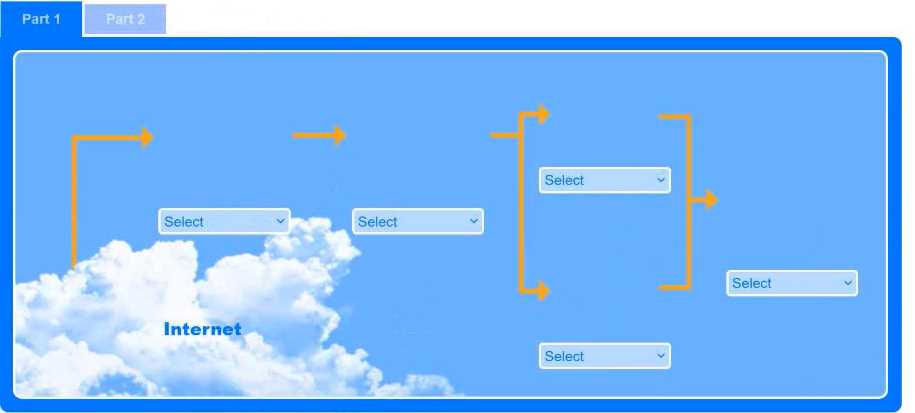
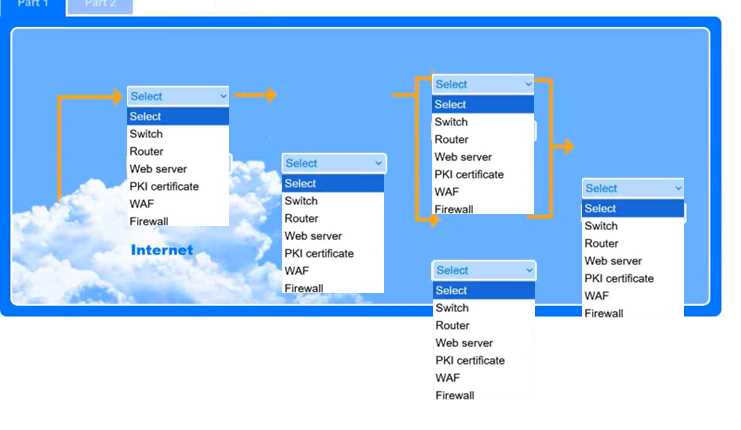
I feel like C is a decent pick since a proxy server can filter traffic and block some unwanted access, especially from the internet. But not sure it’s the strongest for actual internal resource protection. Agree or nah?
Free SY0-701 Practice Test Questions and Answers (2026) | Cert Empire Practice Questions
Free preview: 20 questions.
CompTIA Security + SY0-701
Option B makes the most sense. DPOs are all about compliance and risk, so knowing the data landscape is key for breach impact if something goes wrong. I think A is tempting but more IT-focused than DPO-driven. Not 100% sure-happy to hear other takes though.
Why would A even matter for a DPO though? Storage management isn't really their core job, it's all about compliance and breach planning. Wouldn't the inventory's main use be figuring out risk if something leaks?
Legal's main job here is avoiding trouble with regulators, so A fits best. When a government bans a vendor, using their devices could violate sanctions, which means legal risk and possible fines. Cost (C) or data sovereignty (B) might matter to others but not top priority for general counsel in this scenario. Pretty sure it's A, but open to other takes.
Wouldn't cost of replacement (C) also be a serious concern during hardware refresh? I get that legal would review sanctions, but for most companies budget impact is huge and sometimes general counsel has to sign off when costs skyrocket. Anyone run into this in official practice tests?

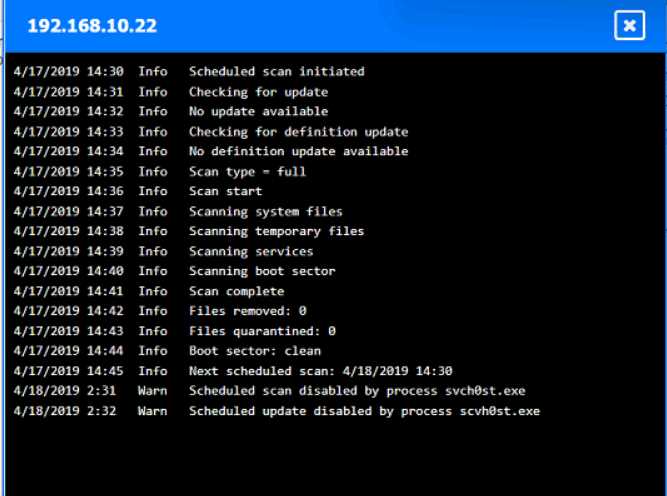
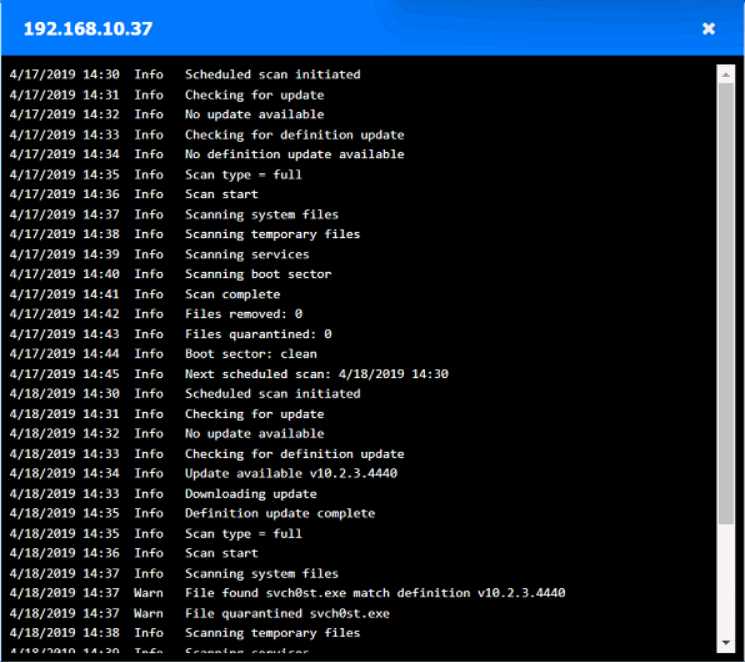
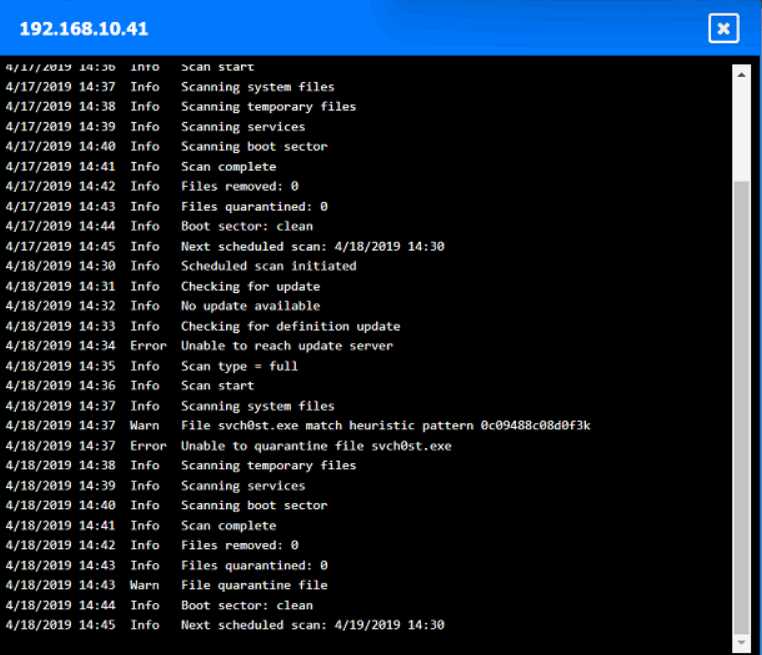
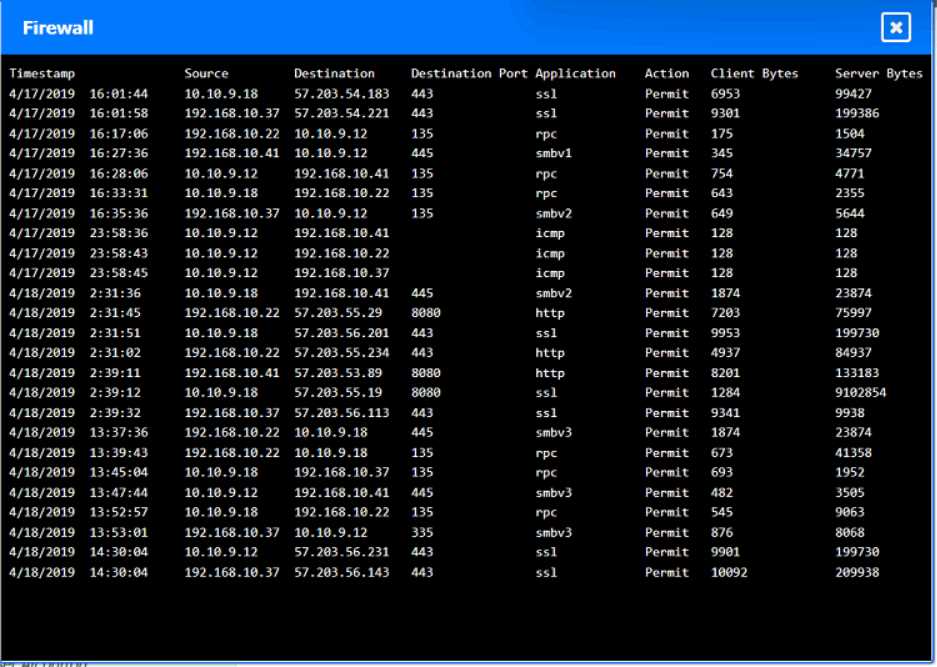
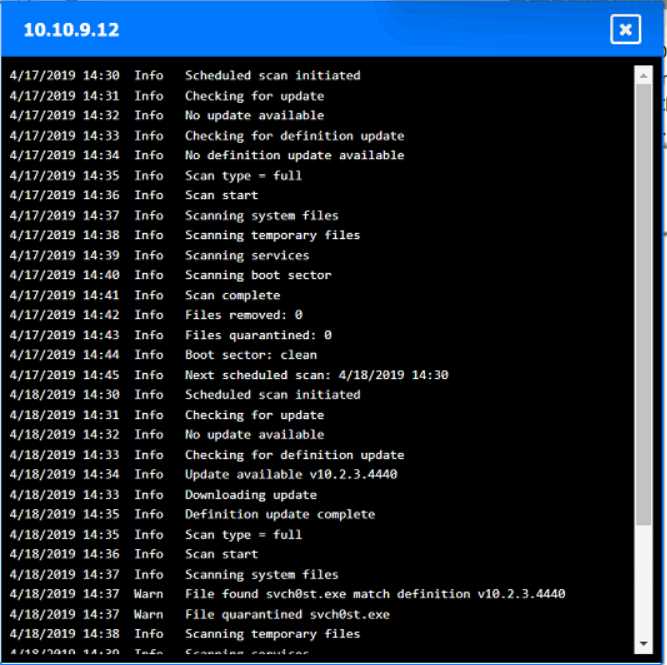
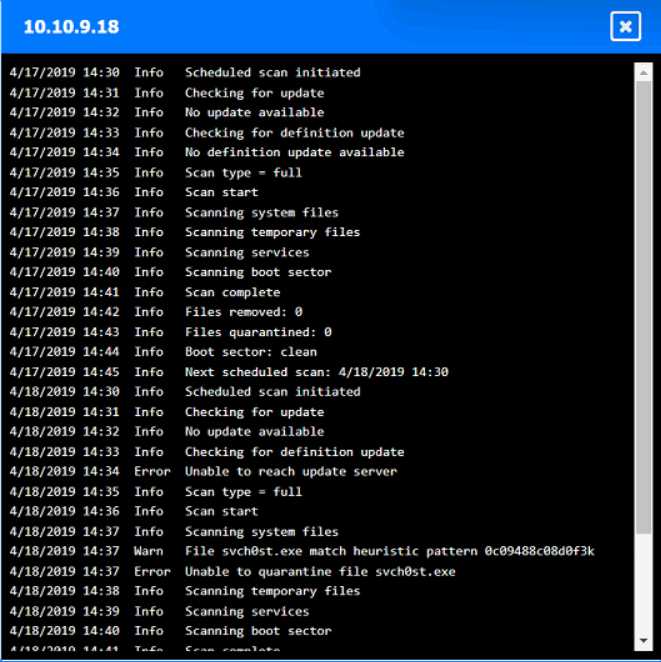
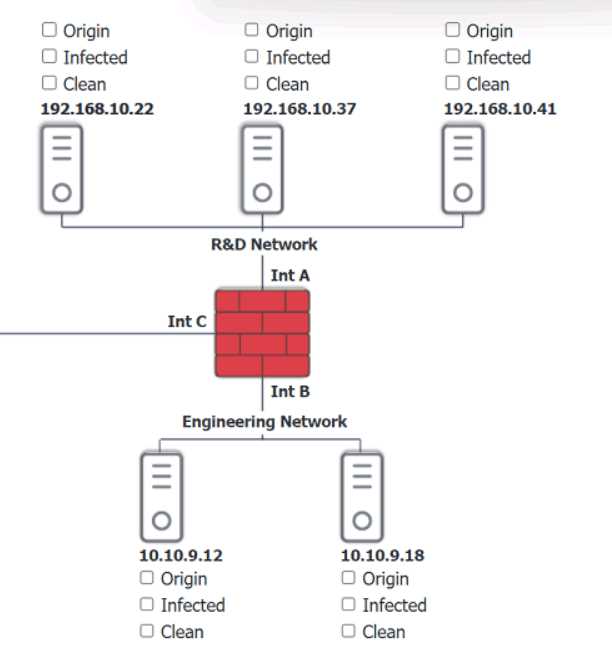
Looks right to me, seen similar drag-and-drop hotspot setups in the official practice tests. If a host's logs show they quarantined svch0st.exe successfully, CompTIA expects you to call it clean. Origin is 192.168.10.22, with 192.168.10.41 and 10.10.9.18 counted as infected. Let me know if you see a different interpretation, but pretty sure that's what the exam wants.
Origin: 192.168.10.22
Infected: 192.168.10.41 & 10.10.9.18
Clean: 192.168.10.37 & 10.10.9.12
CompTIA usually treats hosts as clean if they detected and fully quarantined the malware, even if it showed up in logs, so I think this matches what they want here-unless anyone interprets their criteria differently.
Looks solid to me-origin is definitely 192.168.10.22, since that's where the first signs of disabled security tools pop up. For CompTIA, if a host's logs show svch0st.exe was quarantined successfully (like 192.168.10.37 and 10.10.9.12), they're labeled clean even though something happened there. Infected is for the hosts where that didn't work (192.168.10.41, 10.10.9.18). Pretty sure that's what the exam expects but I'm open if someone spots a different logic here.
Yeah, that's how I'd split it up too. Origin is 192.168.10.22 because it's the first to get the malicious svch0st.exe running and disables security tools, then spreads out. If the logs say a host fully quarantined it (like 192.168.10.37 and 10.10.9.12), that's "clean" even though malware showed up there for a sec. Pretty sure that's CompTIA logic, but open to pushback if someone interprets the logs differently.
Yeah, I’m with the majority here. If the logs show successful quarantine of svch0st.exe like on 10.10.9.12 and 192.168.10.37, CompTIA usually marks those hosts as clean since remediation worked. Origin is 192.168.10.22 for sure, infected are the ones where it couldn’t be quarantined (192.168.10.41 and 10.10.9.18). Pretty sure this matches what they expect, but always double-check log details just in case!
Origin is 192.168.10.22, infected are 192.168.10.41 and 10.10.9.18, clean are 192.168.10.37 and 10.10.9.12.
Some folks mix up 10.10.9.12 but it shows it quarantined svch0st.exe successfully, so pretty sure it counts as clean here by exam logic. If quarantine didn’t count, 10.10.9.12 might look infected at first glance.
I get where you're coming from AmeliaK, but I think A fits best for "unintentional." Code repositories are classic for accidental leaks when devs commit creds or secrets by mistake. The dark web (B) is more like where the info appears after it's already leaked, not the original source. Pretty sure about A, but open if anyone sees it differently.
Ugh, these cloud leaking questions always trip me up on practice. A imo, since devs keep pushing creds to Git or similar by accident, seen this in a bunch of similar exam dumps lately. Not seeing E as accidental leakage, more reporting.
Option C makes the most sense here. Memory injection is when malicious code ends up inside the memory space of a running process, not just an overwritten file on disk like D. This is classic process injection technique, like DLL injection or using Windows API calls. Pretty sure that's what the question wants, but open to counterpoints.

This looks like a spot where you'd use a reverse proxy. It can sit between the clients and the web servers to help manage traffic and provide some basic protection. Not sure if that's enough for layer-7 threats though. Anyone see issues with that approach?
Option D looked right to me since encryption can help protect data even on legacy systems. Had something like this in a mock, and they called out encryption as a control for old servers. But not totally sure if that's enough by itself.
If the requirement said "first step" instead of "most likely," would you still pick B or go for monitoring?
Option A seems right. Secure web gateway covers remote users by filtering their web traffic and applying company policies without needing a VPN, which the question specifically says not to use. Next-gen firewalls are more for network edges, and deep packet inspection isn't really tailored to remote scenarios in this way. Pretty sure SWG is what they're after here but happy to hear other takes if I'm off.

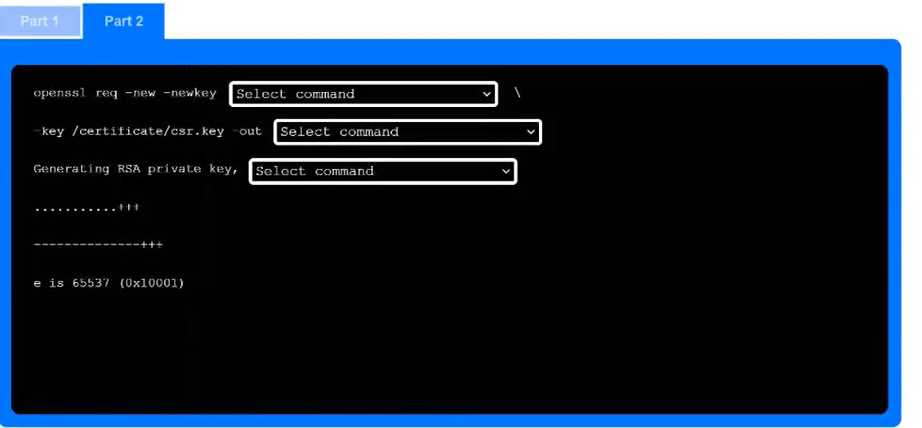
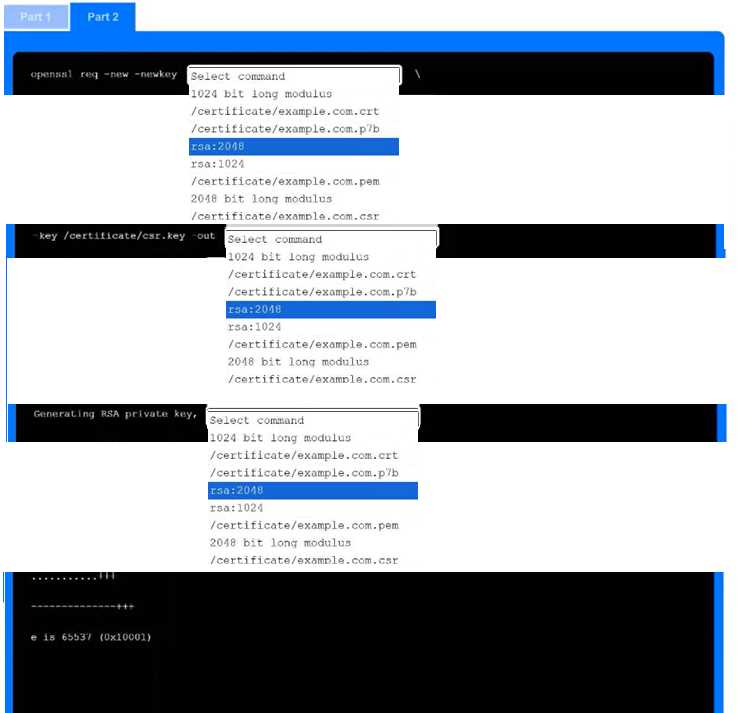
-keyout as one of the picks instead of just rsa:2048 every time. Not 100% sure though, maybe I'm mixing up with another format. Agree?I don't think it's D, since monitoring/review only happens after risks are identified and scoped. B fits because that's where you actually pin down what could go wrong and set those project boundaries. Sometimes the wording trips people up here.
I'm pretty sure it's B in this scenario. Risk identification is where you figure out what could go wrong and clarify which parts of the project you're actually assessing. D (monitoring and review) always comes after, so that's an easy one to rule out. If anyone disagrees, let me know!
Official study guides and practice tests cover scenarios like this a lot. They highlight user provisioning scripts (D) for automating account setup so permissions match policy every time. I think that's the main point here, but if anyone found something different in labs or the exam, let me know.
Anybody else think ticketing workflow (B) could also help here? I know D is more about automating the actual account setup and permissions, but sometimes workflows tie into approvals too. Is there a case where B would apply or is it always D for automation?