
HOTSPOT
Overview
Litware, Inc. is a consulting company that has a main office in Montreal and a branch office in Seattle.
Litware collaborates with a third-party company named A. Datum Corporation.
Environment
On-Premises Environment
The network of Litware contains an Active Directory domain named litware.com. The domain contains three organizational units (OUs) named LitwareAdmins, Montreal Users, and Seattle Users and the users shown in the following table.

The domain contains 2,000 Windows 10 Pro devices and 100 servers that run Windows Server 2019.
Cloud Environment
Litware has a pilot Microsoft 365 subscription that includes Microsoft Office 365 Enterprise E3 licenses and Azure AD Premium P2 licenses.
The subscription contains a verified DNS domain named litware.com.
Azure AD Connect is installed and has the following configurations:
• Password hash synchronization is enabled.
• Synchronization is enabled for the LitwareAdmins OU only.
Users are assigned the roles shown in the following table.

Self-service password reset (SSPR) is enabled.
The Azure AD tenant has Security defaults enabled.
Problem Statements
Litware identifies the following issues:
• Admin1 cannot create conditional access policies.
• Admin4 receives an error when attempting to use SSPR.
• Users access new Office 365 service and feature updates before the updates are reviewed by Admin2.
Requirements
Planned Changes
Litware plans to implement the following changes:
• Implement Microsoft Intune.
• Implement Microsoft Teams.
• Implement Microsoft Defender for Office 365.
• Ensure that users can install Office 365 apps on their device.
• Convert all the Windows 10 Pro devices to Windows 10 Enterprise ES.
• Configure Azure AD Connect to sync the Montreal Users OU and the Seattle Users OU.
Technical Requirements
Litware identifies the following technical requirements:
• Administrators must be able to specify which version of an Office 365 desktop app will be available to users and to roll back to previous versions.
• Only Admin2 must have access to new Office 365 service and feature updates before they are released to the company.
• Litware users must be able to invite A. Datum users to participate in the following activities:
• Join Microsoft Teams channels.
• Join Microsoft Teams chats.
• Access shared files.
• Just in time access to critical administrative roles must be required.
• Microsoft 365 incidents and advisories must be reviewed monthly.
• Office 365 service status notifications must be sent to Admin2.
• The principle of least privilege must be used.
You are evaluating the use of multi-factor authentication (MFA).
For each of the following statements, select Yes if the statement is true. Otherwise, select No.
NOTE: Each correct selection is worth one point.

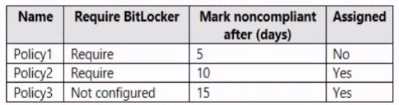
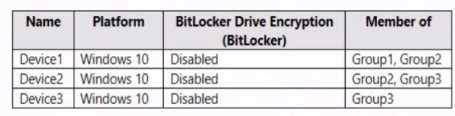 The device compliance policies in Endpoint Manager are configured as shown in the following table.
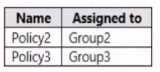
  The device compliance policies have the assignments shown in the following table.
  For each of the following statements, select Yes if the statement Is true. Otherwise, select No. NOTE: Each correct selection is worth one point.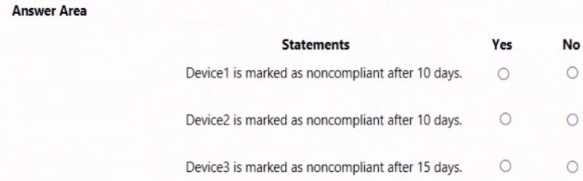
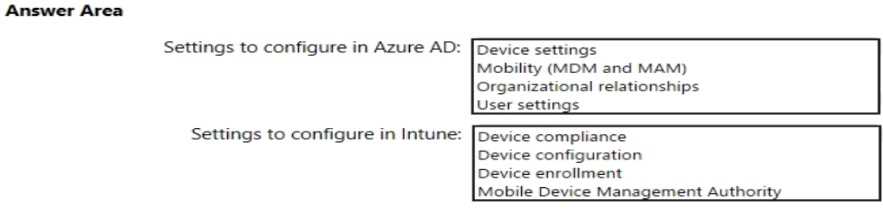
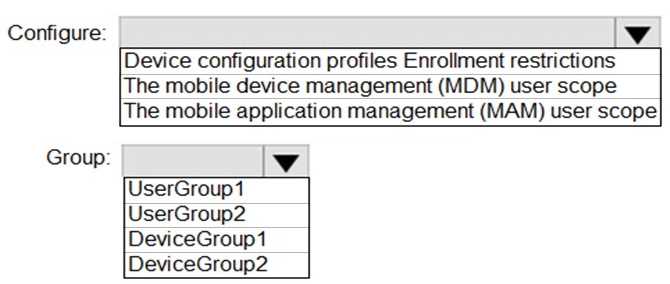
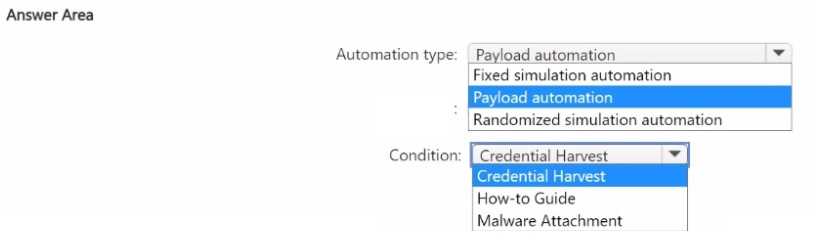
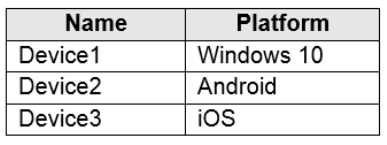 You plan to perform the following device management tasks in Microsoft Endpoint Manager: Deploy a VPN connection by using a VPN device configuration profile. Configure security settings by using an Endpoint Protection device configuration profile. You support the management tasks. What should you identify? To answer, select the appropriate options in the answer area. NOTE: Each correct selection is worth one point.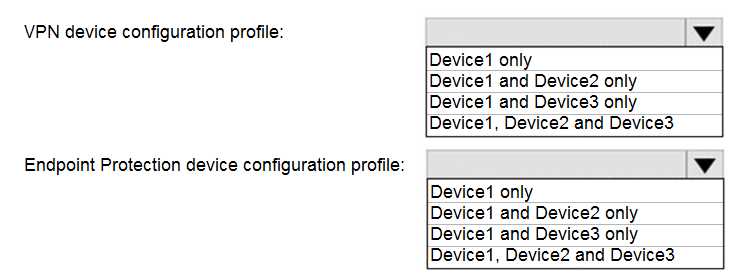
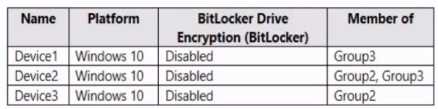 The device compliance policies in Endpoint Manager are configured as shown in the following table.
 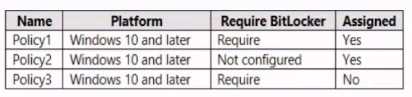 The device compliance policies have the assignments shown in the following table.
 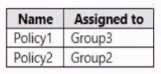 For each of the following statements, select Yes if the statement is true. Otherwise, select No. NOTE: Each correct selection is worth one point.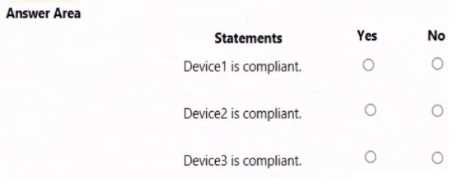
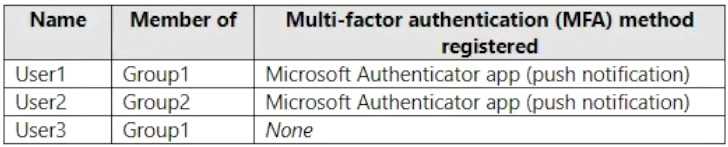 You configure the Microsoft Authenticator authentication method policy to enable passwordless authentication as shown in the following exhibit. Both User1 and User2 report that they are NOT prompted for passwordless sign-in in the Microsoft Authenticator app. For each of the following statements, select Yes if the statement is true. Otherwise, select No. NOTE: Each correct selection is worth one point.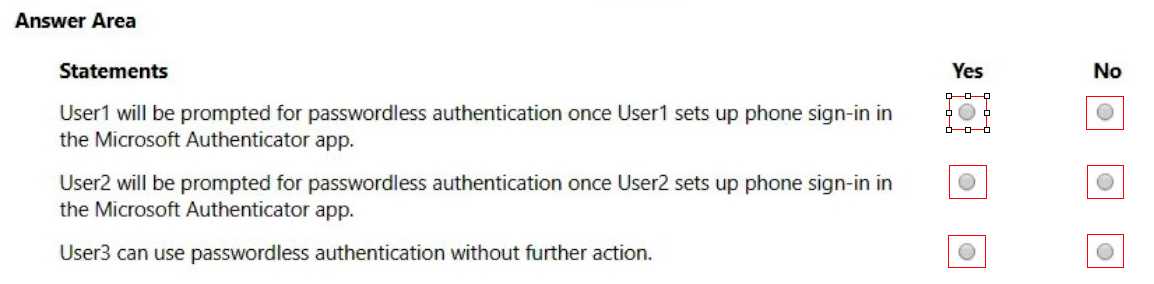
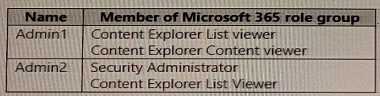 You have labels in Microsoft 365 as shown in the following table.
 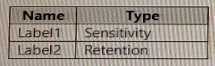 The content in Microsoft 365 is assigned labels as shown in the following table.
  You have labels In Microsoft 365 as shown in the following table. For each of the following statements, select Yes if the statement is true. Otherwise, select No.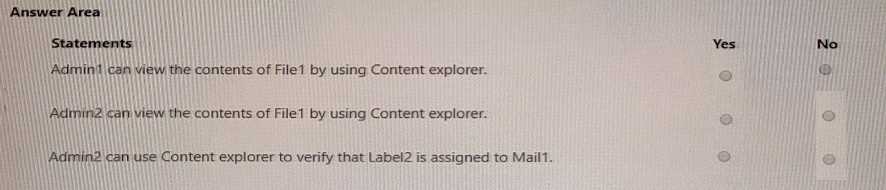
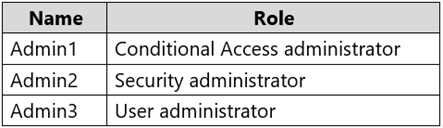 The tenant has a conditional access policy that has the following configurations: Name: Policy1 Assignments: - Users and groups: Group1 - Cloud aps or actions: All cloud apps Access controls: Grant, require multi-factor authentication Enable policy: Report-only You set Enabled Security defaults to Yes for the tenant. For each of the following settings select Yes, if the statement is true. Otherwise, select No. NOTE: Each correct selection is worth one point.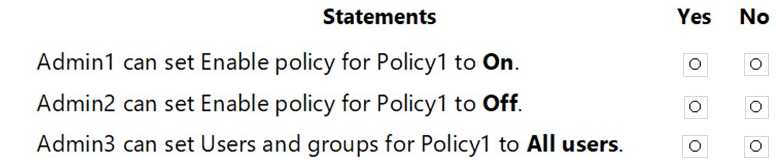


 You apply Retention! to all the Microsoft OneDrive content.
On January 1, 2020, a user stores a file named File1 in OneDrive.
On January 10, 2020, the user modifies File1.
On February 1, 2020, the user deletes File1.
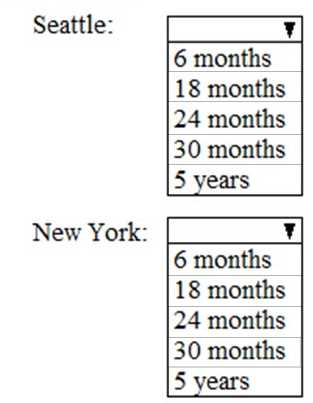
When will File1 be removed permanently and unrecoverable from OneDrive?
You apply Retention! to all the Microsoft OneDrive content.
On January 1, 2020, a user stores a file named File1 in OneDrive.
On January 10, 2020, the user modifies File1.
On February 1, 2020, the user deletes File1.
When will File1 be removed permanently and unrecoverable from OneDrive?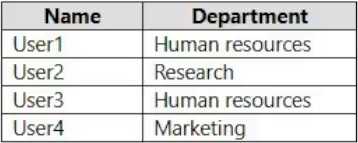 You need to configure group-based licensing to meet the following requirements:
To all users, deploy an Office 365 E3 license without the Power Automate license option.
To all users, deploy an Enterprise Mobility + Security E5 license.
To the users in the research department only, deploy a Power BI Pro license.
To the users in the marketing department only, deploy a Visio Plan 2 license.
What is the minimum number of deployment groups required?
You need to configure group-based licensing to meet the following requirements:
To all users, deploy an Office 365 E3 license without the Power Automate license option.
To all users, deploy an Enterprise Mobility + Security E5 license.
To the users in the research department only, deploy a Power BI Pro license.
To the users in the marketing department only, deploy a Visio Plan 2 license.
What is the minimum number of deployment groups required?