Free GSEC Practice Test Questions and Answers (2026)

Last Update Check

View Mode
Q: 1
What technique makes it difficult for attackers to predict the memory address space location for code execution?
Options
1 comment in the community discussion
C/D? I'm not sure, but I think D is the one that randomizes memory addresses. Can someone confirm if that's right?
Q: 2
When an IIS filename extension is mapped, what does this mean?
Options
4 comments in the community discussion
2
Option B matches what IIS handler mappings actually do. Mapping ties the file extension to a process like ASP.NET or PHP, so the server hands the file and request data to that interpreter. There's a catch: for static files like .html, you might not want a mapping. Anyone disagree?
Its B for sure, that's how IIS knows to send files like .aspx or .php to the right interpreter for processing. The whole request with data gets handed off, not just the file. Pretty basic web server behavior. Let me know if anyone saw something different with custom handlers.
Q: 3
Which of the following SIP methods is used to setup a new session and add a caller?
Options
3 comments in the community discussion
1
Is the question asking about setting up the session or actually adding an additional participant to an ongoing call? If it's about call initiation, D fits, but for adding someone mid-call, it might matter.
Q: 4
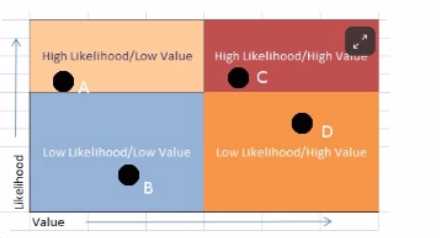
An IT security manager is trying to quickly assess the risks associated with not implementing a corporate firewall system. What sort of risk assessment is most appropriate?
Options
3 comments in the community discussion
If the question asked for the most detailed or data-driven assessment instead of quick, would that change it to C?
Q: 5
You work as a Network Administrator for Net World Inc. The company has a Linux-based network. For testing purposes, you have configured a default IP-table with several filtering rules. You want to reconfigure the table. For this, you decide to remove the rules from all the chains in the table. Which of the following commands will you use?
Options
2 comments in the community discussion
1
DPretty sure it's D since iptables -F flushes all rules from every chain, which is what you need before starting fresh. Still get mixed up with the flags sometimes, so if someone disagrees let me know.
Probably D here. The -F option flushes all the rules from every chain, which is exactly what you'd want if you're wiping everything to start clean.
Q: 6
You have set up a local area network for your company. Your firewall separates your network into several sections: a DMZ with semi-public servers (web, dns, email) and an intranet with private servers. A penetration tester gains access to both sections and installs sniffers in each. He is able to capture network traffic for all the devices in the private section but only for one device (the device with the sniffer) in the DMZ. What can be inferred about the design of the system?
Options
5 comments in the community discussion
B tbh, classic hub behavior in the private zone since sniffers see all traffic there. Only seeing one device in the DMZ points to a switch setup. Seen similar logic show up on practice exams.
Option B, but if the private section had VLANs or port mirroring set up on a switch, that might change things.
Q: 7

Open the MATE terminal and use the tcpdump program to read - /pcaps /cass tech.pcap. What is the source port number? GIAC GSEC question GIAC GSEC question

Options
2 comments in the community discussion
Probably B here. Port 123 is NTP and looks like the type of source port seen in some packet captures. Not fully sure without seeing the actual tcpdump output though.
Q: 8
What is TRUE about Workgroups and Domain Controllers?
Options
5 comments in the community discussion
Its C
E imo, saw this in a similar exam question and stand-alone computers can be on the same network as domain members.
Q: 9
What is a recommended defense against SQL injection, OS injection, and buffer overflows?
Options
5 comments in the community discussion
2
B tbh. Had something like this in a mock, the best defense against all those is solid input validation. Option B covers the root issue for injection and memory attacks. If anyone disagrees let me know, but pretty sure it's B.
1
Need to validate user input here, so B. That’s the main control to block these types of attacks.
Q: 10
Which of the following services resolves host name to IP Address?
Options
3 comments in the community discussion
1
Had something like this in a mock, on some practice sets, it's C.
CDNS is the protocol that actually maps host names to IP addresses. DHCP assigns IPs, but doesn’t translate names. The rest don’t resolve hostnames like DNS does. Pretty sure it’s C but open to feedback.
Q: 11
How can an adversary utilize a stolen database of unsalted password hashes?
Options
Q: 12
Which of the following Unix syslog message priorities is the MOST severe?
Options
1 comment in the community discussion
Option D
Q: 13
Your CIO has found out that it is possible for an attacker to clone your company's RFID (Radio Frequency ID) based key cards. The CIO has tasked you with finding a way to ensure that anyone entering the building is an employee. Which of the following authentication types would be the appropriate solution to this problem?
Options
1 comment in the community discussion
C tbh. Two-factor makes sense here since just the RFID can be cloned, so adding another factor like a PIN or fingerprint makes it much harder for someone who's not an employee to get in. Don't think MAC or Bell-LaPadula fits this physical access issue. Let me know if anyone disagrees.
Q: 14
Which of the following areas of a network contains DNS servers and Web servers for Internet users?
Options
1 comment in the community discussion
D imo, DMZ is where you'd put DNS and web servers for external access. Makes sense based on network segmentation best practices.
Q: 15
In an Active Directory domain, which is the preferred method of keeping host computers patched?
Options
2 comments in the community discussion
4
Official guide and MS docs both point to A for centralized control. Option A
Q: 16
Why would someone use port 80 for deployment of unauthorized services?
Options
1 comment in the community discussion
7
Option D. Port 80 is usually open for web traffic, so using it can help bypass firewalls. Makes sense for sneaky deployments.
Q: 17
Which of the four basic transformations in the AES algorithm involves the leftward circular movement of state data?
Options
1 comment in the community discussion
1
Its B, cause MixColumns does the mixing right? Shift Rows just sounds like moving stuff but not sure it's left.
Q: 18
When are Group Policy Objects (GPOs) NOT applied automatically to workstations?
Options
2 comments in the community discussion
1
For me, A. I thought GPOs also weren't applied strictly every 90 minutes, but rather on a randomized interval so A seemed like a possible trap. Not totally sure though, since launching Windows Explorer definitely shouldn't trigger any policy refresh. Kind of torn between A and C.
1
Option A
Q: 19
What is the name of the command-line tool for Windows that can be used to manage audit policies on remote systems?
Options
Q: 20
Analyze the screenshot below. In what order should the vulnerabilities be remediated? GIAC GSEC question
Options
1 comment in the community discussion
Its C. Similar question popped up in some practice tests and official guide, so worth double checking that order.
Question 1 of 35

What's covered in this practice questions set

13: Network Security Essentials · 2 questions

📖 About this Domain

This domain covers foundational network security principles and technologies. You will explore core networking protocols, common security devices, and fundamental defense-in-depth strategies. It establishes the baseline for understanding how to secure network infrastructure.

🎓 What You Will Learn

  • Understand the TCP/IP protocol suite and the OSI model to analyze network traffic and identify vulnerabilities.
  • Learn the functions and placement of network security devices like firewalls, proxies, and Network Intrusion Detection/Prevention Systems (NIDS/NIPS).
  • Grasp network segmentation concepts, including VLANs and subnetting, to implement defense-in-depth.
  • Explore network address translation (NAT) and its security implications for private networks.

🛠️ Skills You Will Build

  • Ability to analyze network traffic flows and identify anomalous activity based on protocol behavior.
  • Skill in evaluating firewall rule sets and network access control lists (ACLs) for proper security posture.
  • Competency in designing basic secure network architectures using concepts like DMZs and network segmentation.
  • Proficiency in identifying key protocol headers and fields within TCP, UDP, and IP packets for security analysis.

💡 Top Tips to Prepare

  • Create a detailed index of TCP/IP headers, common port numbers, and the functions of each OSI model layer.
  • Practice the SANS SEC401 labs related to packet analysis and firewall configuration to solidify practical knowledge.
  • Memorize the TCP three-way handshake and the key flags like SYN, ACK, FIN, and RST.
  • Focus on understanding the 'why' behind device placement, such as positioning a NIDS sensor or a web application firewall.

7: Enforcing Windows Security Policy · 2 questions

📖 About this Domain

This domain covers hardening Windows systems using centralized policy management. You will focus on Group Policy Objects (GPOs), security templates, and built-in controls to enforce security baselines across an enterprise.

🎓 What You Will Learn

  • Learn to create, link, and troubleshoot GPOs within an Active Directory infrastructure.
  • Understand the application of security templates and baselines for consistent system hardening.
  • Configure AppLocker rules to implement application whitelisting and prevent unauthorized code execution.
  • Deploy and manage BitLocker Drive Encryption to enforce data-at-rest protection on endpoints.

🛠️ Skills You Will Build

  • Gain proficiency in GPO administration using the Group Policy Management Console (GPMC).
  • Develop the ability to harden Windows clients and servers by manipulating security options and user rights.
  • Implement endpoint security controls like AppLocker and BitLocker for defense-in-depth.
  • Troubleshoot policy conflicts using tools like gpresult and Resultant Set of Policy (RSoP).

💡 Top Tips to Prepare

  • Master the LSDOU rule for GPO processing and understand block inheritance and enforced links.
  • Practice applying Microsoft Security Compliance Toolkit (SCT) baselines to a test system.
  • Know the difference between AppLocker's publisher, path, and file hash rules and their operational impact.
  • Understand the process for storing and retrieving BitLocker recovery keys in Active Directory.

11: Malicious Code and Exploit Mitigation · 1 questions

📖 About this Domain

This domain details the taxonomy and behavior of malicious code, including viruses, worms, trojans, and ransomware. It covers common attack vectors used for malware delivery and the exploitation of system vulnerabilities. The focus is on implementing layered defenses to mitigate these threats effectively.

🎓 What You Will Learn

  • You will learn to classify malware types based on their propagation, payload, and concealment mechanisms.
  • You will understand the attack chain of client-side exploits, including the role of exploit kits and drive-by downloads.
  • You will learn about advanced persistent threats (APTs) and their use of custom malware for long-term intrusion.
  • You will explore defensive technologies like anti-virus, host-based intrusion prevention systems (HIPS), and application control.

🛠️ Skills You Will Build

  • You will build the skill to identify malware infection vectors and indicators of compromise (IOCs).
  • You will develop the ability to implement and configure endpoint security controls to block malicious code execution.
  • You will gain proficiency in applying exploit mitigation techniques like Data Execution Prevention (DEP) and Address Space Layout Randomization (ASLR).
  • You will build skills in hardening systems against common malware delivery methods like phishing and malicious attachments.

💡 Top Tips to Prepare

  • Memorize the distinct characteristics and operational goals of different malware families, from spyware to crypto-miners.
  • Focus on the sequence of a client-side attack, from initial contact to payload delivery and command-and-control (C2) communication.
  • Index specific mitigation strategies for each malware type, such as application whitelisting for ransomware.
  • Understand how modern endpoint detection and response (EDR) tools provide visibility beyond traditional signature-based anti-virus.

15: Securing Windows Services: DNS, IIS, and RDP · 1 questions

📖 About this Domain

This domain focuses on the security hardening of essential Windows network services. It covers the technical configurations required to mitigate common attack vectors against Domain Name System (DNS), Internet Information Services (IIS), and Remote Desktop Protocol (RDP). The objective is to reduce the attack surface presented by these default services in an enterprise environment.

🎓 What You Will Learn

  • You will learn to secure DNS by implementing DNSSEC for zone integrity and configuring Response Rate Limiting to thwart amplification attacks.
  • You will learn to harden IIS web servers by configuring request filtering, managing application pool identities, and removing unnecessary modules.
  • You will learn to secure RDP by enforcing Network Level Authentication (NLA), utilizing Remote Desktop Gateway, and restricting access via firewall rules.
  • You will learn to audit these services by enabling and analyzing specific event logs to detect unauthorized access attempts and configuration changes.

🛠️ Skills You Will Build

  • You will build the skill to apply security configuration baselines to Windows services using Group Policy Objects (GPOs) and security templates.
  • You will build the ability to identify and remediate service-specific vulnerabilities like DNS zone transfers, IIS directory traversal, and RDP brute-force attacks.
  • You will build proficiency in using PowerShell for automating the security configuration and auditing of DNS, IIS, and RDP settings.
  • You will build the capability to analyze service logs and network traffic to identify indicators of compromise related to these Windows services.

💡 Top Tips to Prepare

  • Create detailed index entries for specific PowerShell cmdlets and GPO settings related to DNSSEC, NLA, and IIS request filtering.
  • Practice hands-on labs to configure a Remote Desktop Gateway and apply security templates to an IIS installation.
  • Understand the attack chain for common exploits against these services, such as DNS cache poisoning or pass-the-hash over RDP.
  • Memorize the purpose of key security features like Network Level Authentication (NLA) and DNSSEC to answer conceptual questions quickly.

19: Web Communication Security · 1 questions

📖 About this Domain

This domain covers securing web data-in-transit via Transport Layer Security (TLS) and its predecessor, SSL. It details the cryptographic mechanisms, including the TLS handshake, digital certificates, and the Public Key Infrastructure (PKI) trust model.

🎓 What You Will Learn

  • You will learn the sequence of the TLS handshake, including cipher suite negotiation and session key generation.
  • You will learn the structure of X.509 certificates and the role of Certificate Authorities (CAs) in establishing trust.
  • You will learn how symmetric and asymmetric cryptography are used together to secure an HTTPS session.
  • You will learn to identify common attacks against web encryption, such as weak cipher exploits and man-in-the-middle (MITM) attacks.

🛠️ Skills You Will Build

  • You will build the skill to analyze TLS/SSL traffic captures to verify protocol versions and negotiated cryptographic parameters.
  • You will build the skill to validate a certificate's chain of trust and check its revocation status using OCSP or CRLs.
  • You will build the ability to assess web server TLS configurations for security weaknesses like legacy protocol support.
  • You will build the skill to use tools like OpenSSL for command-line inspection of certificates and secure connections.

💡 Top Tips to Prepare

  • Create a detailed index of the TLS handshake process, as exam questions target specific steps like the Client Hello and Server Key Exchange.
  • Practice using the OpenSSL s_client command to connect to web servers and analyze the certificate and connection details.
  • Index the key terms related to PKI, such as Root CA, Intermediate CA, CRL, and OCSP, for quick lookup during the exam.
  • Understand the security differences between TLS versions, especially the cryptographic improvements in TLS 1.3 over 1.2.

16: Security Policy · 1 questions

📖 About this Domain

This domain covers the foundational role of security policies in establishing an organization's information security program. It focuses on the lifecycle of policy development, from creation and implementation to enforcement and review.

🎓 What You Will Learn

  • Differentiate between policies, standards, guidelines, and procedures to build a structured documentation framework.
  • Learn the policy lifecycle, including drafting, stakeholder review, approval, dissemination, and periodic review.
  • Identify critical security policies such as Acceptable Use Policy (AUP), data classification, and access control policies.
  • Understand methods for policy enforcement, compliance monitoring, and handling non-compliance incidents.

🛠️ Skills You Will Build

  • Develop the ability to write clear, concise, and enforceable security policy documents.
  • Align security policies with industry-standard frameworks like NIST CSF or ISO 27001.
  • Communicate policy requirements effectively to both technical and non-technical stakeholders for buy-in.
  • Evaluate existing policies for gaps, relevance, and compliance with regulatory requirements.

💡 Top Tips to Prepare

  • Create detailed index entries for key terms like 'policy,' 'standard,' 'guideline,' and 'procedure'.
  • Memorize the policy documentation hierarchy and the purpose of each level.
  • Focus on the 'why' behind a policy, linking specific policies to the business risks they mitigate.
  • Use practice questions to apply policy concepts to scenarios involving AUP violations or data handling incidents.

9: Linux: Security and Administration · 1 questions

📖 About this Domain

This domain covers foundational Linux administration from a security perspective. It emphasizes command-line interaction for managing users, permissions, and system services to establish a secure baseline. The focus is on practical hardening techniques and log analysis on a Linux host.

🎓 What You Will Learn

  • You will learn to manage Linux user accounts, groups, and password policies using command-line utilities.
  • You will learn to interpret and configure standard permissions, special permissions like SUID/SGID, and Access Control Lists (ACLs).
  • You will learn system hardening techniques including service management with systemd and firewall configuration with iptables.
  • You will learn to locate and analyze critical system logs for security events and troubleshooting.

🛠️ Skills You Will Build

  • Ability to manipulate file and directory permissions using chmod, chown, and setfacl.
  • Competence in securing the SSH daemon by modifying its sshd_config file.
  • Proficiency in parsing log files using tools like grep, tail, and journalctl to find indicators of compromise.
  • Skill in managing system services and daemons to reduce the system's attack surface.

💡 Top Tips to Prepare

  • Master the command-line syntax for user and permission management; expect practical application questions.
  • Index the locations and common directives for key configuration files like /etc/passwd, /etc/shadow, and /etc/sudoers.
  • Practice reading log snippets to quickly identify failed logins, privilege escalations, and service errors.
  • Understand the octal notation for permissions and the specific functions of SUID, SGID, and the sticky bit.

6: Endpoint Security · 1 questions

📖 About this Domain

Endpoint Security focuses on securing end-user devices like workstations, laptops, and servers from threats. This domain covers the technologies and hardening techniques used to protect systems at the host level against malware and unauthorized access.

🎓 What You Will Learn

  • You will learn to implement and manage anti-malware technologies, including signature-based antivirus and behavior-based Endpoint Detection and Response (EDR).
  • You will understand the configuration of host-based firewalls and Host-Based Intrusion Prevention Systems (HIPS) to control network access and block attacks.
  • You will learn application control strategies such as whitelisting with AppLocker to restrict unauthorized software execution.
  • You will explore data protection controls like Full Disk Encryption (FDE) with BitLocker and Data Loss Prevention (DLP) to prevent data exfiltration.

🛠️ Skills You Will Build

  • You will build the skill to harden operating systems by applying security baselines and disabling non-essential services.
  • You will develop the ability to analyze endpoint logs from security tools to identify indicators of compromise (IOCs).
  • You will gain proficiency in deploying and configuring endpoint security solutions to enforce organizational security policy.
  • You will acquire the skill to implement data-at-rest protection mechanisms to secure sensitive information on endpoints.

💡 Top Tips to Prepare

  • Index key terms and commands for tools like AppLocker, BitLocker, and host-based firewalls for quick reference during the exam.
  • Practice configuring security settings in both Windows and Linux environments to understand platform-specific hardening techniques.
  • Clearly differentiate between related concepts like HIDS vs. HIPS and blacklisting vs. whitelisting.
  • Focus on the security objectives behind each control, such as how EDR provides visibility that traditional AV lacks.

14: Penetration Testing and Ethical Hacking · 1 questions

📖 About this Domain

This domain covers the fundamentals of offensive security operations. It details the structured methodologies and core tools used in penetration testing and ethical hacking. The objective is to understand attacker techniques to improve defensive security postures.

🎓 What You Will Learn

  • You will learn the formal penetration testing methodology, including reconnaissance, scanning, gaining access, maintaining access, and covering tracks.
  • You will learn to use key tools like Nmap for port scanning, Nessus for vulnerability scanning, and Metasploit for exploitation.
  • You will learn the difference between various types of security assessments, such as vulnerability scanning versus penetration testing.
  • You will learn the concepts of exploitation, privilege escalation, and pivoting within a compromised network.

🛠️ Skills You Will Build

  • You will build the skill to interpret the output from network mappers and vulnerability scanners to identify potential attack vectors.
  • You will build the ability to apply a systematic, multi-phased approach to discovering and validating security flaws.
  • You will build proficiency in recognizing common vulnerabilities and the types of exploits used to leverage them.
  • You will build an understanding of the attacker's mindset and the kill chain methodology for offensive operations.

💡 Top Tips to Prepare

  • Focus on the specific phases of the penetration testing lifecycle and the key activities performed in each stage.
  • Create detailed index entries for core tools like Nmap, Netcat, and Metasploit, including their primary purpose and common flags.
  • Understand the distinction between active and passive reconnaissance techniques and the information they yield.
  • Practice identifying the purpose of different Nmap scan types, such as SYN stealth scans versus TCP connect scans.

20: Windows Access Controls · 1 questions

📖 About this Domain

This domain covers the Windows access control model, a critical component for system hardening. You will examine how Security Descriptors, Access Control Lists (ACLs), and Access Control Entries (ACEs) are used to enforce permissions on securable objects.

🎓 What You Will Learn

  • You will learn to differentiate between Discretionary Access Control Lists (DACLs) for permissions and System Access Control Lists (SACLs) for auditing.
  • You will learn how an access token, containing a user's Security Identifier (SID) and group memberships, is evaluated against an object's ACL.
  • You will learn to parse the components of an Access Control Entry (ACE), including the SID, access mask, and ACE type.
  • You will learn the hierarchy and impact of NTFS permissions, including inheritance and the precedence of explicit deny.

🛠️ Skills You Will Build

  • You will build the skill to audit and configure file and folder permissions using both the GUI and the icacls command-line utility.
  • You will build the ability to apply the principle of least privilege by correctly setting granular NTFS permissions.
  • You will build proficiency in identifying misconfigurations like the 'Everyone' group having Full Control on sensitive resources.
  • You will build the capability to interpret Security Descriptor Definition Language (SDDL) to understand complex permission sets.

💡 Top Tips to Prepare

  • For the exam, create an index page detailing the order of ACE evaluation, where explicit deny permissions are processed first.
  • Practice using icacls to save and restore ACLs, as command-line proficiency is tested.
  • Memorize the key well-known SIDs, such as S-1-1-0 for 'Everyone' and S-1-5-18 for 'Local System'.
  • Understand the difference between modifying a file's contents and changing its permissions; these are distinct rights in the access mask.

12: Network Device Security · 1 questions

📖 About this Domain

This domain covers hardening network infrastructure devices like routers, switches, and wireless access points. The focus is on establishing secure baselines and mitigating layer 2 and layer 3 threats through proper configuration.

🎓 What You Will Learn

  • Implement router and switch security controls, including disabling unused ports, configuring secure management access via SSH, and setting up port security with MAC address filtering.
  • Differentiate and configure wireless security protocols like WPA2/WPA3-Personal (PSK) and WPA2/WPA3-Enterprise (802.1X).
  • Understand the 802.1X framework for Network Access Control (NAC), including the roles of the supplicant, authenticator, and authentication server.
  • Utilize Virtual LANs (VLANs) for network segmentation and understand attack vectors like VLAN hopping and double tagging.

🛠️ Skills You Will Build

  • Apply secure baseline configurations to network hardware using command-line interfaces (CLI) like Cisco IOS.
  • Analyze wireless network traffic to identify insecure protocols and misconfigurations.
  • Implement network segmentation strategies using VLANs and Access Control Lists (ACLs) to control traffic flow.
  • Enforce device authentication and authorization policies using port-based NAC and 802.1X.

💡 Top Tips to Prepare

  • Practice common Cisco IOS hardening commands for securing VTY lines, console access, and implementing port security.
  • Index specific configuration steps for WPA2/WPA3-Enterprise and the components of an 802.1X deployment.
  • Lab out VLAN configurations and ACL rule processing to understand traffic filtering logic between subnets.
  • Differentiate between standard and extended ACLs and their proper placement within a network topology.

1: Access Control and Password Management · 1 questions

📖 About this Domain

This domain covers the fundamental concepts of controlling access to information systems and resources. It focuses on the core principles of Authentication, Authorization, and Accountability (AAA) and the technical implementation of password security controls.

🎓 What You Will Learn

  • You will learn to differentiate between access control models like Discretionary Access Control (DAC), Mandatory Access Control (MAC), and Role-Based Access Control (RBAC).
  • You will learn password management fundamentals including complexity, history, aging, and secure storage via cryptographic hashing and salting.
  • You will learn about authentication technologies such as multi-factor authentication (MFA), Kerberos, and single sign-on (SSO) frameworks.
  • You will learn the principles of least privilege, separation of duties, and proper account lifecycle management from creation to de-provisioning.

🛠️ Skills You Will Build

  • You will build the skill to configure and interpret Access Control Lists (ACLs) on both Windows (NTFS) and Linux (POSIX) file systems.
  • You will build the skill to assess password strength and audit password databases for weak credentials using common cracking tools.
  • You will build the skill to implement and enforce strong password policies within an enterprise environment like Active Directory.
  • You will build the skill to apply the principle of least privilege when provisioning user and service accounts.

💡 Top Tips to Prepare

  • Create a detailed index for password hashing algorithms like NTLM, bcrypt, and PBKDF2, noting their specific properties and weaknesses.
  • Use hands-on labs to practice command-line permission tools such as `chmod`, `chown`, and `icacls` until they are second nature.
  • Memorize the exact definitions and differences between Authentication, Authorization, and Accountability (AAA).
  • Develop a quick-reference chart comparing DAC, MAC, and RBAC, focusing on who controls access in each model.

10: Log Management and SIEM · 1 questions

📖 About this Domain

This domain covers the collection, management, and analysis of security log data. It focuses on using a Security Information and Event Management (SIEM) system for centralized logging, event correlation, and threat detection. The core objective is turning raw log data into actionable security intelligence.

🎓 What You Will Learn

  • You will learn to identify critical log sources like firewalls, proxies, and endpoints and configure log aggregation.
  • You will learn the architecture of a SIEM, including its collectors, parsers, and correlation engine.
  • You will learn how to write and tune correlation rules to detect attack patterns and reduce false positives.
  • You will learn to use log data for incident investigation and basic digital forensics.

🛠️ Skills You Will Build

  • You will build the skill to configure log forwarding from diverse network and host-based systems to a central SIEM.
  • You will build the skill to perform log analysis to identify indicators of compromise (IOCs) and anomalous activity.
  • You will build the skill to triage SIEM alerts to differentiate between true security incidents and benign events.
  • You will build the skill to leverage SIEM capabilities for compliance monitoring and reporting.

💡 Top Tips to Prepare

  • Master the common log formats, especially syslog, Windows Event Logs, and web server logs.
  • Understand the complete SIEM data pipeline: collection, normalization, aggregation, correlation, and alerting.
  • Practice creating simple correlation rules for attack scenarios like brute-force attempts or data exfiltration.
  • Index key terms like HIDS/NIDS, log parsing, event correlation, and data retention for quick lookup.

2: Cloud Security: Core Concepts and Security Controls · 1 questions

📖 About this Domain

This domain introduces fundamental cloud security principles and the security architecture of major cloud providers. It focuses on service models like IaaS, PaaS, and SaaS, and the critical shared responsibility model.

🎓 What You Will Learn

  • You will learn to identify and differentiate cloud service and deployment models.
  • You will understand the shared responsibility model and how it applies to cloud security tasks.
  • You will learn about core cloud security controls, including Identity and Access Management (IAM) and network security.
  • You will be introduced to security concepts for cloud-native technologies like containers and serverless functions.

🛠️ Skills You Will Build

  • You will build the skill to apply the shared responsibility model to different cloud scenarios.
  • You will build competence in configuring basic IAM policies and roles for least privilege access.
  • You will build the ability to implement fundamental cloud network security controls like security groups.
  • You will build the skill to identify security risks associated with cloud infrastructure and services.

💡 Top Tips to Prepare

  • Master the shared responsibility model for AWS, Azure, and GCP as it is a core exam concept.
  • Create a detailed index of cloud-specific acronyms, services, and their security functions.
  • Practice applying IAM principles through hands-on labs or conceptual problem-solving.
  • Focus on understanding the security differences between on-premises infrastructure and cloud IaaS.

5: Defensible Network Architecture · 1 questions

📖 About this Domain

This domain covers the design and implementation of secure network architectures. It emphasizes defense-in-depth, network segmentation, and securing network infrastructure components to create a resilient and monitored environment.

🎓 What You Will Learn

  • Learn to implement network segmentation using DMZs, VLANs, and private zones to control traffic flow and isolate assets.
  • Understand how to harden network devices like routers and switches by securing management interfaces and disabling unused services.
  • Grasp the implementation of Network Access Control (NAC) using 802.1X to enforce endpoint security posture.
  • Learn to secure wireless networks by configuring WPA3-Enterprise, EAP, and deploying wireless intrusion prevention systems (WIPS).

🛠️ Skills You Will Build

  • Build the ability to design and implement granular firewall and router ACLs for effective ingress and egress filtering.
  • Develop the skill to place network-based IDS/IPS sensors and interpret their alerts for threat detection.
  • Gain proficiency in designing a layered security architecture that applies the principle of defense-in-depth.
  • Learn to analyze packet captures with tools like tcpdump to identify anomalous network behavior and security incidents.

💡 Top Tips to Prepare

  • Master IPv4/IPv6 subnetting and CIDR notation as it is critical for understanding ACLs and network segmentation.
  • Create detailed index entries for common TCP/UDP ports, protocols, and their security implications for quick reference.
  • Practice configuring router ACLs and firewall rules in a lab environment to understand traffic flow and rule processing order.
  • Memorize the OSI and TCP/IP models to understand how different security controls operate at each layer.

4: Cryptography: Fundamentals · 1 questions

📖 About this Domain

This domain covers the foundational principles of cryptography, focusing on the core security services of confidentiality, integrity, and authentication. You will explore the mechanics of symmetric and asymmetric encryption, hashing algorithms, and their role in securing data at rest and in transit.

🎓 What You Will Learn

  • Differentiate between symmetric encryption algorithms like AES and asymmetric algorithms like RSA, including their respective use cases for bulk encryption and key exchange.
  • Understand the function of cryptographic hashing algorithms such as SHA-256 to ensure data integrity and their one-way, collision-resistant properties.
  • Grasp the concepts of digital signatures and certificates for providing authentication, non-repudiation, and integrity through public key infrastructure (PKI).
  • Identify the fundamental principles of key management, including the generation, distribution, and storage of cryptographic keys.

🛠️ Skills You Will Build

  • Ability to select the appropriate cryptographic algorithm, such as AES for confidentiality or RSA for key exchange, based on security requirements.
  • Skill in using hashing tools to generate and compare checksums like SHA-256 to verify file integrity.
  • Competency in explaining the process of creating a digital signature and the role of a Certificate Authority (CA) in a PKI.
  • Capability to articulate the fundamental differences between block ciphers and stream ciphers and their modes of operation.

💡 Top Tips to Prepare

  • Create a detailed index of symmetric vs. asymmetric algorithms, their key lengths, and common use cases for quick reference during the exam.
  • Memorize the core properties of hashing (one-way, collision resistance) and the security status of common algorithms like MD5, SHA-1, and SHA-2.
  • Practice explaining the key exchange process for both symmetric (e.g., Diffie-Hellman) and asymmetric (e.g., RSA) systems to solidify your understanding.
  • Focus on the 'why' behind using specific crypto tools, such as PKI for authentication, rather than just memorizing acronyms.

21: Windows Automation, Auditing, and Forensics · 1 questions

📖 About this Domain

This domain focuses on leveraging native Windows capabilities for security operations. It covers scripting with PowerShell for automation, configuring system auditing for detection, and using tools for initial forensic investigations.

🎓 What You Will Learn

  • You will learn to use PowerShell for automating security tasks and configuration management across Windows systems.
  • You will understand how to enable and interpret Windows security auditing to track user activity and system changes.
  • You will discover methods for performing live response and collecting volatile data from potentially compromised hosts.
  • You will explore the Sysinternals suite for in-depth system analysis, malware hunting, and troubleshooting.

🛠️ Skills You Will Build

  • You will build the ability to write PowerShell scripts to automate security baselining and data collection.
  • You will develop proficiency in analyzing Windows Event Logs to identify Indicators of Compromise (IOCs).
  • You will gain skills in using tools like Process Monitor and Autoruns to detect persistence mechanisms and anomalous behavior.
  • You will acquire foundational digital forensics skills for evidence preservation on live Windows systems.

💡 Top Tips to Prepare

  • Practice common PowerShell cmdlets for process, service, and event log manipulation in a lab environment.
  • Create detailed index references for key Windows Event IDs related to authentication, object access, and process tracking.
  • Familiarize yourself with the specific purpose of core Sysinternals tools like Procmon, Autoruns, and PsExec.
  • Understand the order of volatility to prioritize data collection during a live forensic response scenario.

18: Vulnerability Scanning and Penetration Testing · 1 questions

📖 About this Domain

This domain covers proactive security assessment through automated and manual techniques. It details the methodologies for identifying, validating, and reporting security weaknesses using vulnerability scanning and penetration testing.

🎓 What You Will Learn

  • You will learn the mechanics of vulnerability scanning, including credentialed versus non-credentialed scans and interpreting scanner output.
  • You will understand the formal phases of a penetration test, from pre-engagement interactions and reconnaissance to post-exploitation.
  • You will be introduced to foundational tools for network mapping and vulnerability discovery, such as Nmap and Nessus.
  • You will learn to prioritize discovered vulnerabilities using the Common Vulnerability Scoring System (CVSS) for effective remediation.

🛠️ Skills You Will Build

  • You will build the skill to configure and run network vulnerability scans to identify potential security flaws.
  • You will develop the ability to analyze scan reports, identify false positives, and prioritize vulnerabilities based on risk.
  • You will gain the skill to map attacker techniques to the structured phases of the Penetration Testing Execution Standard (PTES).
  • You will build proficiency in using Nmap for host discovery, port scanning, and service version detection.

💡 Top Tips to Prepare

  • Index key Nmap command-line switches for different scan types, such as SYN scans (-sS), version detection (-sV), and script scans (-sC).
  • Create a clear conceptual chart distinguishing the goals, scope, and outcomes of vulnerability scanning versus penetration testing.
  • Memorize the seven phases of the Penetration Testing Execution Standard (PTES) and the key activities within each phase.
  • Practice reading sample vulnerability scan reports to quickly locate CVEs, CVSS scores, and recommended remediation actions.

3: Cryptography: Algorithms and Deployment

📖 About this Domain

This domain covers fundamental cryptographic concepts, including symmetric and asymmetric encryption, hashing, and digital signatures. It focuses on the core algorithms and the practical deployment of cryptographic solutions like Public Key Infrastructure (PKI) to secure data.

🎓 What You Will Learn

  • Differentiate the use cases for symmetric ciphers like AES versus asymmetric ciphers like RSA.
  • Understand how hashing algorithms like SHA-256 provide data integrity and form the basis of digital signatures.
  • Grasp the components of a Public Key Infrastructure (PKI), including Certificate Authorities, Registration Authorities, and certificate revocation.
  • Identify how cryptography secures communications with protocols like TLS and protects stored data with disk encryption.

🛠️ Skills You Will Build

  • Select appropriate cryptographic algorithms and key lengths to meet specific security objectives for confidentiality and integrity.
  • Analyze the components and trust models of a PKI deployment for secure authentication and communication.
  • Utilize command-line tools like OpenSSL to perform basic cryptographic functions such as key pair and CSR generation.
  • Recognize common cryptographic attacks and understand the importance of proper implementation and algorithm choice.

💡 Top Tips to Prepare

  • Focus on the distinct purposes of symmetric, asymmetric, and hashing algorithms rather than deep mathematical details.
  • Create detailed index entries for specific algorithms (AES, RSA), PKI components (CA, CRL), and their characteristics.
  • Practice the OpenSSL commands from your course labs to build muscle memory for certificate and key management tasks.
  • Diagram the TLS handshake process to visualize how symmetric and asymmetric cryptography work together in a real-world application.

8: Incident Handling and Response

📖 About this Domain

This domain covers the six-step incident handling process for responding to security events and breaches. It focuses on structured methodologies to contain, eradicate, and recover from cyber-attacks. You will learn the operational functions of a Computer Security Incident Response Team (CSIRT).

🎓 What You Will Learn

  • You will learn the six phases of the PICERL incident response model: Preparation, Identification, Containment, Eradication, Recovery, and Lessons Learned.
  • You will understand the structure, roles, and responsibilities of a Computer Security Incident Response Team (CSIRT).
  • You will learn techniques for incident triage, including initial analysis and prioritization of security events.
  • You will understand the critical nature of post-incident activities, such as root cause analysis and lessons learned reporting.

🛠️ Skills You Will Build

  • You will build the ability to scope an incident to determine the extent of a system compromise.
  • You will develop skills to formulate and apply short-term and long-term containment strategies during an active attack.
  • You will build the skill to plan for the eradication of malicious artifacts and the recovery of systems to a secure baseline.
  • You will develop the ability to document incident response activities and create reports for technical and management audiences.

💡 Top Tips to Prepare

  • Memorize the PICERL framework and the specific actions associated with each of the six phases.
  • Focus on the different CSIRT models and the key roles and responsibilities within an incident response team.
  • Practice applying incident identification and triage concepts to sample log data and security alerts.
  • Create detailed index entries for key terms like indicator of compromise (IOC), chain of custody, containment, and eradication.

23: Windows Security Infrastructure

📖 About this Domain

This domain covers the fundamental security components within a Microsoft Windows environment. It focuses on Active Directory, Group Policy, and other built-in security mechanisms for enterprise-level control.

🎓 What You Will Learn

  • You will learn Active Directory structure, including forests, domains, and Organizational Units (OUs) for identity and access management.
  • You will learn to deploy and manage Group Policy Objects (GPOs) to enforce security settings and configurations across the network.
  • You will learn about native Windows security tools like BitLocker, AppLocker, and Windows Defender for endpoint hardening.
  • You will learn the mechanics of Windows authentication protocols like Kerberos and NTLM, and authorization through Access Control Lists (ACLs).

🛠️ Skills You Will Build

  • You will build skills in configuring GPOs and troubleshooting their application using the LSDOU processing order.
  • You will build the ability to harden Active Directory infrastructure against common credential-based attacks.
  • You will build competence in implementing endpoint security controls using native Windows features to minimize attack surfaces.
  • You will build proficiency in managing resource access by configuring Discretionary Access Control Lists (DACLs) and System Access Control Lists (SACLs).

💡 Top Tips to Prepare

  • Master the Group Policy processing order of Local, Site, Domain, OU (LSDOU) and the effect of policy enforcement.
  • Index the specific locations of critical security settings within the Group Policy Management Editor for quick lookup.
  • Understand the functional differences and use cases for Software Restriction Policies (SRP) versus AppLocker.
  • Know the default permissions and capabilities of critical Active Directory security groups like Domain Admins and Enterprise Admins.

24: Wireless Network Security

📖 About this Domain

This domain addresses the inherent vulnerabilities of wireless networking technologies. It details the security mechanisms for IEEE 802.11 networks and the common threats targeting Wi-Fi infrastructure.

🎓 What You Will Learn

  • You will learn the fundamentals of IEEE 802.11 standards, including Service Set Identifiers (SSIDs) and Basic Service Set Identifiers (BSSIDs).
  • You will learn to differentiate between wireless encryption protocols like WEP, WPA, WPA2, and WPA3, understanding their cryptographic weaknesses and strengths.
  • You will learn to identify common wireless attacks such as Rogue Access Points, Evil Twins, and deauthentication floods.
  • You will learn best practices for securing wireless networks, including implementing 802.1X with EAP and a RADIUS server for robust authentication.

🛠️ Skills You Will Build

  • You will build the skill to assess the security posture of a wireless network by identifying weak configurations and legacy protocols.
  • You will build the skill to configure secure wireless access points using WPA3-Enterprise and strong authentication mechanisms.
  • You will build the skill to detect unauthorized wireless devices and malicious traffic using wireless intrusion detection systems (WIDS).
  • You will build the skill to recommend appropriate countermeasures for specific wireless threats, such as implementing client isolation and MAC filtering.

💡 Top Tips to Prepare

  • Focus on the specific cryptographic differences and vulnerabilities between WEP, WPA, WPA2, and WPA3.
  • Understand the mechanics of attacks like the KRACK attack and deauthentication attacks, not just their names.
  • Master the components and process of 802.1X authentication, including the roles of the supplicant, authenticator, and authentication server.
  • Create detailed index entries for terms like EAP, PEAP, RADIUS, SSID, and BSSID for quick reference during the exam.

22: Windows Command Line

📖 About this Domain

This domain covers the Windows command-line, focusing on cmd.exe and PowerShell for system administration and security analysis. It emphasizes CLI-based interaction for managing Windows environments, a critical skill for security practitioners. You will learn to perform tasks without the GUI.

🎓 What You Will Learn

  • Utilize core cmd.exe commands for file system navigation, process enumeration with tasklist, and network analysis using netstat.
  • Grasp PowerShell fundamentals, including cmdlets, the pipeline, and scripting for advanced system automation and information gathering.
  • Leverage Windows Management Instrumentation (WMI) via wmic and PowerShell to query detailed system configuration and operational data.
  • Execute commands and manage remote systems using tools like PsExec and native PowerShell Remoting capabilities.

🛠️ Skills You Will Build

  • Perform rapid system triage by analyzing running processes, network connections, and user sessions directly from the CLI.
  • Develop basic automation scripts using batch files and PowerShell to streamline security checks and administrative tasks.
  • Gain proficiency in remote system administration, enabling command execution and management across a network from a single console.
  • Extract specific system artifacts and configuration details using WMI queries for forensic analysis and compliance auditing.

💡 Top Tips to Prepare

  • Practice extensively in a lab environment with commands like netstat, wmic, tasklist, and PowerShell's Get-Process and Get-NetTCPConnection.
  • Create detailed index tabs for the net command suite (net user, net localgroup, net share) and their syntax.
  • Differentiate the capabilities and syntax of cmd.exe versus PowerShell, especially for tasks like process and service management.
  • Memorize the purpose of common switches for key executables, such as -anob for netstat or /svc for tasklist.

17: Virtualization and Cloud Security

📖 About this Domain

This domain covers foundational security concepts for virtualized environments and cloud computing. It examines threats specific to hypervisors, containers, and cloud service models. Key focus is on securing virtual machines (VMs) and understanding the shared responsibility model in major cloud platforms.

🎓 What You Will Learn

  • You will learn the security implications of Type 1 (bare-metal) and Type 2 (hosted) hypervisors, including risks like VM escape.
  • You will learn to differentiate between Infrastructure as a Service (IaaS), Platform as a Service (PaaS), and Software as a Service (SaaS) security models.
  • You will learn fundamental container security concepts, including Docker and Kubernetes hardening techniques.
  • You will learn how to apply the shared responsibility model to determine security ownership for cloud assets.

🛠️ Skills You Will Build

  • You will build the skill to identify and mitigate virtualization-specific attacks like VM sprawl and resource exhaustion.
  • You will build the ability to configure baseline security controls for cloud environments, such as security groups and network ACLs.
  • You will build competence in assessing security risks associated with different cloud deployment models like public, private, and hybrid.
  • You will build the skill to articulate security responsibilities for data and infrastructure within a cloud service provider (CSP) environment.

💡 Top Tips to Prepare

  • Create a detailed index for hypervisor types, their attack surfaces, and specific vulnerabilities like VM escape.
  • Master the shared responsibility model chart; know exactly who is responsible for what in IaaS, PaaS, and SaaS.
  • Focus on the security differences between virtualization and containerization, especially regarding kernel sharing.
  • Understand the function of a Cloud Access Security Broker (CASB) and its role in enforcing security policies.
Scroll to Top