
Q: 1
A Linux administrator needs to restart a server and wants to see if any users are currently connected
to it. Which of the following commands should the administrator run to find this information?
Options
Discussion
Option C. saw similar on practice exams. w lists logged-in users, not id or man.
Not sure here but C seems right. B just gives user info, not who's logged in.
C or B depending on what "connected" means. If it's about logged-in sessions, C (
w) is right since it lists current users. But if the intent is just to view user info, B could confuse people. Leaning toward C but this kind of wording can trip you up.Was anyone able to find official guide coverage on this? I saw similar questions in some practice exams but not sure if the "w" command’s output is always expected over "who" for this scenario.
Not B, C. Only w lists everyone logged in, not just your own details.
B not C. id shows user info so might help if just checking who's connected, right?
I don't think B is right since it only shows info about your current user. The correct pick is C.
Call it C here. The
w command lists all users currently logged into the system, which is exactly what the admin needs before restarting. B just shows info about your own user account, not all sessions. Pretty sure on this, but open to other thoughts if I'm missing something.I don’t think it’s B. C is the one that lists all users currently connected, not just user info.
I don’t think it’s C. B would show user info, not sessions.
Be respectful. No spam.
 The server administrator is investigating the issue on the server and receives the following outputs:
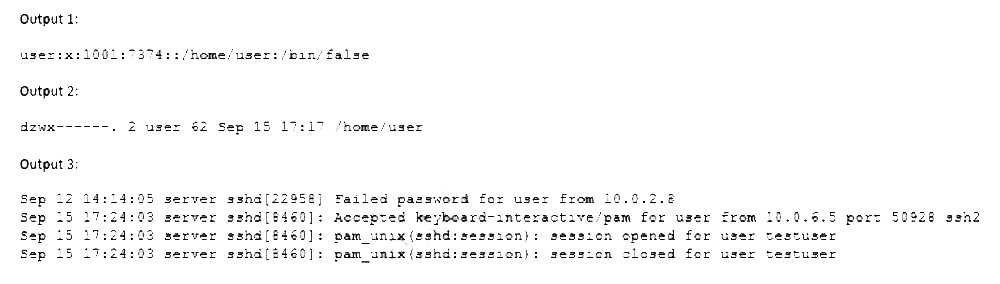 Which of the following is causing the issue?