
Q: 11
An administrator deployed a Linux server that is running a web application on port 6379/tcp.
SELinux is in enforcing mode based on organization policies.
The port is open on the firewall.
Users who are trying to connect to a local instance of the web application receive Error 13,
Permission denied.
The administrator ran some commands that resulted in the following output:
 Which of the following commands should be used to resolve the issue?
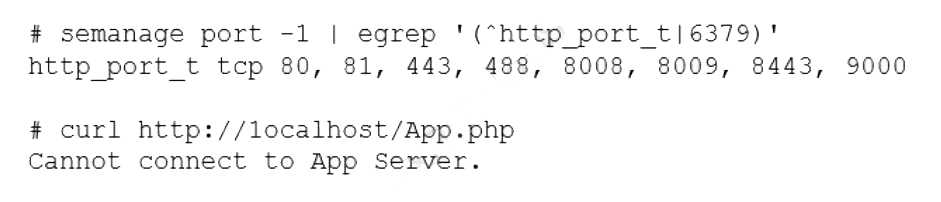 Which of the following commands should be used to resolve the issue?
Options
Discussion
Option B that's the SELinux command for adding a port to the right context. Seen this on labs and mentioned in official guides too.
Guessing D makes more sense to me since listing with
-l should verify if the port is associated with the type. That way you can check before adding anything. Might be missing something basic, though. Agree?B looks right but just noting C is a trap, typo on the protocol (should be tcp, not top). A would actually remove the port from context, which isn’t what we want. Only B adds 6379/tcp to http_port_t so SELinux allows the app through. Pretty sure B but open to correction if I'm missing something.
Yep this is B. SELinux needs to know that port 6379 is for web/http traffic, so
semanage port -a -t http_port_t -p tcp 6379 is the fix. Pretty sure that's all that's needed unless some other weird context is missing.Be respectful. No spam.
