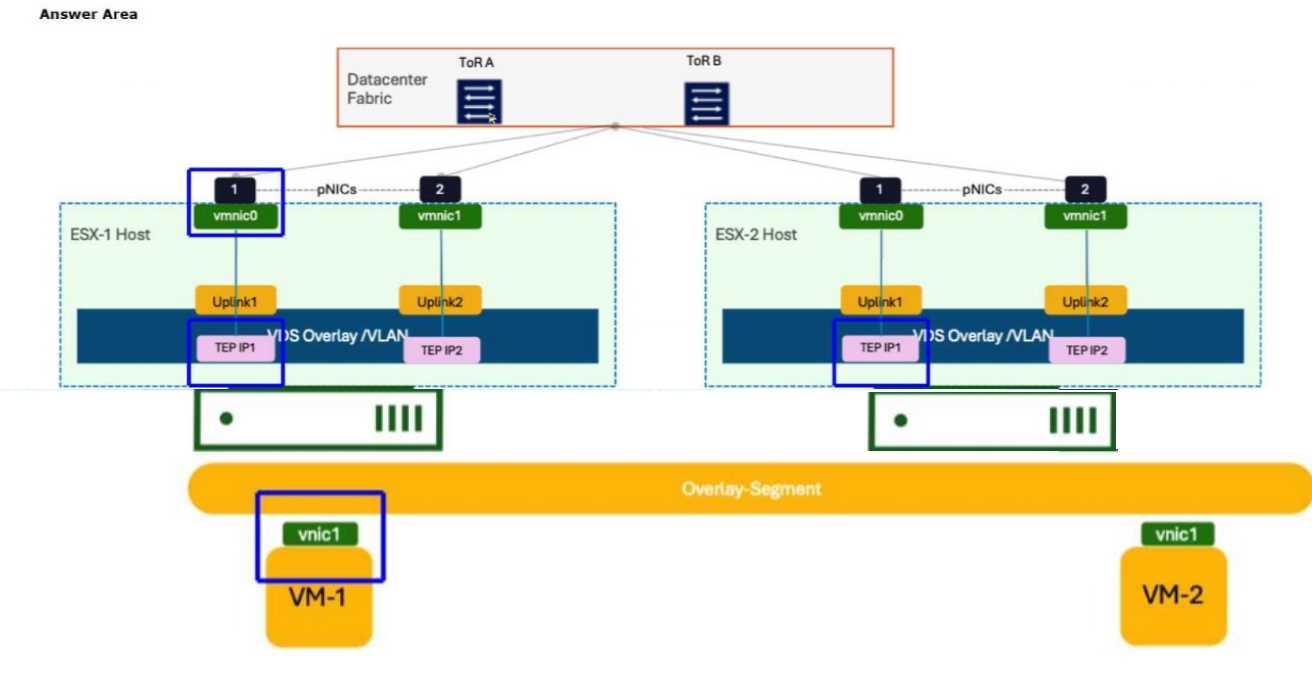
Correct Answer:
The administrator should click the vmnic0 interface on the ESX-1 Host.
In a VMware Cloud Foundation (VCF) environment, the GENEVE (Generic Network Virtualization
Encapsulation) protocol is the industry-standard tunnel format used by NSX to create an overlay
network. This protocol allows Layer 2 traffic from virtual machines to be "tunneled" over a Layer 3
physical IP fabric, enabling workloads to communicate as if they were on the same segment even
when separated by physical routers.
When VM-1 on ESX-1 sends an ICMP request to VM-2 on ESX-2, the packet starts as a standard
Ethernet frame at the virtual machine's vnic1. At this stage, the packet contains no encapsulation. As
the frame enters the Virtual Distributed Switch (VDS) and hits the Tunnel End Point (TEP), the host's
kernel performs the encapsulation process. The TEP adds a GENEVE header, a UDP header (port
6081), and an outer IP header.
The vmnic0 (physical NIC) on the source host (ESX-1) is the specific "egress" point where this
transformation is complete. A packet capture taken at this physical interface will show the "Outer IP"
address of the source TEP and destination TEP, with the original ICMP packet hidden inside the
GENEVE payload. If the administrator were to click on the VM's vnic, they would only see standard
ICMP. By selecting the vmnic0, the administrator captures the traffic as it is placed onto the physical
wire, which is the verified location to troubleshoot MTU issues, encapsulation errors, or physical
fabric connectivity in a VCF environment.