
Q: 14
DRAG DROP
An administrator is responsible for managing a VMware Cloud Foundation (VCF) Private Cloud
consisting of a single VCF Fleet with a single Workload Domain.
The administrator has been tasked with configuring NSX to support the new Virtual Desktop
Infrastructure (VDI) solution that allows users to securely access a mainframe-
based application located on the physical network. The VDI solution will use a dedicate DHCP
solution for each of the the desktop pool segments and static addresses for all
VDI management components.
The administrator completes the following steps towards configuring DHCP:
1. Creates a new tier-1 gateway (vdi-tier-1) and links it to the tier-0 gateway (gw-tier-0).
2. Creates one new segment for vdi management (vdi-seg-01) and connects it to vdi-tier-1.
3. Creates two new segments for virtual desktops (vdi-seg-02 and vdi-seg-03) and connects them to
vdi-tier-1.
Drag and drop the six steps from the list of Possible Steps on the left and place them in order in to
the Solution Steps. (Choose six.)

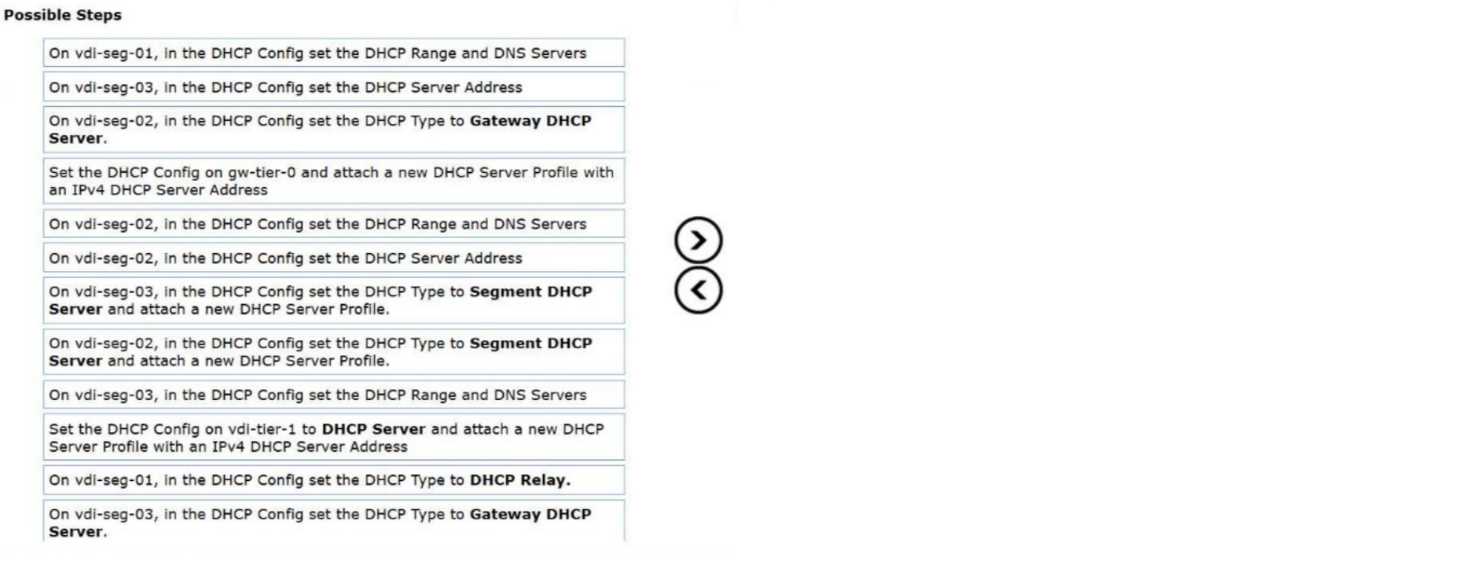
Your Answer
Discussion
This looks like: Set DHCP config on vdi-tier-1 as DHCP Server & attach a new server profile, then for vdi-seg-02 and seg-03 set type to Gateway DHCP Server and define range/DNS, finally set vdi-seg-01 to DHCP Relay. Not 100 percent but lines up with typical VCF/NSX VDI builds.
Be respectful. No spam.
