https://kxbjsyuhceggsyvxdkof.supabase.co/storage/v1/object/public/file-images/UIPATH_UIPATH-SAIAV1/page_69_img_2.jpg
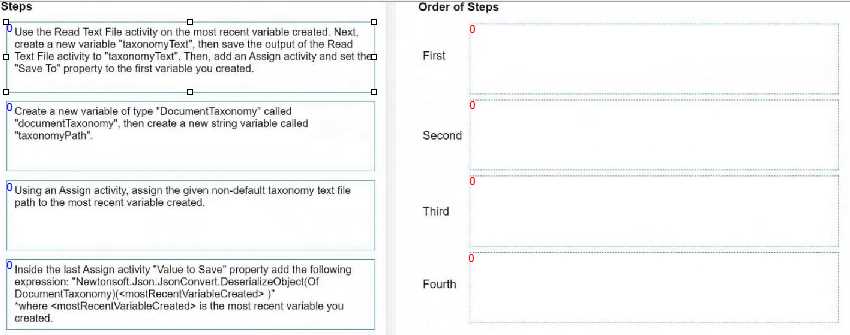
to load a taxonomy from a given non-default location text file into a variable, the order of steps
should be as follows:
Create a new variable of type 'DocumentTaxonomy' called 'documentTaxonomy', then create a new
string variable called 'taxonomyPath'.
This step involves setting up the necessary variables that will be used in the process. The
'documentTaxonomy' variable will hold the deserialized taxonomy object, and 'taxonomyPath' will
store the path to the taxonomy file.
Using an Assign activity, assign the given non-default taxonomy text file path to the most recent
variable created.
Here you will assign the path of the taxonomy file to the 'taxonomyPath' variable.
Use the Read Text File activity on the 'taxonomyPath' variable created. Next, create a new variable
'taxonomyText', then save the output of the Read Text File activity to 'taxonomyText'.
This step is where you read the contents of the taxonomy file using the 'Read Text File' activity. The
contents are stored in the 'taxonomyText' variable.
Inside the last Assign activity 'Value to Save' property add the following expression:
"Newtonsoft.Json.JsonConvert.DeserializeObject(Of DocumentTaxonomy)(taxonomyText)" where
'taxonomyText' is the text read from the file and 'documentTaxonomy' (the most recent variable
created) is the variable you created.
In this final step, you will deserialize the JSON content from the 'taxonomyText' into a
'DocumentTaxonomy' object using the 'JsonConvert.DeserializeObject' method and assign it to the
'documentTaxonomy' variable.
Following these steps in this order will load the taxonomy from a text file into the
'documentTaxonomy' variable in UiPath.