Q: 1
An engineer needs to find a solution that creates an added layer of security by preventing
unauthorized access to internal company resources. Which of the following would be the best
solution?
Options
Discussion
Probably B. A jump server is set up specifically to control and monitor access into a more sensitive zone, so only authorized users get through. RDP or proxy servers don't provide that choke point for internal access, and hypervisor isn’t really about access control in this context. Pretty sure B is the best fit but open to other views.
Be respectful. No spam.
Q: 2
Which of the following is the most relevant reason a DPO would develop a data inventory?
Options
Discussion
Option B but I'm honestly not 100% sure. Seems like knowing data locations helps in breach situations? Can anyone confirm?
B or maybe A but leaning toward B. DPO needs to know what data they have to figure out risk if there's a breach. Think that's more about impact assessment than just storage stuff. Anyone else think B is right?
Be respectful. No spam.
Q: 3
While conducting a business continuity tabletop exercise, the security team becomes concerned by
potential impacts if a generator fails during failover. Which of the following is the team most likely to
consider in regard to risk management activities?
Options
Discussion
B tbh, since ARO is about how often a risk event happens and generator failures would need frequency considered too.
Probably C. Business Impact Analysis looks at what happens if something critical fails, so that would be my pick here.
D , MTTR matters most because they’re worried about how long systems are down if the generator fails. Saw similar scenarios in practice tests and MTTR was the focus. Official guide covers this kind of risk metric.
Be respectful. No spam.
Q: 4
A company receives an alert that a network device vendor, which is widely used in the enterprise,
has been banned by the government.
Which of the following will the company's general counsel most likely be concerned with during a
hardware refresh of these devices?
Options
Discussion
Maybe C, since cost of replacement could be a huge issue for the company in this scenario.
A tbh
Be respectful. No spam.
Q: 5
HOTSPOT
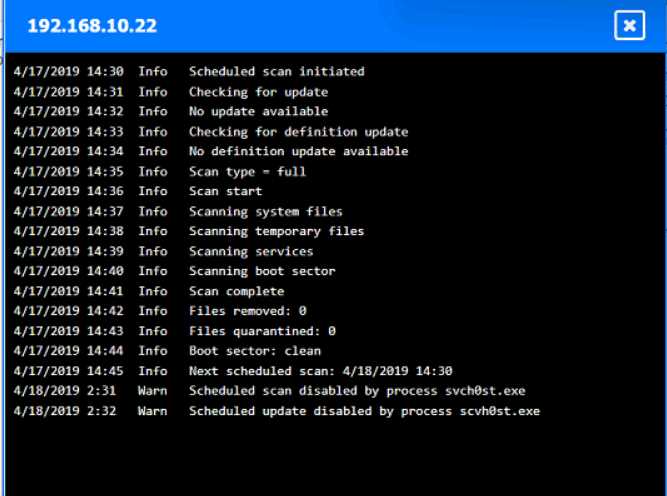
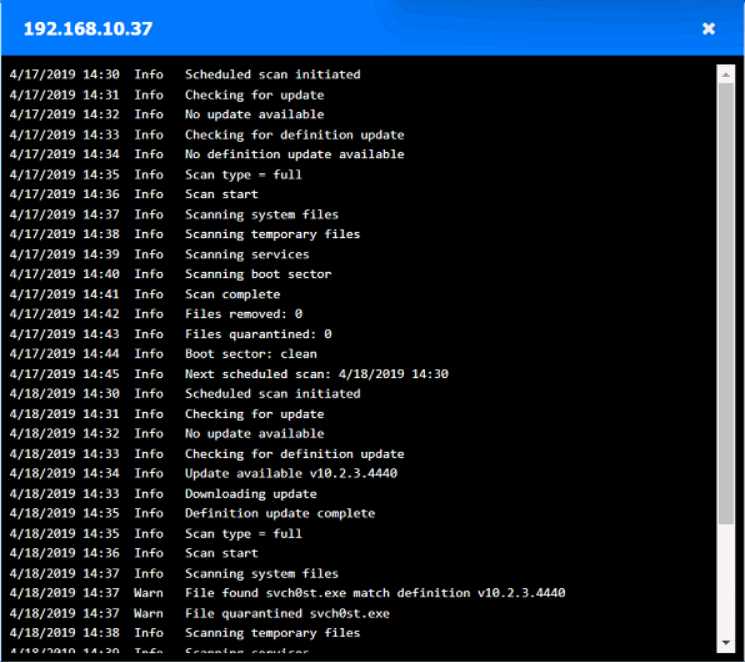
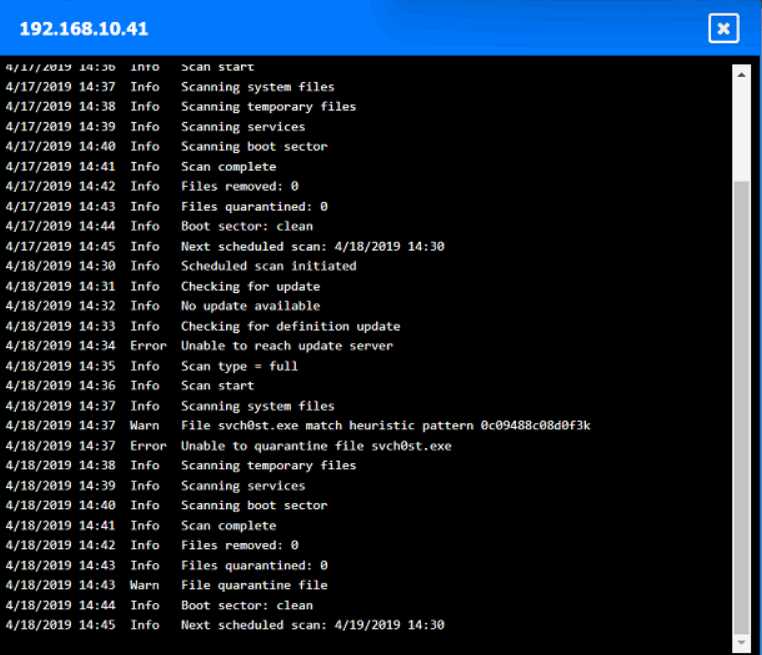
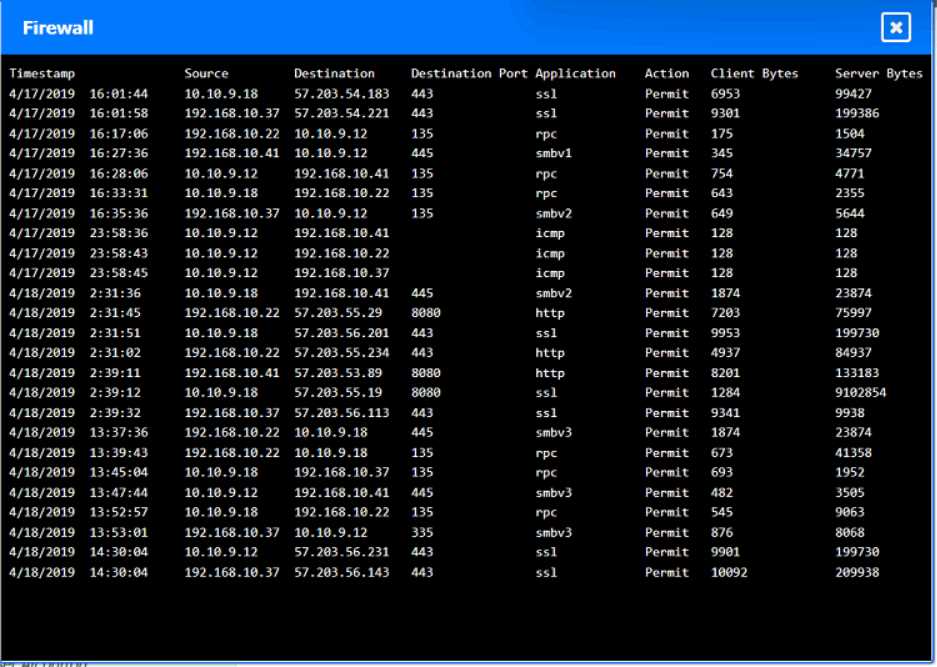
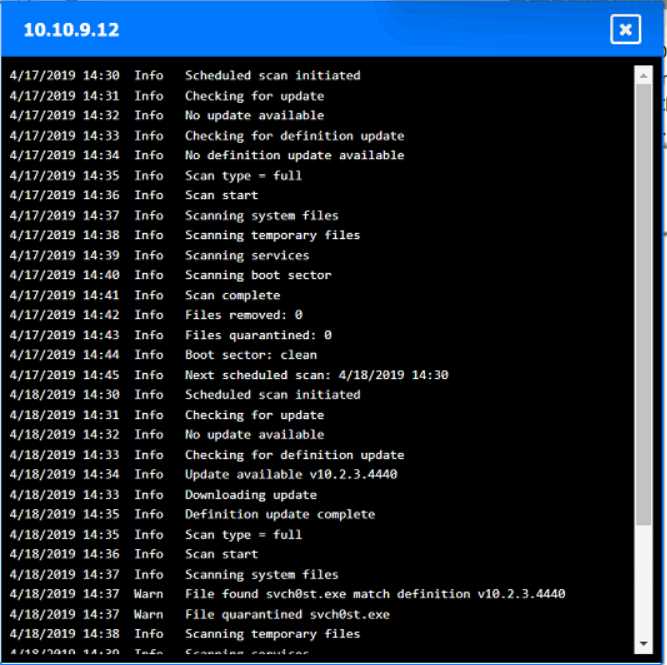
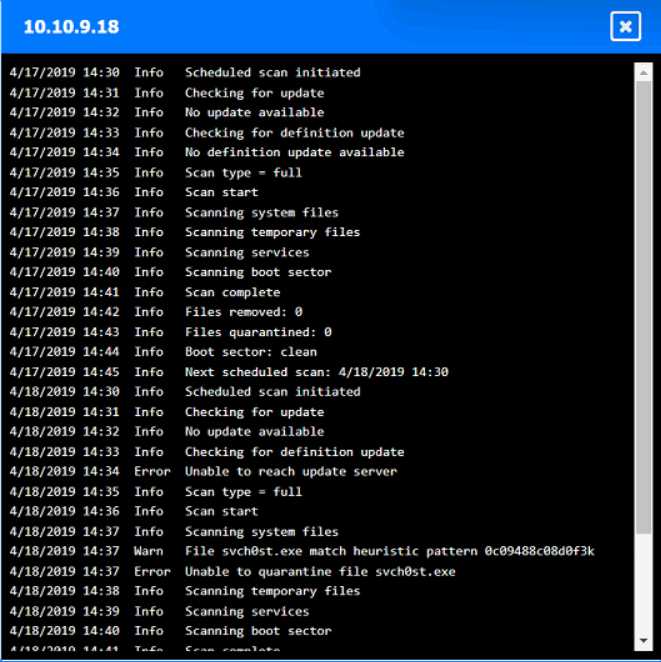
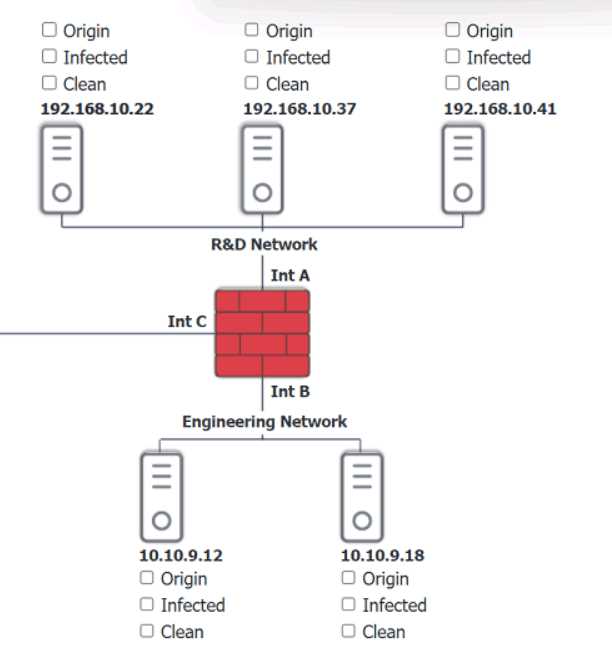
You are security administrator investigating a potential infection on a network.
Click on each host and firewall. Review all logs to determine which host originated the Infecton and
then deny each remaining hosts clean or infected.


Your Answer
Discussion
Looks like 192.168.10.22 is the origin, infected are 192.168.10.41 and 10.10.9.18, clean are 192.168.10.37 and 10.10.9.12.
Be respectful. No spam.
Q: 6
A network manager wants to protect the company's VPN by implementing multifactor
authentication that uses:
. Something you know
. Something you have
. Something you are
Which of the following would accomplish the manager's goal?
Options
Discussion
Its C
Be respectful. No spam.
Q: 7
Which of the following is best used to detect fraud by assigning employees to different roles?
Options
Discussion
C or D here. Separation of duties also helps prevent fraud by splitting responsibilities, so sometimes it gets confused with job rotation. I think C fits since it stops someone from having all access, but not 100% sure.
Had something like this in a mock, pretty sure it's D. Job rotation lets a new person spot issues the last user might've hidden. C is more about preventing fraud, but D directly helps detect it by switching up roles.
Its D. Job rotation puts different eyes on the same tasks, so fraud gets caught when roles shift. I think some people mix it up with separation of duties but here it's about switching roles.
Be respectful. No spam.
Q: 8
Which of the following is a common source of unintentional corporate credential leakage in cloud
environments?
Options
Discussion
Ugh, these cloud leaking questions always trip me up on practice. A imo, since devs keep pushing creds to Git or similar by accident, seen this in a bunch of similar exam dumps lately. Not seeing E as accidental leakage, more reporting.
A or E? But I'm thinking A since public repos with embedded creds have popped up in recent exam reports.
Probably A. Code repositories get overlooked a lot and it’s pretty common for creds or API keys to get pushed by accident, especially if proper secret management isn’t enforced. Not as likely with the other options. Anyone else agree?
Be respectful. No spam.
Q: 9
Which of the following environments utilizes a subset of customer data and is most likely to be used
to assess the impacts of major system upgrades and demonstrate system features?
Options
Discussion
I always thought this would be B. Test environments are common for trying out upgrades and features, right?
D or B, but pretty sure it's D. Staging environments are made for real-world checks before go-live, and usually mirror production with limited customer data. Super clear question compared to some others!
Be respectful. No spam.
Q: 10
Which of the following is an example of memory injection?
Options
Discussion
A is wrong, B. Practiced with some labs and this scenario about unexpected data triggering code showed up a few times.
Option C fits memory injection since it describes malicious code ending up in a running process. Nice, clear wording on this one. Not 100% but exam reports point at C for this type of question.
Be respectful. No spam.
Question 1 of 20 · Page 1 / 2