.
Explanation:
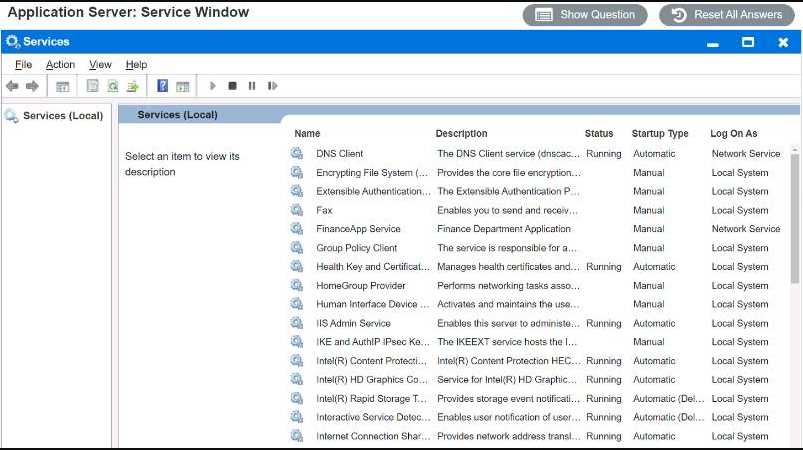
FinanceApp software is running as a service named “FinanceApp Service”. The service description
says “Provides financial data and calculations for the FinanceApp software”. The service status is
“Stopped”, which means that the service is not running and the software is not functional. The
service startup type is “Manual”, which means that the service needs to be started manually by the
user or the administrator. The service log on as is “Local System”, which means that the service runs
under a predefined local account that has extensive privileges on the local computer.
To fix the issue with the FinanceApp software, you need to do two things:
First, you need to start the service, so that the software can run. To do this, you can right-click on the
service name and select “Start” from the menu. Alternatively, you can select the service name and
click on the “Start” button on the toolbar. You should see a message saying that the service has
started successfully.
Second, you need to change the service startup type, so that the service can start automatically every
time the server boots up. This way,you don’t have to contact the help desk every time the issue
occurs. To do this, you can right-click on the service name and select “Properties” from the menu.
Alternatively, you can select the service name and click on the “Properties” button on the toolbar.
You should see a window with several tabs and options. On the “General” tab, under “Startup type”,
you can select “Automatic” from the drop-down list. Then, click on “OK” to save your changes.
By doing these two steps, you should be able to use the FinanceApp software without any problems.
The MarketApp software is running as a service named “MarketApp Service”. The service description
says “Provides market data and analysis for the MarketApp software”. The service status is
“Running”, which means that the service is running and the software is functional. However, as you
reported, the software may crash sometimes, which can cause significant downtime. The service
startup type is “Automatic”, which means that the service starts automatically every time the server
boots up. The service log on as is “TestAccount”, which is a test account that was probably used for
development or testing purposes.
To fix the issue with the MarketApp software, you need to do one thing:
You need to change the service log on as, so that the service runs under a proper account that has
sufficient permissions and security settings for production use. To do this, you can right-click on the
service name and select “Properties” from the menu. Alternatively, you can select the service name
and click on the “Properties” button on the toolbar. You should see a window with several tabs and
options. On the “Log On” tab, under “Log on as”, you can select either “Local System account” or
“This account”. If you choose “Local System account”, then the service will run under a predefined
local account that has extensive privileges on the local computer. If you choose “This account”, then
you will need to enter a valid username and password for an account that has appropriate
permissions and security settings for running the service. You may need to consult with your IT team
or your software vendor to determine which option is best for your situation. Then, click on “OK” to
save your changes.