
HOTSPOT You have a Microsoft 365 subscription. Auditing is enabled. A user named User1 is a member of a dynamic security group named Group1. You discover that User1 is no longer a member of Group1. You need to search the audit log to identify why User1 was removed from Group1. Which two activities should you use in the search? To answer, select the appropriate activities in the answer area. NOTE: Each correct selection is worth one point. 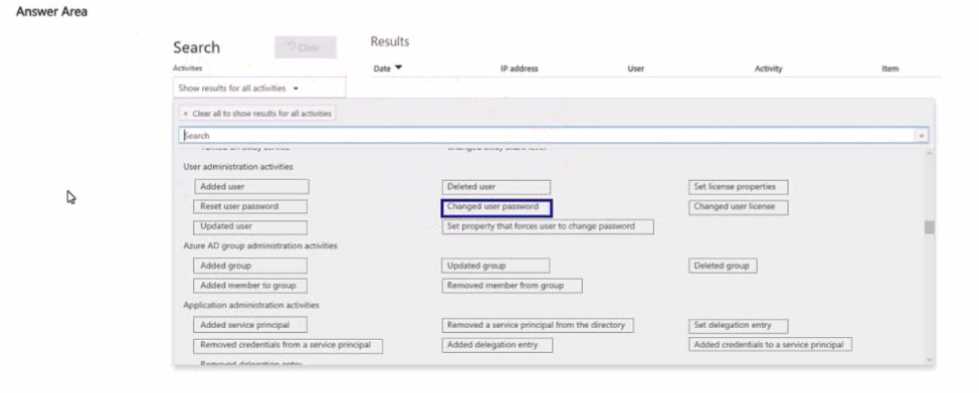
Updated group and Removed member from group are both needed for this. Changes to dynamic membership rules show as Updated group, while the actual removal is logged as Removed member from group. Saw a similar question in practice sets, so pretty confident, but open to correction.
Has anyone reviewed the official audit log activity docs or tried this in a M365 trial lab? I think practice exams and Microsoft’s docs are great for these Hotspot details.
Updated group and Removed member from group is what you want for dynamic security groups. Updated group shows if the membership rule was edited (which could remove someone automatically) and Removed member from group logs the actual event of User1 leaving the group. I think that's correct but let me know if anyone's seen a case where just one is enough.
I'd go with Updated group and Deleted user from group. Pretty sure these log membership changes, but maybe I'm mixing up the "deleted user" one with something else. If anyone's seen this in the real audit log let me know if that's off.
