
Q: 18
HOTSPOT You have an Azure Active Directory (Azure AD) tenant that has multi-factor authentication (MFA) enabled. The account lockout settings are configured as shown in the following exhibit. 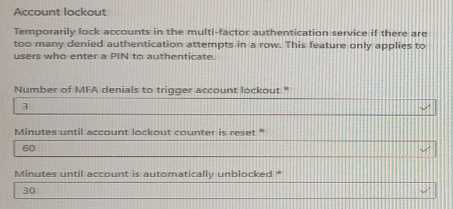 Use the drop-down menus to select the answer choice that completes each statement based on the information presented in the graphic. NOTE: Each correct selection is worth one point.
Your Answer
Discussion
Is the official practice test or Microsoft docs better to drill these lockout settings?
Microsoft Authenticator app code and 30 minutes. That's what the lockout config points to here.
Nah, I don’t think it’s about the password here. It’s the Microsoft Authenticator app code that triggers lockout after failed MFA attempts. For duration, pretty sure it’s 30 minutes, not 60-easy to mix those up.
So for the first drop-down, it's Microsoft Authenticator app code, right? And then 30 for the lockout time?
What happens if you enter the Authenticator app code wrong 3 times here?
Be respectful. No spam.
