
Q: 12
DRAG DROP You have an Azure subscription that contains the users shown in the following table. 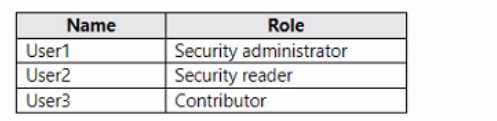 You need to delegate the following tasks: • Enable Microsoft Defender for Servers on virtual machines. • Review security recommendations and enable server vulnerability scans. The solution must use the principle of least privilege. Which user should perform each task? To answer, drag the appropriate users to the correct tasks. Each user may be used once, more than once, or not at all. You may need to drag the split bar between panes or scroll to view content.
Drag & Drop
Discussion
Pretty sure both tasks go to User2 since Security Admin has just enough rights for Defender policy changes. Anyone else pick differently?
Yeah, both tasks go to User2 for least privilege. Security Admin is all you need for enabling Defender and reviewing recommendations, Owner is too much. Looks correct to me.
User2 → Enable Defender, User2 → Review recommendations. Owner looks tempting but too broad, Security Admin is least privilege here.
User2 -> Enable Microsoft Defender for Servers, User2 -> Review recommendations.
Why do they make us drag this out? Security Admin covers both without the overkill of Owner rights, so least privilege is met. I've seen similar in other practice sets and it's always User2 for these Defender tasks.
Why do they make us drag this out? Security Admin covers both without the overkill of Owner rights, so least privilege is met. I've seen similar in other practice sets and it's always User2 for these Defender tasks.
Be respectful. No spam.
