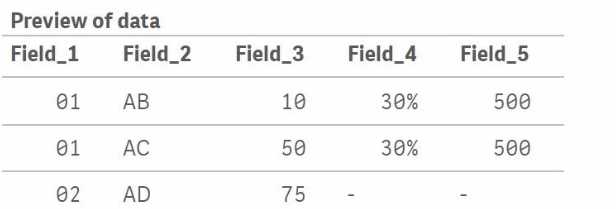
1. Qlik Sense for Windows Help: In the section on data loading script syntax, the Join prefix is detailed. It specifies that a LEFT JOIN includes all rows from the first table and only matching rows from the second. The examples implicitly demonstrate that for matching keys, values in identically named non-key fields are updated from the second table.
Source: Qlik Sense on Windows Help, "Scripting" -> "Script syntax and chart functions" -> "Script regular statements" -> "Join".
2. Qlik Community Technical Brief: While not a formal publication, technical articles by Qlik employees often clarify these behaviors. The logic of a LEFT JOIN is to keep the entire left table and enrich it with data from the right table where keys match. If non-key field names are identical, the join acts as an update for the matched records.
Source: Qlik Community, "Technical Brief: Joins and Lookups", which explains the fundamental difference between Qlik's associative logic and traditional SQL joins, including the update-like behavior on matching keys.

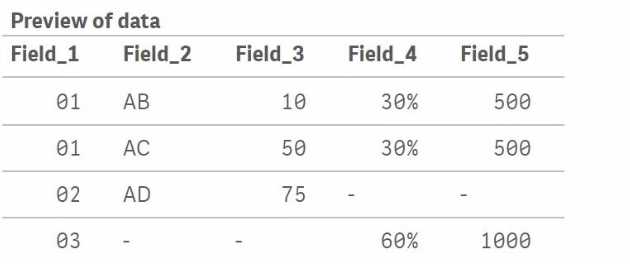
 What will be the result of Table.A?
A)
What will be the result of Table.A?
A)
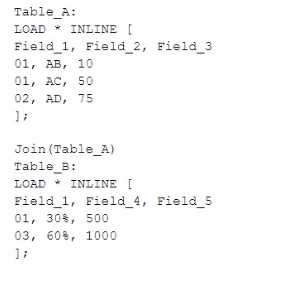 What will be the result of Table.A?
A)
What will be the result of Table.A?
A)
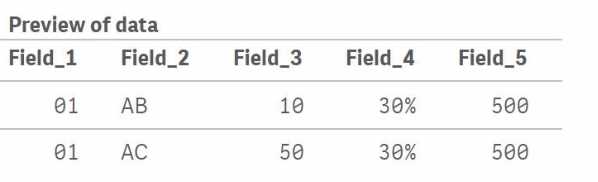 B)
B)
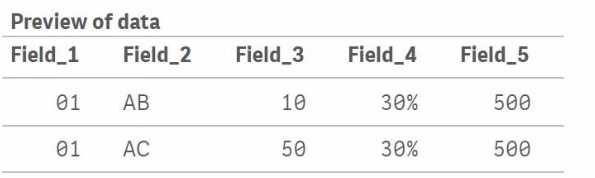 C)
C)
 D)
D)