
Q: 3
Note: This question is part of a series of questions that present the same scenario. Each question in
the series contains a unique solution that might meet the stated goals. Some question sets might
have more than one correct solution, while others might not have a correct solution.
After you answer a question in this section, you will NOT be able to return to it. As a result, these
questions will not appear in the review screen.
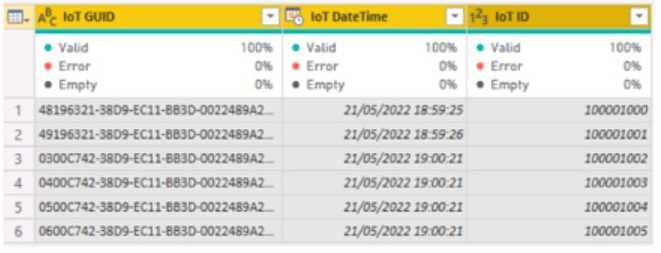
From Power Query Editor, you profile the data shown in the following exhibit.
 The IOT ID columns are unique to each row in query.
You need to analyze 10T events by the hour and day of the year. The solution must improve dataset
performance.
Solution: You change the IOT DateTime column to the Date data type.
Does this meet the goal?
The IOT ID columns are unique to each row in query.
You need to analyze 10T events by the hour and day of the year. The solution must improve dataset
performance.
Solution: You change the IOT DateTime column to the Date data type.
Does this meet the goal?
 The IOT ID columns are unique to each row in query.
You need to analyze 10T events by the hour and day of the year. The solution must improve dataset
performance.
Solution: You change the IOT DateTime column to the Date data type.
Does this meet the goal?
The IOT ID columns are unique to each row in query.
You need to analyze 10T events by the hour and day of the year. The solution must improve dataset
performance.
Solution: You change the IOT DateTime column to the Date data type.
Does this meet the goal?Options
Discussion
Option B I remember seeing this in the official docs and practice sets-changing to Date helps with performance but it loses the hour detail, so doesn't fit the analysis goal here.
B. I saw a similar question on a practice exam and it's the same logic here.
Honestly, I wish Microsoft made these questions a bit clearer. B here, since switching to Date strips out the hours and you can't do hourly analysis anymore. Pretty sure that's what trips people up on this one.
Why do they always word these Power BI questions so awkwardly? It's B because converting DateTime to just Date wipes out the hour, so you lose that granularity for analysis. I think that's the whole trap here, agree?
Probably B since converting DateTime to just Date cuts out all the hour details. That means you can't group by hour anymore. This would only satisfy the goal if only daily, not hourly, insight was needed.
B because converting DateTime to just Date means you can't group by hour anymore. You'd lose all the time info needed for hourly analysis even if it does help performance a bit. Pretty sure that's the catch here, but open to other takes.
B tbh. If you switch to Date type, you drop the time info, so hourly analysis can't be done. Cardinality goes down, sure, but that's not enough for the goal in this case unless only daily breakdown mattered. Anyone see this handled differently?
A , since changing to Date should reduce the cardinality and might help performance, which was mentioned in the requirement. I know you lose the hour part but if the goal is just overall improvement, this could still count. Correct me if I'm off here.
Its B
Seriously, who writes these scenario questions? B is the only choice because converting DateTime to Date drops the hour info, so there's no way you can slice the data hourly after that. That's exactly what they're trying to trip people up on, I think.
Be respectful. No spam.
