1. Palo Alto Networks PAN-OS® Administrator's Guide 10.2: In the chapter "User-ID
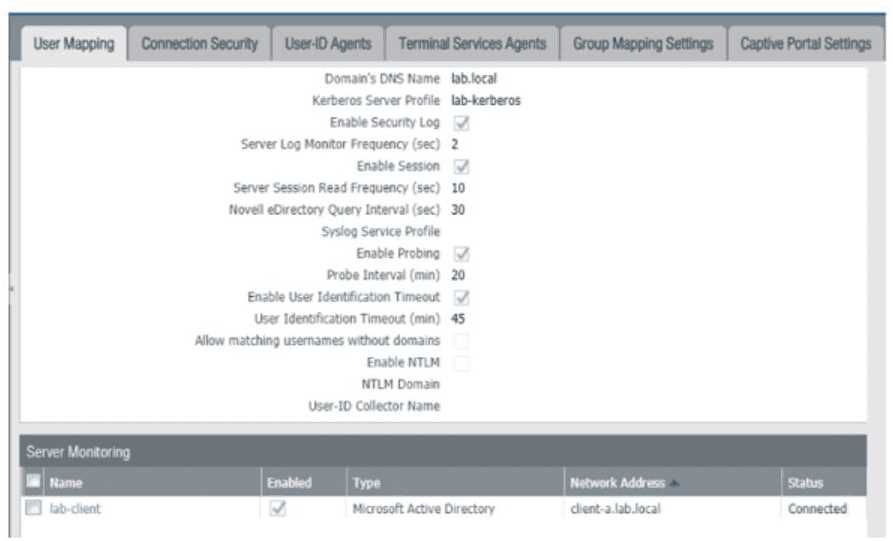
" the section "Configure the Integrated User-ID Agent to Monitor a Server" describes this functionality. The guide explains that the Server Monitoring table (Device > User Identification) shows the connection status between the firewall and the monitored servers
such as Domain Controllers. The Status column indicates if the connection is successful (Connected).
2. Palo Alto Networks PAN-OS® Administrator's Guide 11.0: The section "Monitor User-ID" states
"To verify that the firewall is successfully connecting to the servers you configured for monitoring
select Device > User Identification and
in the Server Monitoring section
view the Status for each server." This directly corresponds to the graphic
confirming it shows the firewall's connection status to a monitored server.
3. Palo Alto Networks
"User-ID™ Technology Overview" White Paper: This document explains that the firewall can be configured to directly monitor the security event logs of a Microsoft Domain Controller to map users to IP addresses. The Server Monitoring panel is the tool used to verify this connection.