Hutchins, E. M., Cloppert, M. J., & Amin, R. M. (2011). Intelligence-Driven Computer Network Defense Informed by Analysis of Adversary Campaigns and Intrusion Kill Chains. Lockheed Martin Corporation. In this foundational paper, the authors define the stages:
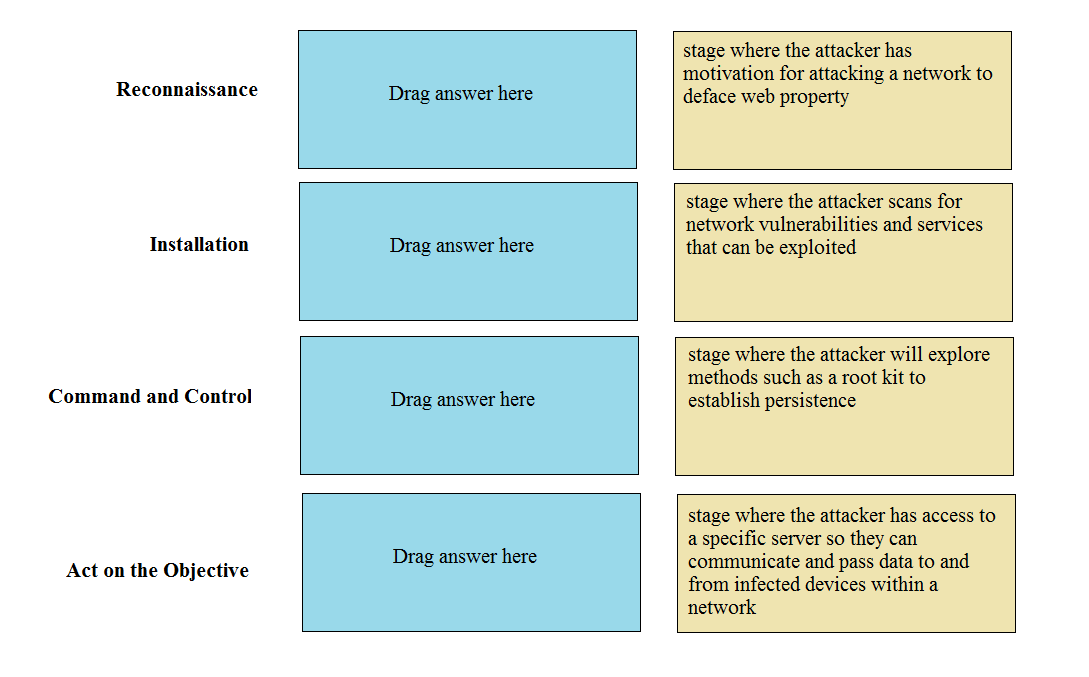
Reconnaissance (p. 4): "Research, identification and selection of targets..."
Installation (p. 6): "Installation of a persistent backdoor or implant in the victim environment..."
Command & Control (C2) (p. 6): "...adversaries establish a command channel to remotely manipulate the victim."
Actions on Objectives (p. 6): "...adversaries take actions to achieve their original goals," which could include website defacement.
Palo Alto Networks. What Is the Cyberattack Lifecycle? Palo Alto Networks Vendor Documentation. This resource outlines a similar model:
The "Installation" phase is described as the point where the attacker "establishes a backdoor" to maintain persistence.
The "Command and Control (C2)" phase is defined by the attacker gaining "hands-on keyboard access" and initiating communications between the infected device and their C2 server.
Rowe, N. C. (2014). A kill-chain model for cyber-attacks on C4I systems. Proceedings of the 9th International Conference on Cyber Warfare and Security, ICCWS 2014, p. 223. This academic paper discusses the kill-chain model, aligning with the descriptions provided. It notes that Reconnaissance involves "identifying vulnerabilities," Installation ensures "persistence," C2 enables "remote control," and Actions on Objectives is the "culmination" where the adversary's goals are met. DOI: 10.13140/2.1.3411.0086.