Capturing ESP Traffic:
ESP (Encapsulating Security Payload) traffic is associated with IPsec and is identified by the protocol
number 50. To capture ESP traffic, you need to filter packets based on this protocol.
In this specific case, you also need to filter for the host associated with the VPN tunnel, which is
10.200.3.2 as indicated in the exhibit.
Sniffer Command:
The correct command to capture ESP traffic for the VPN named DialUp_0 is:
diagnose sniffer packet any ‘esp and host 10.200.3.2’
This command ensures that only ESP packets to and from the specified host are captured, providing a
focused and relevant data set for troubleshooting.
Reference:
Fortinet Documentation: Verifying IPsec VPN Tunnels(Fortinet Docs)(Welcome to the Fortinet
Community!).
Fortinet Community: Troubleshooting IPsec VPN Tunnels(Welcome to the Fortinet Community!)
(Fortinet Docs).

 Which command will capture ESP traffic for the VPN named DialUp_0?
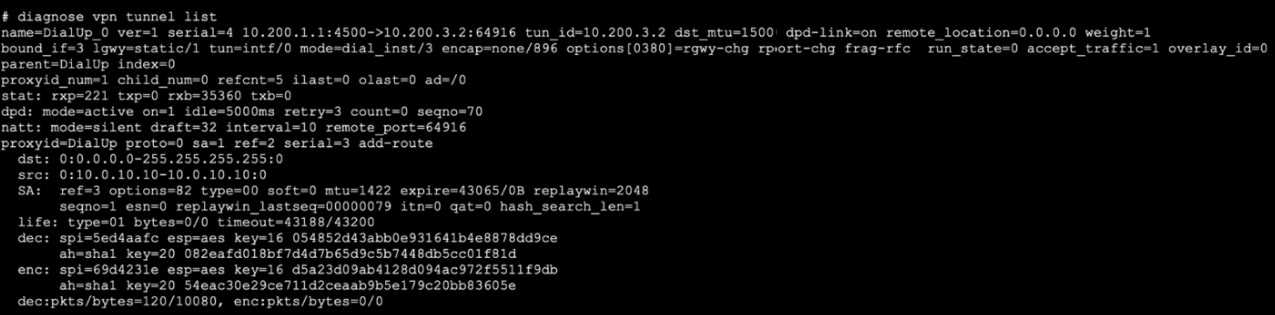 Which command will capture ESP traffic for the VPN named DialUp_0?