The BGP summary output shows the state of the 10.200.3.1 peer as "Connect." This state indicates
that the local router has attempted to initiate a BGP session with the peer, but the peer has not yet
responded to the initial connection request.
State Explanation: The "Connect" state in BGP indicates that the TCP connection has been initiated
but is waiting for a response. If the peer does not respond within the configured timers, the session
will transition to the "Active" state and retry the connection.
Possible Causes: This can occur due to network issues preventing the peer from responding, a
misconfiguration on the peer device, or issues like access control lists (ACLs) blocking the BGP traffic.
To troubleshoot, check the connectivity between the routers, ensure that the BGP configurations on
both sides match, and verify that there are no firewalls or ACLs blocking the BGP packets.
Reference:
Fortinet Documentation on BGP Troubleshooting
Fortinet Community Discussion on BGP State Issues

 Which statement explains why the state of the 10.200.3.1 peer is Connect?
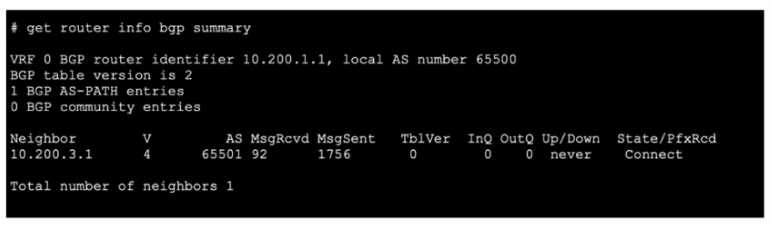 Which statement explains why the state of the 10.200.3.1 peer is Connect?