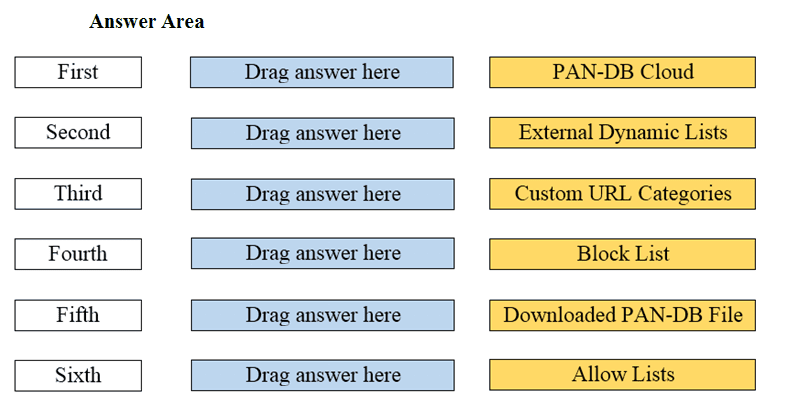
DRAG DROP Arrange the correct order that the URL classifications are processed within the system.
📖 About this Domain
This domain covers securing public cloud environments and cloud-native applications. You will learn about Prisma Cloud's role in providing comprehensive visibility, threat prevention, and compliance enforcement across multi-cloud infrastructures.
🎓 What You Will Learn
- You will learn the core components of Prisma Cloud, including its Cloud Security Posture Management (CSPM) and Cloud Workload Protection Platform (CWPP) functionalities.
- You will understand how to onboard cloud accounts and configure security policies for continuous monitoring and compliance.
- You will learn to analyze security alerts related to misconfigurations, vulnerabilities, and runtime threats in cloud assets.
- You will explore methods for enforcing compliance with industry standards like CIS, GDPR, and HIPAA using Prisma Cloud.
🛠️ Skills You Will Build
- You will build skills in identifying and remediating security risks in Infrastructure as Code (IaC) templates and container images.
- You will develop the ability to investigate security incidents using Prisma Cloud's asset inventory and alert data.
- You will gain proficiency in configuring runtime protection policies for hosts, containers, and serverless functions.
- You will build competence in using Resource Query Language (RQL) to create custom queries for threat hunting and compliance checks.
💡 Top Tips to Prepare
- Focus on understanding the Prisma Cloud alert lifecycle from initial detection through to remediation.
- Memorize the key differences between Prisma Cloud's security pillars: Code Security, CSPM, CWPP, and Cloud Network Security.
- Practice navigating the Prisma Cloud console to locate specific asset information and security findings efficiently.
- Review the official Prisma Cloud Administrator's Guide for detailed information on policy types and configuration options.
📖 About this Domain
This domain covers the core functions of network security within the Palo Alto Networks Security Operating Platform. It focuses on the configuration and management of Next-Generation Firewalls (NGFWs) to control traffic and prevent threats. You will learn how security policies are processed to secure network assets.
🎓 What You Will Learn
- You will learn to configure Security Policy rules using App-ID, User-ID, and Content-ID for granular traffic control.
- You will understand how to implement Network Address Translation (NAT) policies for source and destination IP address mapping.
- You will learn to apply security profiles like Antivirus, Anti-Spyware, and Vulnerability Protection to block known and unknown threats.
- You will explore the configuration of SSL Forward Proxy decryption to inspect encrypted traffic for policy enforcement.
🛠️ Skills You Will Build
- You will build the skill to analyze traffic logs to verify security policy enforcement and troubleshoot connectivity issues.
- You will develop the ability to interpret threat logs and correlate security profile actions with specific attack attempts.
- You will gain proficiency in using packet captures and session details to diagnose complex traffic processing on the firewall.
- You will build skills in security rulebase optimization by identifying shadowed, redundant, and overly permissive policies.
💡 Top Tips to Prepare
- Master the PAN-OS packet flow logic to accurately predict how the NGFW processes specific sessions.
- Practice configuring Security, NAT, and Decryption policies in a lab environment using the web interface and CLI.
- Focus on the interaction between security profiles and Security Policy rules to understand layered threat prevention.
- Review Palo Alto Networks security best practices for rulebase management and policy implementation.
📖 About this Domain
This domain establishes the foundational knowledge of the modern threat landscape. It covers core cybersecurity principles, attack methodologies, and the technologies used for defense.
🎓 What You Will Learn
- You will learn to identify the stages of the cyber-attack lifecycle and the concept of a kill chain.
- You will learn to differentiate between various threat types, including malware, phishing, and denial-of-service attacks.
- You will learn to recognize different threat actors and their motivations, from hacktivists to nation-states.
- You will learn the basic principles of cryptography, including symmetric and asymmetric encryption.
🛠️ Skills You Will Build
- You will build the skill to map observed activity to specific stages of the cyber-attack lifecycle.
- You will build the ability to classify threats based on their delivery vectors and payloads.
- You will build competence in describing fundamental network security zoning and trust level concepts.
- You will build the skill to apply the Zero Trust security model principles to a given scenario.
💡 Top Tips to Prepare
- Focus on understanding each phase of the Cyber-Attack Lifecycle as defined by Palo Alto Networks.
- Practice identifying attack vectors and vulnerabilities in sample network topologies.
- Study the characteristics of common malware families and exploit kits.
- Review the Palo Alto Networks Cybersecurity Survival Guide for foundational terminology.
📖 About this Domain
This domain covers the complete narrative of a cyberattack, from initial compromise to final objective. It emphasizes connecting individual alerts and data points to understand the full attack lifecycle. You will analyze the sequence of events to determine the root cause and scope of an incident.
🎓 What You Will Learn
- You will learn to map observed malicious activity to the stages of the cyberattack lifecycle.
- You will learn to use Cortex XDR to investigate causality chains and process trees for root cause analysis.
- You will learn to correlate disparate data sources, including logs and endpoint telemetry, to build a coherent incident timeline.
- You will learn to identify attacker Tactics, Techniques, and Procedures (TTPs) using frameworks like MITRE ATT&CK.
🛠️ Skills You Will Build
- You will build the skill to perform root cause analysis (RCA) by tracing an alert back to its origin.
- You will build the skill to reconstruct the full attack narrative by synthesizing multiple pieces of evidence.
- You will build the skill to determine the scope and impact of a security incident.
- You will build the skill to articulate the cybersecurity story for incident response and reporting.
💡 Top Tips to Prepare
- Master the Cortex XDR causality view to understand process relationships and event sequences.
- Practice analyzing case studies to trace the attack path from initial alert to root cause.
- Memorize the cyberattack lifecycle stages and their associated indicators of compromise (IOCs).
- Familiarize yourself with how Palo Alto Networks products map alerts and events to the MITRE ATT&CK framework.
📖 About this Domain
The SecOps domain covers the core principles of a modern Security Operations Center (SOC) utilizing the Palo Alto Networks security platform. It focuses on the operational lifecycle of detecting, investigating, and responding to cyber threats. This involves leveraging integrated tools for efficient incident management and threat hunting.
🎓 What You Will Learn
- You will learn the stages of the incident response lifecycle and how Palo Alto Networks products map to each phase.
- You will learn to use Cortex XDR for alert triage, causality chain analysis, and endpoint investigation.
- You will learn the fundamentals of Security Orchestration, Automation, and Response (SOAR) using Cortex XSOAR playbooks.
- You will learn how to integrate threat intelligence from sources like WildFire and AutoFocus to enrich security incidents.
🛠️ Skills You Will Build
- You will build the skill to analyze and prioritize security alerts based on severity and contextual data.
- You will build the ability to perform root cause analysis by investigating endpoint, network, and cloud telemetry in Cortex XDR.
- You will build proficiency in using the XDR Query Language (XQL) for proactive threat hunting.
- You will build an understanding of how to apply automation playbooks to standardize and accelerate incident response actions.
💡 Top Tips to Prepare
- Focus on the Cortex XDR console, specifically understanding the incident view, causality chains, and agent actions.
- Memorize the standard incident response framework and be able to map specific tool functions to each stage.
- Understand the concept of a playbook in Cortex XSOAR and its role in automating SOC tasks like enrichment and containment.
- Practice interpreting XQL queries to understand how analysts search for indicators of compromise (IOCs) across datasets.
📖 About this Domain
This domain covers the modern cyber threat landscape, focusing on the methods and motivations of malicious actors. You will identify common attack vectors and the stages of a typical network intrusion.
🎓 What You Will Learn
- Identify common attack vectors including phishing, malware, and web-based exploits.
- Understand the seven stages of the Cyber-Attack Lifecycle, from reconnaissance to acting on objectives.
- Differentiate between threat actor types such as Advanced Persistent Threats (APTs), hacktivists, and cybercriminals.
- Recognize various Command-and-Control (C2) techniques used by malware to communicate with attackers.
🛠️ Skills You Will Build
- Analyzing attack patterns to map them to the Cyber-Attack Lifecycle.
- Differentiating between malware types like viruses, worms, ransomware, and spyware.
- Identifying Indicators of Compromise (IoCs) associated with specific threats.
- Correlating threat intelligence from sources like Unit 42 with observed network events.
💡 Top Tips to Prepare
- Memorize each stage of the Palo Alto Networks Cyber-Attack Lifecycle and its purpose.
- Study recent Unit 42 threat intelligence reports to understand current attack trends.
- Focus on the motivations that drive different threat actor groups.
- Practice identifying the methods used for reconnaissance, weaponization, and delivery in attack scenarios.
Premium Access Includes
- ✓ Quiz Simulator
- ✓ Exam Mode
- ✓ Progress Tracking
- ✓ Question Saving
- ✓ Flash Cards
- ✓ Drag & Drops
- ✓ 3 Months Access
- ✓ PDF Downloads